The 7 best time tracking apps for HVAC technicians on iPhone, ranked for 2026
An HVAC technician's year has two seasons of emergencies and two of maintenance. In July it is eight no-cool calls a day and an attic at 130 degrees; in October it is the furnace tune-ups you promised under a service agreement and bill every month. The app has to put the emergency on the right customer at the emergency rate, keep the capacitor receipt with the call, and remind you at the start of the month who gets a recurring invoice.
In 2012 someone at a service company wrote that they used iTimeSheet to manage the time of their service techs, found it easy to navigate, and asked for a toggle to mark a job complete and pull up the ones still open. I show that review on this page because it is the HVAC use case in one paragraph: many calls, some finished and some waiting on a part, and an office trying to see which is which. I also show it because it is a fair warning: iTimeSheet is single-user, and a company with several techs today has better options, which I name below.
This list is for the technician who owns the van: the no-cool calls, the maintenance agreements, the parts run, and the invoices. If you run a shop with a dispatcher, read the first entry as background and go to the field-service suites.
Rules of the page: every rating is the US App Store number on the date in the pill above, every fact about another app comes from its own listing, and the author builds the app in first place and has since 2008.
How I ranked them
I ranked for a July week of emergencies and an October of contract visits, because an HVAC app has to handle both.
- Emergency rate on one call, not on the customerA no-cool on a Sunday bills at a different rate from the Tuesday tune-up for the same household. The app must override the rate on a single entry and leave the customer's regular rate alone.
- Parts on the call they went intoThe capacitor, the contactor, the pound of refrigerant: each belongs to one visit. A receipt photographed at the counter and pinned to that call is the difference between billed and forgotten.
- Agreements that bill on a scheduleMaintenance agreements are invoiced monthly or per visit. The app should remind you who is due, and keep each visit under the agreement it belongs to.
- Works in an attic and a mechanical roomNo signal in either. The timer must keep running and the entry must be saved locally, not held until the phone finds a tower.
- Invoice the same day, chase the late onesService calls are small amounts that add up; late ones add up faster. One tap to invoice, a filter for Unpaid, and a chase e-mail already written.
- The customer list is the businessWho has which unit, when it was last serviced, and what they pay is the file a competitor would love. Keep it on the phone, or in a cloud you chose knowingly.
The ranking
App Store ratings checked on October 15, 2026 (US App Store).

iTimeSheet
Calls, agreements, and parts per customer, with a monthly nudge for the ones on contract
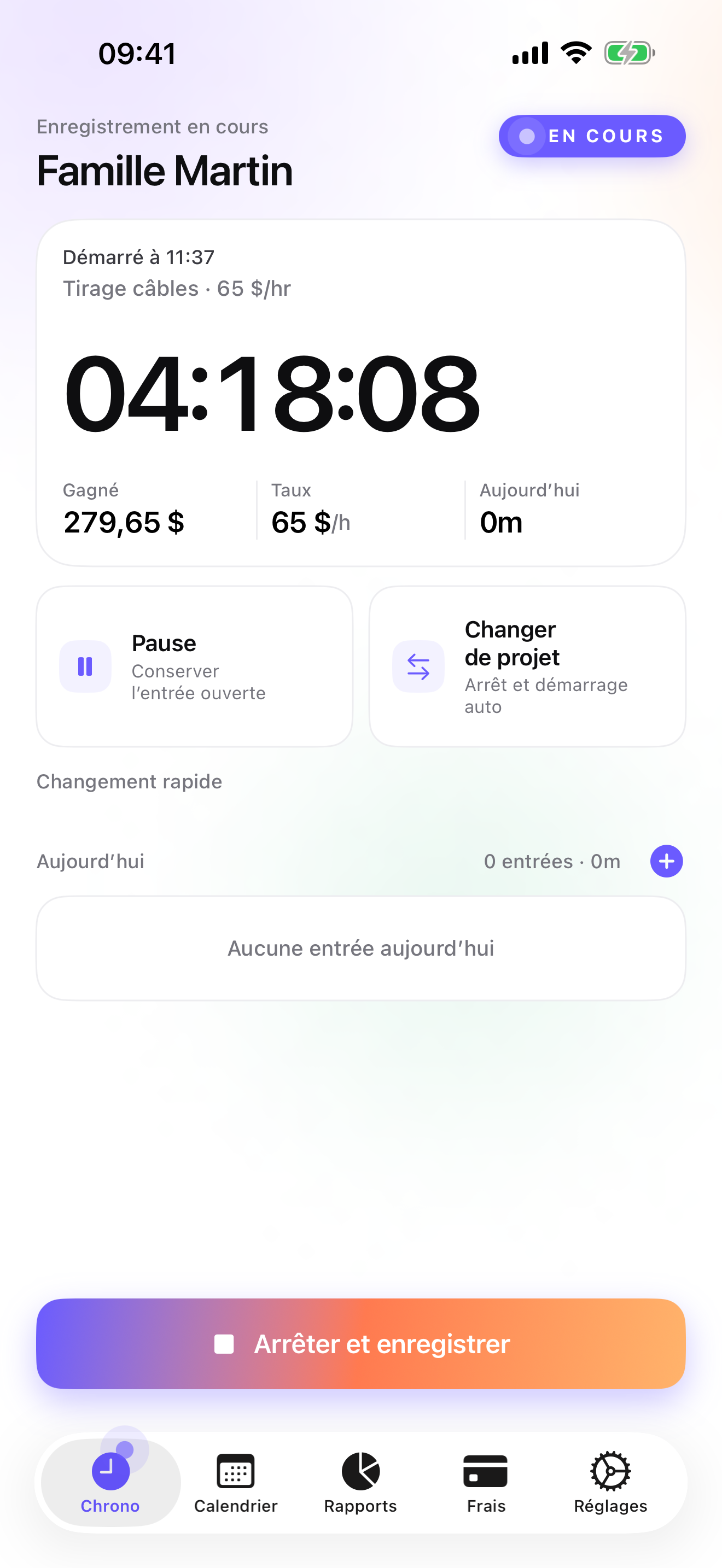
The Client → Mission → Task tree reads Customer → Agreement or Call → Visit for an HVAC business. A household on a maintenance agreement gets one mission for the agreement and its spring and fall visits as entries under it; a one-off no-cool gets its own mission. Rates cascade from the customer, so the agreement visits bill at the agreed rate and the Sunday emergency gets an override on that single entry. The timer starts from the Watch, the Lock Screen, or a widget, and switching from one call to the next saves the previous one with its duration. Eight calls in a July day, eight entries on eight customers, without opening the app more than a handful of times.
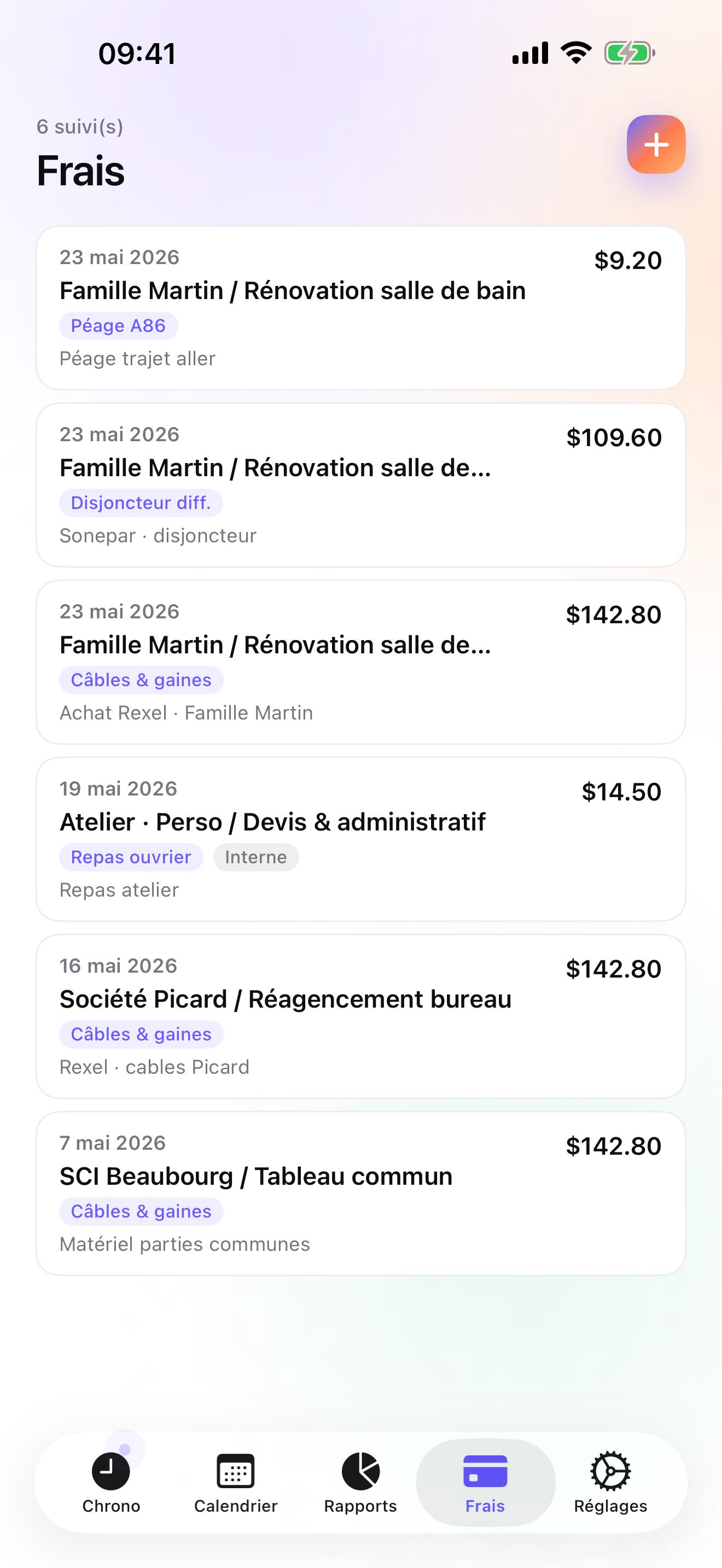
Parts and invoices follow the same tree. On Pro you photograph the supply-house receipt, pin it to the call, and pick a category from the fourteen presets or your own. On Studio the Invoices tab lists each customer's un-invoiced amount, labor plus parts, and makes the PDF in one tap with your logo, sequential numbering per year, the US layout, and your payment details. For agreement customers there is a monthly recurring-invoice nudge, so the new month comes with a reminder of who you bill on a schedule rather than a search through last month's calls. Unpaid invoices are a filter away and the overdue reminder comes with a pre-filled chase e-mail; a credit note cancels an invoice that went out wrong. Quotes and deposit invoices cover the system replacement that starts with a number on paper.
Everything is on the phone: a local database, no account, no server, no analytics, and a backup file in your own iCloud Drive, daily from Essential. The honest limits: one user, so no dispatch board and no second tech; iPhone and Apple Watch only, no iPad yet, no web app; no card payments inside the app; no equipment records per customer; and no accounting connector, so the bookkeeper gets a CSV.
Strengths
- Per-entry rate override for emergency calls on top of the customer rate
- Receipt photos pinned to the call, with 14 expense presets on Pro
- Monthly recurring-invoice nudge for agreement customers, Unpaid filter, and a pre-filled chase e-mail on Studio
- No account, no vendor cloud; Watch taps queue offline and are backdated
Limits
- Single user: no dispatch, no scheduling, no second technician in the same database
- No equipment or service-history records per customer; the tree is customer, mission, and task
- iPhone and Apple Watch only: no web app, no iPad version yet, no Android
- A single US rating since the July 2026 relaunch
Best for: An owner-operator HVAC technician who services households and small businesses, carries maintenance agreements, and sends their own invoices.
Pricing: Free: 3 customers and 2 entries a day. Essential is $4.99/mo or $29.99/yr for unlimited entries, expense lines, drill-down reports, CSV and PDF export, and daily iCloud backup. Pro is $7.99/mo or $59.99/yr for receipt photos, the expense presets, and the widgets. Studio is $9.99/mo or $89.99/yr for invoices, the recurring-invoice nudge, quotes, deposits, and credit notes. There is no free trial on Studio, but a watermarked invoice preview shows the PDF with your own data before you commit.
★★★★ Very useful app« We use this app to manage our time for our service techs. Very user friendly and easy to navigate! I would like to recommend that a toggle be added to make a job complete/incomplete and be able to pull up the jobs still incomplete. »
Elkbstr · App Store review · United States · 2012

ServiceM8
Job cards for HVAC, with staff on a map
ServiceM8 lists HVAC among the trades it was built for, and the product matches: digital job cards with photos and notes, quotes, staff locations, invoicing, and payments, with the phone as the primary screen and the office in a browser. It is a subscription with an account, and it assumes staff to manage. For a shop with three techs and someone taking calls, it does the whole day; for one technician it is more structure than the day has.
Strengths
- Trade-specific job cards, quotes, and photos
- Invoicing and payments included
- Phone-first with a browser back office
Limits
- Subscription and account; data on the vendor's servers
- Designed around staff, heavy for a single tech
- Time tracking is one feature among many
Best for: A small HVAC company with a few technicians that wants job cards, staff locations, and payments in one account.
Pricing: Subscription

Housecall Pro
Dispatch, online booking, and card payments at company scale
Housecall Pro is the big home-services platform on the US store, with more than thirty thousand ratings: scheduling, dispatch, invoicing, card payments, and customer marketing, on monthly plans. HVAC is squarely its market. It is built for a business with a dispatcher and technicians, and priced for one. Where it beats iTimeSheet is obvious: a dispatch board, customers booking online, payment on the doorstep. Where it loses is the price for one person and the fact that your customer list lives on their servers.
Strengths
- Scheduling, dispatch, invoicing, and payments together
- Customer-facing booking and marketing
- Large, established user base
Limits
- Monthly plans priced for a company
- Account and vendor cloud required
- Far more than an owner-operator needs
Best for: An HVAC company with a dispatcher and several vans that wants booking, dispatch, and payments in one system.
Pricing: Subscription

Jobber
Quotes, scheduling, dispatch, and a QuickBooks sync for a crew
Jobber is the field-service suite that keeps a crew's day in order: quotes approved online, scheduling and dispatch, invoicing, card payments, and a QuickBooks sync. It is among the best-rated apps on this page on the US store. It expects a business with people in it, in both the setup and the monthly plans. For an HVAC company it is a serious contender against Housecall Pro; for a technician alone in a van it is a company's software bought for one person.
Strengths
- Online quote approval and card payments
- Scheduling and dispatch for a crew
- QuickBooks sync
Limits
- Monthly plans priced for a business
- Account required; customer data on their servers
- Heavy for one technician
Best for: An HVAC contractor with several technicians who wants dispatch, quotes, and payments under one account.
Pricing: Subscription

Fergus
Supplier invoices imported into the job, accounting sync, strongest down under
Fergus Go is trades job management with a feature the others on this list do not advertise: supplier invoices imported into the job, so the parts cost lands on the right customer without a photo. It syncs to accounting software and it is a team product on a subscription. Two cautions for a US reader: the company is strongest in New Zealand and Australia, and on the US store it shows a 4.2 average on only 8 ratings as of the date above, so there is little local track record to go on.
Strengths
- Supplier invoice import into the job
- Accounting sync
- Job management built for the trades
Limits
- Team product on a subscription, with an account
- Strongest in NZ and AU; thin US presence
- Only 8 US ratings as of 15 October 2026
Best for: A small HVAC business, ideally in New Zealand or Australia, that wants supplier invoices and accounting in the same flow.
Pricing: Subscription

Timemator
A one-time purchase with no account, for the tech who invoices elsewhere
Timemator is the clean, private tracker: pay once, no account, data synced through your own iCloud, hourly rates and earnings, a Live Activity on the Lock Screen, an Apple Watch app, and a PDF report you can hand to a customer. It organises time in folders and tasks rather than customers and calls, and it does not invoice or keep receipts. For a technician whose shop sends the invoices and who wants a personal record of hours per customer, it is a good, honest tool.
Strengths
- One-time purchase, no account, iCloud sync
- Hourly rates, earnings, PDF report for a client
- Live Activity and Apple Watch
Limits
- No invoices, no quotes, no receipts
- Folder / task model, not customer / call
- Few US ratings so far
Best for: An HVAC tech who wants a private, pay-once hours tracker and bills through someone else.
Pricing: One-time purchase

HoursTracker
The clock-in veteran with a geofence at the customer's address
HoursTracker has been logging shifts since 2009 and carries more than fifty thousand US ratings. Jobs, clock in and out, breaks, pay, CSV export, and a geofence that nudges you to clock in when the van reaches a saved address. No invoicing, no receipts, and the optional account is only for cloud backup. For a technician employed by a contractor who wants proof of hours per call, it is enough and it is cheap.
Strengths
- Geofenced clock-in reminders per address
- Breaks, pay, CSV export
- Account optional, for backup only
Limits
- No invoicing, no receipts
- Jobs only, no customer → agreement → visit tree
- Billing happens elsewhere
Best for: An employed HVAC technician who needs an accurate, exportable record of hours per job.
Pricing: Free with in-app purchase
Side by side
| App | Account required | Where your data lives | Invoices | Receipt photos | Platforms | Pricing | Rating |
|---|---|---|---|---|---|---|---|
| iTimeSheet | No | Your iPhone (your iCloud for backup) | Yes (Studio) | Yes (Pro) | iPhone + Apple Watch | Free plan, paid plans | 5.0 ★ (1) |
| ServiceM8 | Yes | Vendor's servers | Yes | — | iPhone + web/other | Subscription | 4.5 ★ (848) |
| Housecall Pro | Yes | Vendor's servers | Yes | — | iPhone + web/other | Subscription | 4.7 ★ (30,906) |
| Jobber | Yes | Vendor's servers | Yes | — | iPhone + web/other | Subscription | 4.8 ★ (21,250) |
| Fergus | Yes | Vendor's servers | Yes | — | iPhone + web/other | Subscription | 4.2 ★ (8) |
| Timemator | No | Your iPhone (your iCloud for backup) | No | — | iPhone + Apple Watch | One-time purchase | 4.7 ★ (170) |
| HoursTracker | Optional | Your iPhone; optional cloud | No | — | iPhone + web/other | Free with in-app purchase | 4.8 ★ (56,323) |
App Store ratings checked on October 15, 2026 (US App Store).
A day with iTimeSheet
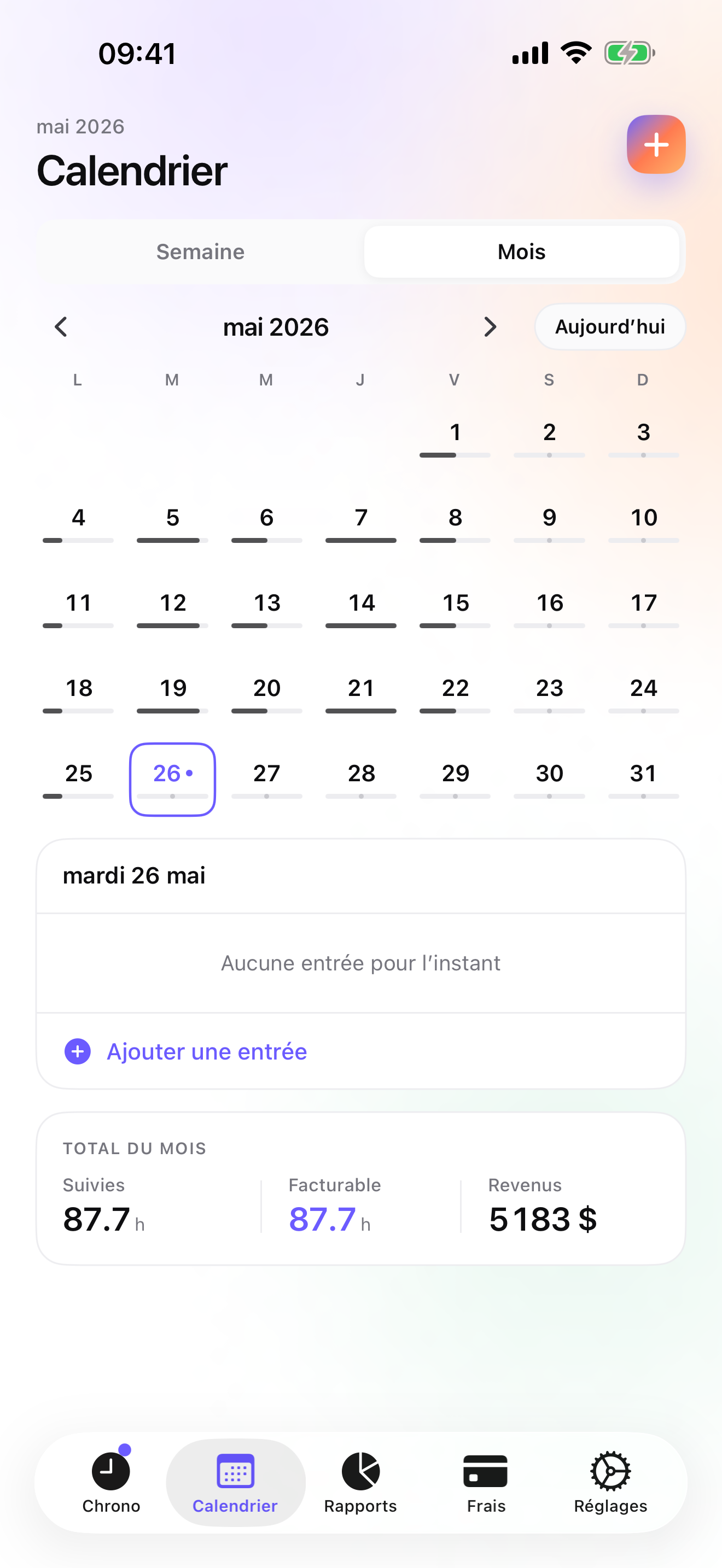
A July Tuesday and the start of the next month, for a one-van HVAC business, using only shipped features.
6:30, first no-cool
The call came in overnight. Customer created on the phone, timer started from the Lock Screen in the driveway, at the customer's regular rate.
9:10, supply house
A dual-run capacitor and a contactor. Photo of the receipt, pinned to the morning call, in the category you set up for parts. The hours and the parts now sit on the same job.
11:00, agreement visit
The Okafor household is on a maintenance agreement. Switch mission from the Watch: the morning call is saved with its hours, and this tune-up goes under the Okafor agreement at the agreed rate.
15:40, attic, no signal
Phone in a pocket, no bars. The timer keeps running on the device; nothing waits for a tower. On the way down you switch to the next call from the Watch.
Start of the month
Invoices tab: the recurring-invoice nudge reminds you of the agreement customers you bill every month. One tap per customer makes the PDF; the Unpaid filter shows last month's stragglers, and the chase e-mail is already written.
Questions people ask
Does the timer keep going in an attic or a mechanical room with no signal?
Yes. iTimeSheet never waits for a server: the timer, entries, expenses, and reports all run on the phone. If you only have the Apple Watch with you, it queues its taps when out of range and backdates them once it reconnects. A connection is only needed for the iCloud backup and the App Store purchase. Nothing you log in an attic is lost because the attic had no bars.
Where is my customer list, with the agreements and prices?
In a local SQLite database on your iPhone. There is no account, no server on our side, no analytics SDK, and no ads. Turn on iCloud backup and a single file goes to your own iCloud Drive, visible in the Files app; from Essential it is written daily on its own. The App Store privacy label lists device identifier, purchases, and usage data, none linked to you and none used for tracking, which the anonymous subscription SDK needs to work.
How do I bill maintenance agreements every month?
On Studio, each customer on an agreement has it as a mission with the visits logged under it. The Invoices tab shows the un-invoiced amount per customer, and a monthly recurring-invoice nudge reminds you which customers you bill on a schedule. It is a reminder, not an automatic send: you still tap to generate each PDF, which keeps you in control of what goes out. Mark each one paid when the transfer arrives, and the Unpaid filter shows the rest.
What does it cost for one technician?
Free covers 3 customers and 2 entries a day. Essential is $4.99/mo or $29.99/yr, Pro is $7.99/mo or $59.99/yr, and Studio, which has the invoicing, the recurring nudge, and the quotes, is $9.99/mo or $89.99/yr on the US store. Essential and Pro offer a free trial; Studio does not, but a watermarked preview shows the invoice PDF with your real data before you pay. Subscriptions renew through Apple and are cancelled from your Apple account settings; cancelling never deletes or locks your data.
I just hired a second tech. Can we share the customer list?
No. iTimeSheet is single-user by design: one database per phone, no shared workspace, no dispatch, no approvals. Your second tech can run the app on their own phone and send you CSV or PDF timesheets that you add to the job by hand before invoicing, but that is a workaround, not a team feature. If you need both of you on one schedule with one customer list, ServiceM8, Housecall Pro, or Jobber are the honest recommendation, at a company subscription.
Verdict
For the HVAC technician who owns the van and the customer list, iTimeSheet is the first install: the Sunday no-cool bills at its own rate on one entry, the capacitor receipt stays with the call, the agreement customers come up in the monthly nudge, and the invoice leaves from the same tab, with nothing stored on a server you do not control.
Once there is a dispatcher and a second van, ServiceM8, Housecall Pro, or Jobber are the tools, and the subscription is the price of running a crew. Fergus is worth a look if supplier-invoice import matters and you are in its home markets. If someone else invoices, Timemator or HoursTracker will keep your hours honest for very little.