The 7 best time tracking apps for plumbers on iPhone, ranked for 2026
A plumber's week does not run in order. A water heater booked for Tuesday, a leak under a kitchen sink that turns into a second visit once the part arrives, and a burst pipe at eleven at night that bills at a rate nobody discussed in advance. The right app catches each of those on the right job, keeps the supply-house receipt with it, and puts the after-hours rate on the invoice without an argument.
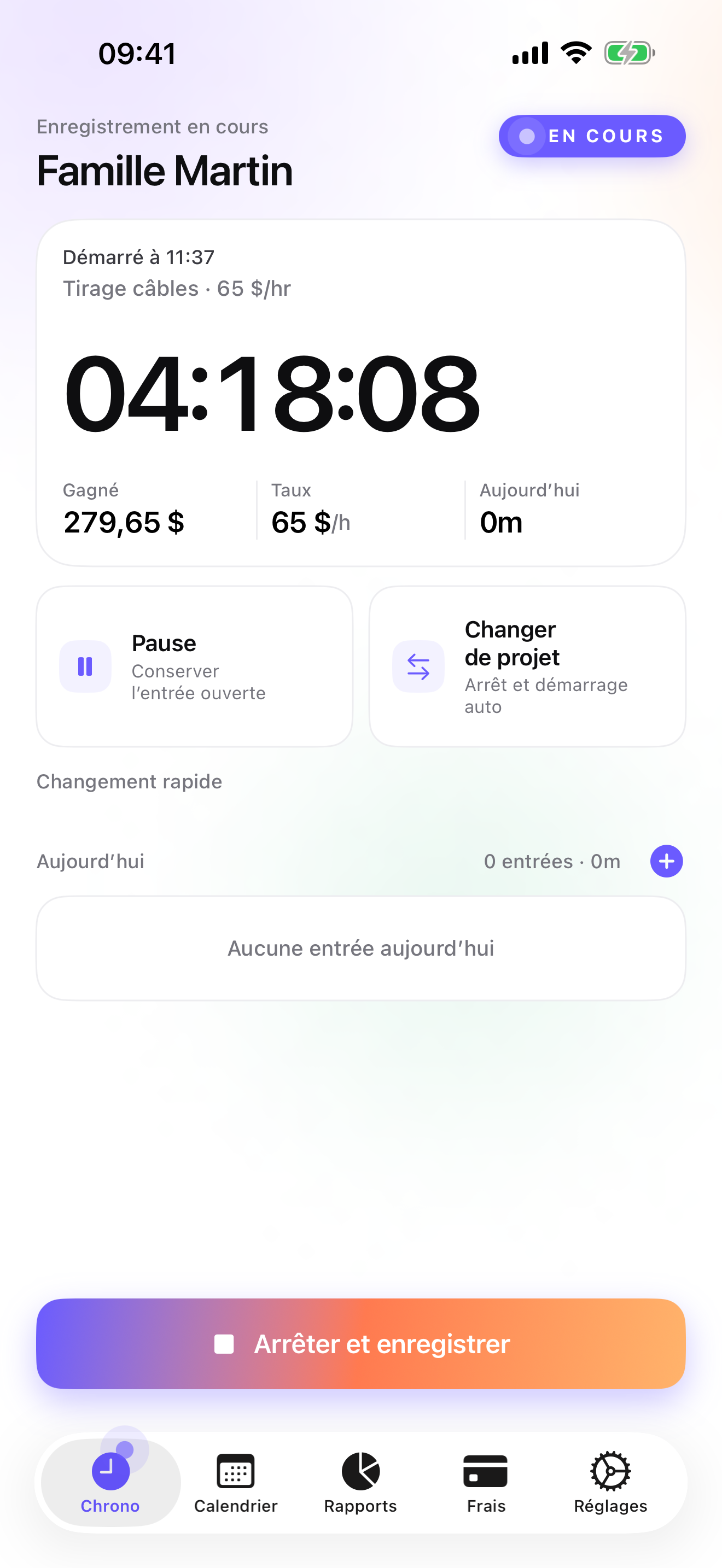
In 2010 a tradesman left a four-star review in French that said the app was probably the best in the store, and then named the one thing missing: a way to log purchases, travel, and mileage next to the hours. He was right. A plumber's invoice is half labor and half the part from the supply house, and an app that only knows about hours leaves the other half in the glovebox. That review is part of why expenses sit on the job today, and it is the one I chose to show on this page.
This list is for the plumber who answers the phone, drives the van, buys the fittings, does the work, and sends the bill. If you have an office and three technicians, the ranking turns upside down and I say which app to look at instead.
I build the app in first position and I have since 2008. To keep the rest honest, every rating below is the US App Store figure on the date printed at the top, and every statement about another app comes from its own listing. Where one of them is the better tool for you, I say so.
How I ranked them
I weighted the list toward what happens in a crawl space with wet hands and what happens at the supply counter, not toward office dashboards.
- An emergency rate on one entryThe night call bills differently from the Tuesday install. The app must let you set a rate on the customer and override just that one entry, not make you create a second customer called Smith after hours.
- Parts receipts on the job, not in a pileA P-trap, a ball valve, and forty feet of PEX belong to the house they went into. If the receipt is not attached to that job the moment you buy it, it gets invoiced late or forgotten.
- Two visits, one jobDiagnose today, come back Thursday with the cartridge. Both visits must land on the same job so the invoice reads as one piece of work.
- Works where the phone cannot see a towerBasements, mechanical rooms, and crawl spaces have no signal. The timer has to keep running and the entry has to survive.
- From the job to the invoice the same eveningA service call should be billed before you forget what you did. Quote, invoice, mark as paid, chase the late ones, with as little re-typing as possible.
- Your customer list stays yoursAddresses, access codes in your notes, and what each household pays you are your business. Prefer an app that keeps that on the phone or lets you leave with the data intact.
The ranking
App Store ratings checked on October 15, 2026 (US App Store).

iTimeSheet
Hours, parts, and the after-hours rate on the same job, then the invoice
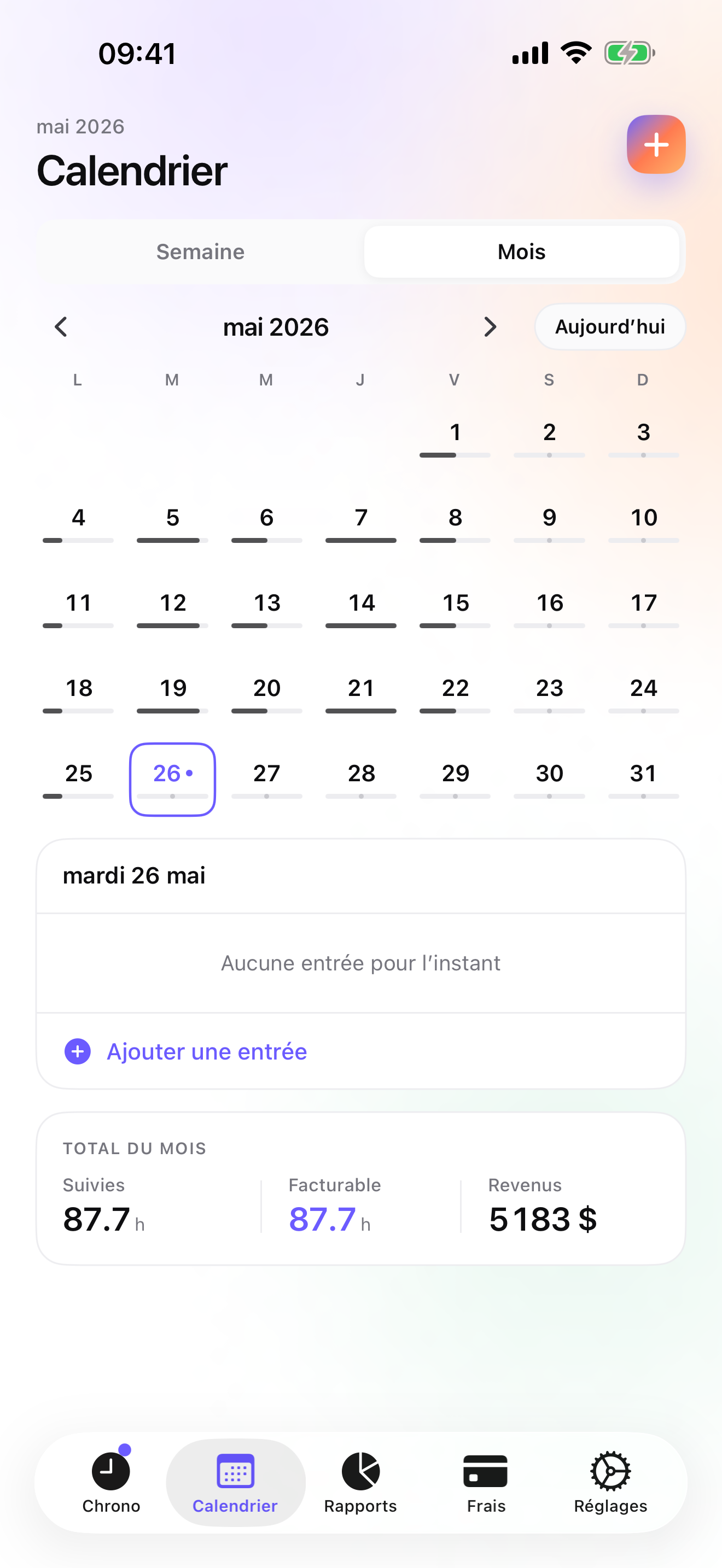
iTimeSheet's Client → Mission → Task tree becomes Customer → Job → Visit for a plumber, and you can collapse it to customers only if that is all you need. Rates cascade: set the regular rate on the customer, and when the burst pipe comes in at 11 pm, override the rate on that single entry. The timer starts from the Apple Watch, the Lock Screen, or the Home Screen widget, which matters when the phone is in a dry pocket and your hands are not. Switching from the Tuesday job to the emergency saves the first entry with its duration; the Thursday return visit goes on the same job as the first diagnosis, so the invoice tells one story.
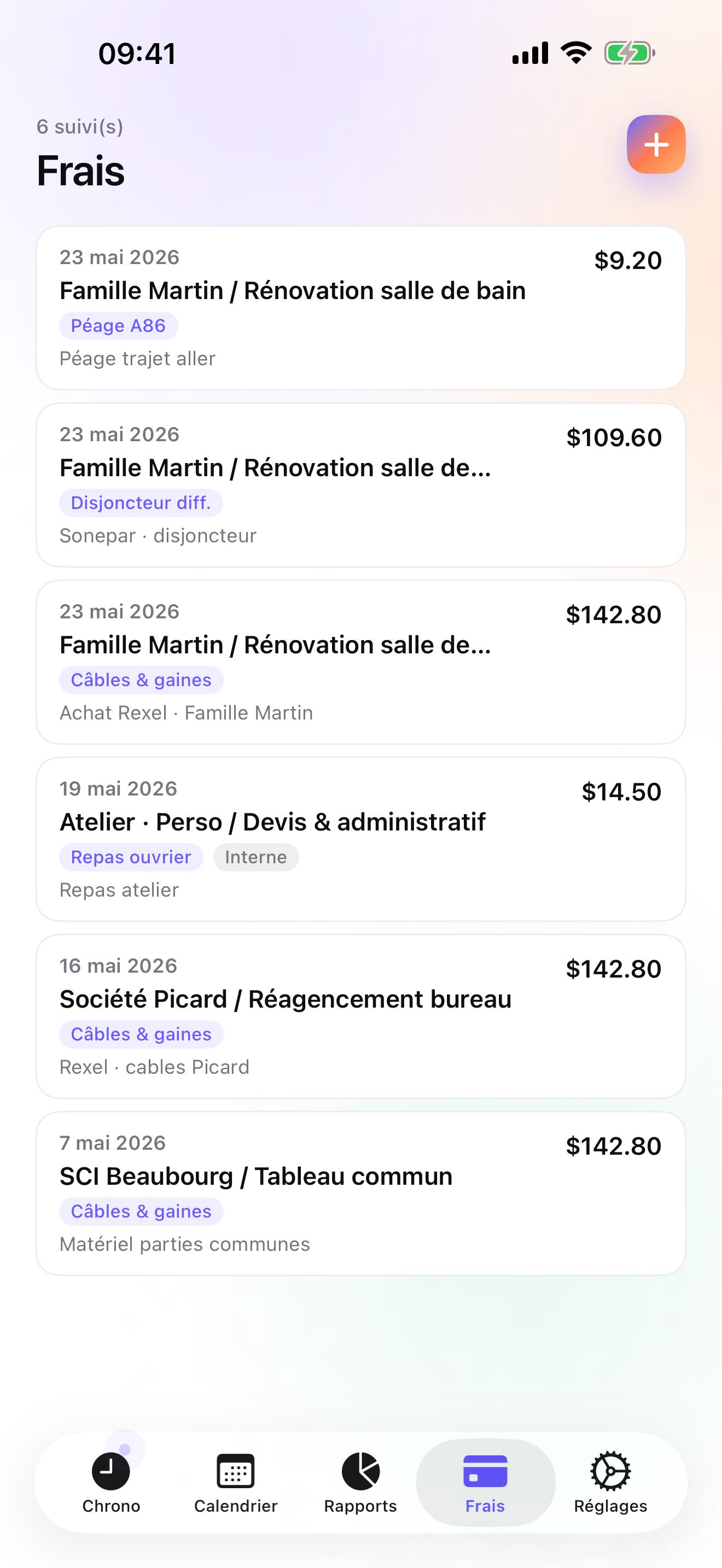
Expenses are the half of the invoice most time apps ignore. On Pro you photograph the supply-house receipt, pick the job, and choose a Parts category you created once (the fourteen presets do not include parts); the fitting then sits next to the hours it was installed in. On Studio, the Invoices tab shows what each customer has not been billed, and one tap makes the PDF with your logo, sequential numbering per year, the US layout, your routing and account details, and the payment terms from the customer's billing profile. A water heater replacement can start as a quote and convert to an invoice in one tap, with a deposit invoice for 20, 30, or 50 percent of the quote if you want the money before you order the unit. The final invoice does not deduct a deposit automatically; you account for it yourself. Late payers get an overdue reminder with a pre-filled chase e-mail.
Nothing leaves the phone: no account, no server on my side, no analytics, no ads. The backup is one file in your own iCloud Drive, daily from Essential. The flip side is real and I will not dress it up. iPhone and Apple Watch only, no iPad version yet, one user, no dispatch or scheduling, no card payments inside the app, and no accounting connector, so your bookkeeper gets a CSV.
Strengths
- Per-entry rate override for emergency and after-hours work, on top of the customer rate
- Receipt photos pinned to the job, with 14 expense presets on Pro
- Quotes, deposit invoices, credit notes, overdue chasing, and paid/unpaid filters on Studio
- No account, no vendor cloud; the Watch queues taps offline and backdates them
Limits
- No Android, no web app, no iPad version yet: iPhone and Apple Watch only
- Single user: no dispatch, no scheduling, no second technician
- No card payments in the app and no QuickBooks connector; CSV export only
- Relaunched in July 2026, so a single rating on the US store today
Best for: A self-employed plumber, alone or with one helper, who bills households and small businesses directly and wants hours, parts, and invoices in one place.
Pricing: Free to start: 3 customers and 2 entries a day, enough to test a week of calls. Essential is $4.99/mo or $29.99/yr and adds unlimited entries, expense lines, CSV and PDF export, and daily iCloud backup. Pro is $7.99/mo or $59.99/yr for receipt photos, the expense presets, and the widgets. Studio is $9.99/mo or $89.99/yr for quotes, deposits, invoices, and reminders; no free trial on Studio, but the watermarked invoice preview shows the real PDF with your data before you pay.
★★★★ Super mais....The app is great and it is very probably the best in the store. However, it is missing one little thing to be perfect: the ability to also manage expenses (purchases, travel, mileage...). Please consider it for the next update and it will be 5 stars
translated from French ·« L'appli est super et c'est très probablement la meilleure du store.par contre, il lui manque un petit quelque chose pour être parfaite : c'est la possibilité de pouvoir également gérer des frais (achats, transports, kilomètres...). Merci d'y penser pour la prochaine MAJ et ce sera 5 étoiles »
Gueutio · App Store review · France · 2010

ServiceM8
Job cards for plumbers, with the office in a browser
ServiceM8 names plumbers first in its own description, and the product shows it: job cards with photos and notes, quotes, staff locations, invoicing, and payments, with the phone as the main screen and the admin side in a browser. It needs an account and a subscription, and it is designed for a business with staff, so a lone plumber pays for dispatch screens they will not open. Where it beats iTimeSheet is clear: if you have two vans and a part-time office person, it runs the day; iTimeSheet runs one person's hours and invoices.
Strengths
- Trade-specific job cards, quotes, and photos
- Invoicing and payments built in
- Phone-first design with a web back office
Limits
- Subscription and account required; data on the vendor's servers
- Built for staff management, heavy for one person
- Time tracking is one feature among many
Best for: A plumbing business with a few technicians that wants job cards, staff locations, and payments in one account.
Pricing: Subscription

Housecall Pro
The home-services platform with dispatch, payments, and marketing
Housecall Pro is the big one in home services on the US store, with more than thirty thousand ratings: scheduling, dispatch, invoicing, card payments, and customer marketing on monthly plans. It is a company tool and it is priced like one. If you employ technicians and want the customer to book online and pay by card on the doorstep, it does things iTimeSheet does not try to do. If it is just you and the van, you will be paying a company's subscription for a timer and an invoice.
Strengths
- Scheduling, dispatch, invoicing, and payments together
- Customer-facing booking and marketing tools
- Large, established user base
Limits
- Monthly plans priced for a business
- Account and vendor cloud required
- Far more than a sole trader needs
Best for: A plumbing company with a dispatcher that wants online booking, card payments, and customer follow-up.
Pricing: Subscription

Jobber
Quotes, scheduling, and QuickBooks sync for a crew
Jobber covers the office side of a plumbing business: quotes the customer approves online, scheduling and dispatch for several technicians, invoicing, card payments, and a QuickBooks sync. Its rating on the US store is as high as any on this list. It is built for a business with a crew, and both the setup and the monthly plans assume one. The honest comparison: Jobber manages a company's jobs; iTimeSheet manages one person's hours and bills them.
Strengths
- Online quote approval, scheduling, dispatch, and payments
- QuickBooks sync
- Very well rated on the US store
Limits
- Monthly plans aimed at a company, not a sole trader
- Account required; your customer list lives on their servers
- Heavy for one plumber
Best for: A plumbing contractor with several technicians and someone in the office who schedules the day.
Pricing: Subscription

Joist
A signed estimate in the driveway, but no clock
Joist builds the estimate on the phone, gets the customer's signature, takes the payment, and sends the invoice. For fixed-price work, a water heater swap or a bathroom rough-in, that is the whole transaction. It has no timer and no hours log, so for hourly service calls you need something next to it. There is a free tier and paid plans, and an account is required. Pair it with a plain hours tracker and you have most of what Studio does, in two apps.
Strengths
- Fast estimates and invoices with customer e-signature
- Payments on the spot
- Free tier to begin
Limits
- No time tracking at all
- Account required; documents on their servers
- Useful extras sit in the paid plans
Best for: A plumber who sells mostly fixed-price jobs and wants a signed estimate before starting.
Pricing: Free plan, paid plans

HoursTracker
Fifty thousand ratings of clock-in, clock-out
HoursTracker is the plain hours log with the biggest rating base on this list. Jobs, clock in and out, breaks, pay, CSV export, and a geofence that nudges you to clock in when the van arrives at a saved address. No invoicing, no receipts, and the account is optional, only for cloud backup. For a plumber paid by the hour by a contractor, or one who bills from a desktop program and only needs accurate hours, it does the job for very little.
Strengths
- Geofenced clock-in reminders per job address
- Breaks, pay, and CSV export
- No account needed; cloud backup optional
Limits
- No invoicing and no receipt photos
- Jobs only, no customer → job → visit tree
- Billing happens elsewhere
Best for: A plumber employed by a contractor who needs an accurate, exportable record of hours per job.
Pricing: Free with in-app purchase

Punch Time Clock
A time clock and nothing else, paid for once
Punch is a time clock: clock in, clock out, PDF or CSV timesheet, with a one-time Pro purchase instead of a subscription and no account at all. It has more than thirty-six thousand US ratings and a 4.8 average. Two caveats. It does not invoice or track parts, and its last update on the store is April 2025, so check that it still behaves on your iOS version before relying on it. As a pure punch clock for an employed plumber, it is hard to argue with the price.
Strengths
- No account, no subscription; one-time Pro purchase
- PDF and CSV timesheets
- Very simple
Limits
- No invoicing, no parts, no customer list
- Last updated April 2025
- Shift and job list only, no customer tree
Best for: An employed plumber who wants a dead-simple punch clock and a PDF timesheet for the boss.
Pricing: Free with in-app purchase
Side by side
| App | Account required | Where your data lives | Invoices | Receipt photos | Platforms | Pricing | Rating |
|---|---|---|---|---|---|---|---|
| iTimeSheet | No | Your iPhone (your iCloud for backup) | Yes (Studio) | Yes (Pro) | iPhone + Apple Watch | Free plan, paid plans | 5.0 ★ (1) |
| ServiceM8 | Yes | Vendor's servers | Yes | — | iPhone + web/other | Subscription | 4.5 ★ (848) |
| Housecall Pro | Yes | Vendor's servers | Yes | — | iPhone + web/other | Subscription | 4.7 ★ (30,906) |
| Jobber | Yes | Vendor's servers | Yes | — | iPhone + web/other | Subscription | 4.8 ★ (21,250) |
| Joist | Yes | Vendor's servers | Yes | — | iPhone + web/other | Free plan, paid plans | 4.8 ★ (14,324) |
| HoursTracker | Optional | Your iPhone; optional cloud | No | — | iPhone + web/other | Free with in-app purchase | 4.8 ★ (56,323) |
| Punch Time Clock | No | Your iPhone (your iCloud for backup) | No | — | iPhone | Free with in-app purchase | 4.8 ★ (36,264) |
App Store ratings checked on October 15, 2026 (US App Store).
A day with iTimeSheet
A Thursday for a one-van plumber, told with the features that ship today.
6:50, no hot water
The text comes in while you are still in the kitchen. From the phone you add the Martinez household as a customer, create the water heater job, and start the timer from the Lock Screen as you pull out.
9:40, supply house
A 50-gallon unit, a pan, and two flex lines. Photo of the receipt, pick the Martinez job, in the category you set up for parts. The expense is now part of that job, not part of a Sunday shoebox.
13:15, the leak from Monday
Back to the Chen kitchen with the cartridge that arrived. Switch mission from the Watch: Martinez is saved with its hours, and this visit lands on the Chen job next to Monday's diagnosis.
22:40, burst pipe
An emergency call across town. New customer, start the timer, and override the rate on this one entry to your night rate. Nobody has to remember in the morning what was agreed.
Friday, 7:30, coffee
Invoices tab: Martinez shows the un-invoiced amount, labor plus the unit; one tap makes the PDF with your numbering and bank details, and Chen's is next. The emergency gets its own invoice at the night rate, and the Due versus Paid recap in Reports shows who still owes you.
Questions people ask
Does the timer survive a crawl space with no signal?
Yes. iTimeSheet keeps everything on the phone and never waits for a server, so the timer runs and the entry is saved whether or not there is a bar of signal. If the phone stays in the van and you only have the Apple Watch, the Watch queues its taps while out of range and backdates them once it reconnects. The only moments that need a connection are the iCloud backup and the App Store purchase itself.
Where do my customers' addresses and notes live?
In a local SQLite database on your iPhone, and nowhere else unless you turn on iCloud backup, which writes a single file to your own iCloud Drive that you can see in the Files app. There is no account, no server of ours, no analytics SDK, and no ads. The App Store privacy label lists device identifier, purchases, and usage data, not linked to you and not used for tracking; that is what the anonymous subscription SDK needs.
Can I bill the night call-out at a higher rate on the same customer?
Yes. The rate set on the customer applies to every job and visit by default, and you can override it on one job or on a single entry. For a burst pipe at 11 pm you keep the regular customer, start the timer, and set the night rate on that entry alone. The un-invoiced amount and the invoice generated on Studio reflect each entry at its own rate, so the Tuesday install keeps the regular one. No second customer and no manual correction.
What does it cost for a one-van plumber?
Free gets you 3 customers and 2 entries a day, no export. Essential is $4.99/mo or $29.99/yr, Pro is $7.99/mo or $59.99/yr, and Studio, the tier that makes the invoices, is $9.99/mo or $89.99/yr on the US store. Essential has a 7-day trial on monthly and 14 days on annual, Pro 7 days; Studio has no trial, but the watermarked preview shows your invoice PDF with real data first. Subscriptions run through Apple and are cancelled from your Apple account settings; cancelling never locks the data you entered.
My brother works with me two days a week. Can he log his hours in my app?
Not in the same database. iTimeSheet is single-user: there is no shared workspace, no second login, no dispatch. He can run the app on his own phone and send you a CSV or PDF timesheet of his hours, which you add to the job by hand before invoicing. If you need both of you on one schedule, with job assignment and a shared customer list, ServiceM8 or Jobber are the honest recommendation, at a company subscription.
Verdict
For the plumber who is also the business, iTimeSheet is the first install: the night rate lives on one entry, the supply-house receipt lives on the job, and the invoice comes out of the same screen on Studio, with the customer list staying on your phone.
With two vans and an office, go to ServiceM8 or Jobber and budget for the subscription. For fixed-price work only, Joist with a punch clock next to it is a fair pair. If someone else sends the invoices and you just owe them hours, HoursTracker or Punch will do it for pennies.