The 7 best time tracking apps for electricians on iPhone, ranked for 2026
An electrician's day is five addresses, a van, a supplier counter and a phone that has to work with dusty hands. The right app logs the hours per job site without a login screen, keeps the receipt for the breaker you bought on the way, and turns the week into an invoice on Sunday evening. Here is what I would install, and why.
I have been building iTimeSheet since 2008, which means I have read seventeen years of reviews from people who use it on job sites. One of the earliest was from a technician servicing half a dozen accounts a day within a hundred miles of his plant. He used the export to prove to his supervisors how long a service call really took. That use case has not changed. What changed is that your phone is now the only computer you carry.
So this list is written for the electrician who is also the company: you quote, you wire, you buy the parts, you invoice, you chase the payment. If you have an office person and three vans, the ranking changes and I say so below.
Two rules I applied. First, every number is from the App Store on the day I wrote this, so you can check it. Second, I make the app that sits in first place. Read the rest of the list as what I would honestly recommend if iTimeSheet did not fit you, and there are real cases where it does not.
How I ranked them
Electricians do not sit at a desk, so I weighted the list toward what happens between 7 am and 6 pm, not toward dashboards.
- Works with the phone in a pocketStart and stop from the Lock Screen, a widget or the Watch. If the app needs you to unlock, find it and tap three times, you will stop logging by Wednesday.
- Hours land on the right job siteA day often spans a kitchen rewire, a fuse-board upgrade and an emergency call. The app must switch sites in one tap and save the previous entry without asking.
- Receipts stay attached to the siteThe supplier receipt for cable and sockets belongs to that site, not to a generic expense pile. Otherwise it never makes it onto the invoice.
- From hours to invoice without re-typingQuote, deposit, invoice, credit note. If the app only logs time, you will spend Sunday copying numbers into something else.
- No network needed in a basementMeter cupboards and plant rooms have no signal. The app has to keep working and not lose the entry.
- Your clients' addresses stay yoursA list of who you worked for, where, and for how much is your business. Prefer apps that keep it on the phone or at least let you leave without losing it.
The ranking
App Store ratings checked on October 15, 2026 (US App Store).

iTimeSheet
The one built around a job site, not around a team dashboard
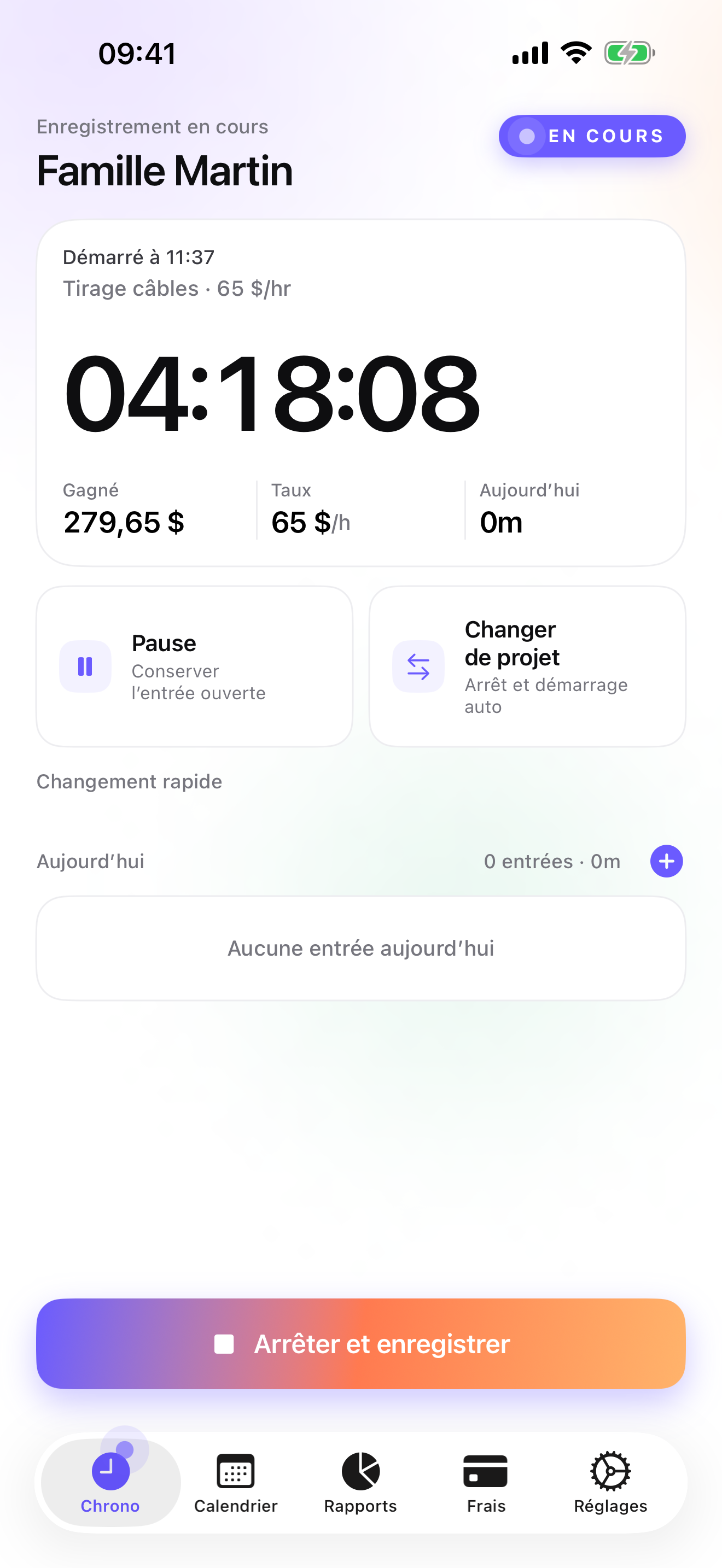
iTimeSheet tracks a Client → Mission → Task tree, and for an electrician that reads Client → Job site → Phase. Set the hourly rate on the client once, every site and phase inherits it, and you can override a single entry when a Sunday call-out bills at a different rate. Start the timer from the Home Screen widget, the Lock Screen or the Apple Watch, switch to the next site with one tap and the previous entry is saved with its duration.
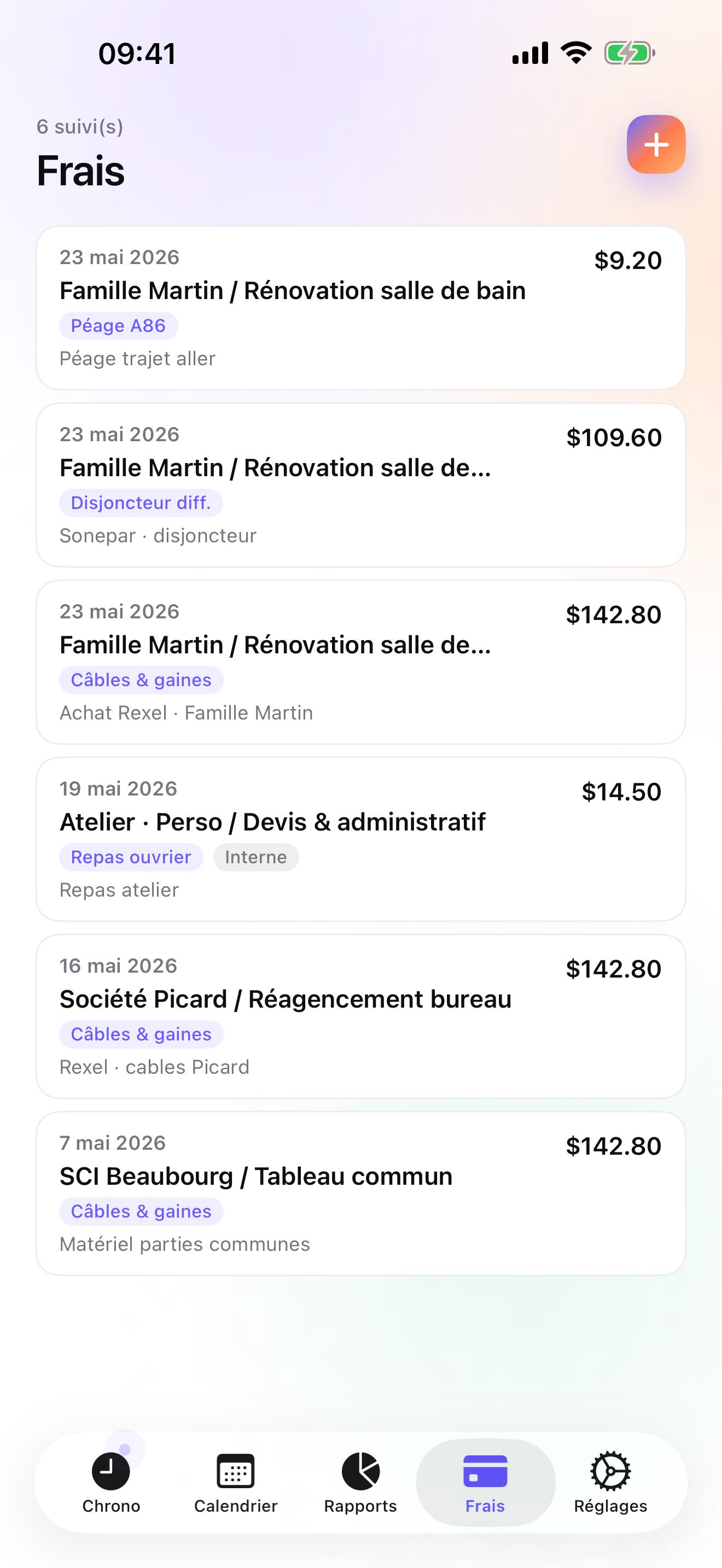
Expenses are where most time apps give up. Here you photograph the supplier receipt, pick the site it belongs to, and it sits next to the hours of that site. Pro ships fourteen ready-made categories (mileage, parking, hotel, meals on the road, hardware, phone and internet and more), and you add your own for cable and fittings once. On Studio, the Invoices tab shows the un-invoiced amount per client and generates the PDF in one tap, with your logo, sequential numbering, the legal mentions required in the US, France, Germany, Spain or Japan, your bank details, and quotes, deposits and credit notes when a job changes scope.
Nothing leaves the phone. There is no account, no vendor server, no analytics SDK. Backup goes to your own iCloud Drive as a single file you can see in the Files app, daily and automatic from the Essential tier. The flip side is real: iPhone and Apple Watch only, one user, no web dashboard, and no QuickBooks connector (you export CSV).
Strengths
- Timer from widget, Lock Screen, Dynamic Island and Apple Watch; offline taps on the Watch are backdated when it reconnects
- Receipt photos pinned to the job site; 14 expense presets on Pro
- Quotes, deposit invoices, credit notes, overdue reminders and paid/unpaid tracking on Studio
- No account, no cloud, backup to your own iCloud; free tier with 3 clients to try the workflow
Limits
- iPhone and Watch only: no Android, no web app, no iPad version yet
- Single user: no crew scheduling or dispatch
- No direct accounting connector; CSV export only
- Relaunched July 2026, so very few ratings on the US store so far
Best for: A self-employed electrician, or one with a helper, who bills clients directly and wants the quote, the hours, the receipts and the invoice in one place on the phone.
Pricing: Free to start (3 clients, 2 entries a day). Essential $4.99/mo or $29.99/yr for unlimited entries, CSV/PDF export and automatic backup. Pro $7.99/mo or $59.99/yr adds receipt photos and the widgets. Studio $9.99/mo or $89.99/yr adds the full invoicing workflow. No free trial on Studio, but a watermarked invoice preview lets you see the output with your real data first.
★★★★★ A very useful app!« I started out with the lite version & liked this app so much I purchased the full app. Im just a blue collar worker servicing 1/2 a dozen accounts a day within 100 miles of my plants location. I was having problems with overtime because my work load had been increased but I was expected to stay under 40 hours because the supervisors "thought" a certain service call "should" only take so much time. Using iTimesheet I was able to track my complete day from clocking in to work, arrivals & departures at clients, lunch breaks & clocking out at the end of the day. I then exported all this info to excel & after a couple of months I was able to complie all this information to help my company stop the guess work concerning how long it should take to service a client & make us more efficient by showing the actual service times. This created an average that we now use to determine labor cost & service charges. I came out smellin' like a rose! »
doodude · App Store review · United States · 2009

Jobber
The field-service suite, when there is an office behind the van
Jobber is the app you see on the phones of the bigger outfits: quotes a client approves online, scheduling and dispatch, invoices and card payments, QuickBooks sync. It is built for a business with a dispatcher and several technicians, and it shows in both the price and the setup. If you are that business, it is a serious tool. If you are one person, you will pay for a lot of screens you never open.
Strengths
- Scheduling, dispatch, quotes, invoices and payments in one account
- Clients can approve quotes and pay online
- QuickBooks sync
Limits
- Monthly plans priced for a business, not a sole trader
- Account and vendor cloud required; your client list lives on their servers
- Heavy for one person
Best for: An electrical contractor with two or more vans and someone in the office who schedules the day.
Pricing: Subscription

ServiceM8
Job cards and quotes for the trades, iPhone and iPad first
ServiceM8 was built for plumbers, electricians, HVAC and locksmiths and it has been on the App Store since 2010. Digital job cards, quotes, staff locations, job photos and notes, invoicing and payments, with the office side in a browser. It is a subscription and it needs an account, but it is one of the few field-service tools that treats the phone as the primary screen rather than as a companion.
Strengths
- Trade-specific from the start: job cards, quotes, photos, forms
- Invoicing and payments included
- Mature product, updated regularly
Limits
- Subscription plus account; data on the vendor's servers
- Time tracking is a feature, not the centre of the product
- More admin than a one-person business needs
Best for: A small electrical business that wants job cards and client messaging as much as time tracking.
Pricing: Subscription

Tradify
Quotes, scheduling and timesheets for one to twenty people
Tradify says it is made for businesses between one and twenty people, and that is a fair description. Quoting, scheduling, invoicing, timesheets and job costing, with QuickBooks and Xero sync. The iOS app rates well and has a French interface. For the solo electrician it is a reasonable middle ground between a bare time tracker and a full dispatch platform, as long as you accept that it is a subscription with an account.
Strengths
- Quotes, invoices, scheduling and timesheets together
- Xero and QuickBooks sync
- Interface available in English and French
Limits
- Subscription, account, vendor cloud
- Built around jobs and staff, less around the individual's hours
- Pricing aimed at a company
Best for: A growing electrical business that already uses Xero or QuickBooks and wants quotes and timesheets in the same place.
Pricing: Subscription

Joist
Estimates and invoices from the driveway, but no timer
Joist is the contractor's estimate and invoice maker: build the quote on site, get the client's signature on the phone, take payment, send the invoice. It is well rated and fast. What it does not do is track your hours, so it pairs with a time tracker rather than replacing one. If your work is mostly fixed-price jobs and you rarely bill by the hour, that may be exactly the split you want.
Strengths
- Fast, professional estimates and invoices on the phone
- Client e-signature and payments
- Free tier to start
Limits
- No time tracking at all
- Account required; documents live on their servers
- Paid tiers for the useful extras
Best for: Electricians who sell fixed-price jobs and want a quick, signed estimate before leaving the house.
Pricing: Free plan, paid plans
HoursTracker
The clock-in clock-out veteran with geofenced reminders
HoursTracker has been on the App Store since 2009 and has more than fifty thousand US ratings. You create jobs, clock in and out, add breaks, and it tracks pay, mileage and tips. The useful trick for an electrician is the geofence: set a job site's location and it reminds you to clock in when you arrive and out when you leave. There is no invoicing and no receipt photos; it exports CSV and you do the billing elsewhere. It works without an account, which only matters for the optional cloud backup.
Strengths
- Geofenced clock-in and clock-out reminders per job site
- Breaks, pay, mileage, tips, CSV export
- No account needed to use it; cloud backup optional
Limits
- No invoicing, no receipt photos
- Job-based, not client → site → phase
- Interface in English only
Best for: An electrician who is paid by the hour by a contractor and just needs an accurate, exportable log.
Pricing: Free with in-app purchase

Time Squared
Hours, mileage and photos per project, ready for an invoice made elsewhere
Time Squared sits between a plain hours log and a job tool. Projects with notes and photos, GPS punch in and out, mileage, tax rates, and project reports meant to feed an invoice you create somewhere else. Individual accounts are free with ads, a premium subscription removes them and unlocks the advanced bits. It is the closest thing on this list to iTimeSheet's expense-per-site idea, minus the invoice itself.
Strengths
- Projects with notes, photos and mileage
- GPS punch in and out
- Project reports for invoicing
Limits
- No invoices generated in the app
- Free tier carries ads
- Company features need a subscription and an account
Best for: Someone who wants photos and mileage attached to each job but already has an invoicing tool.
Pricing: Free with in-app purchase

atWork
The simple hours and pay tracker that speaks 22 languages
atWork is the plain, well-made option: clock in and out, or ask Siri, add hours later if you forgot, export the timesheet as CSV, Excel or PDF with pay and overtime. It backs up to iCloud and has an Apple Watch app. No account, no invoicing, no receipts. For an electrician employed by a company who wants their own proof of hours, it is hard to beat for the price.
Strengths
- No account, iCloud backup, Apple Watch
- CSV, Excel and PDF timesheets
- Available in 22 languages
Limits
- No invoicing or expense photos
- Jobs rather than client → site hierarchy
- Pro features are an in-app purchase
Best for: An employed electrician keeping a personal record of hours and overtime.
Pricing: Free with in-app purchase
Side by side
| App | Account required | Where your data lives | Invoices | Receipt photos | Platforms | Pricing | Rating |
|---|---|---|---|---|---|---|---|
| iTimeSheet | No | Your iPhone (your iCloud for backup) | Yes (Studio) | Yes (Pro) | iPhone + Apple Watch | Free plan, paid plans | 5.0 ★ (1) |
| Jobber | Yes | Vendor's servers | Yes | — | iPhone + web/other | Subscription | 4.8 ★ (21,250) |
| ServiceM8 | Yes | Vendor's servers | Yes | — | iPhone + web/other | Subscription | 4.5 ★ (848) |
| Tradify | Yes | Vendor's servers | Yes | — | iPhone + web/other | Subscription | 4.8 ★ (179) |
| Joist | Yes | Vendor's servers | Yes | — | iPhone + web/other | Free plan, paid plans | 4.8 ★ (14,324) |
| HoursTracker | Optional | Your iPhone; optional cloud | No | — | iPhone + web/other | Free with in-app purchase | 4.8 ★ (56,323) |
| Time Squared | Optional | Your iPhone; optional cloud | No | Yes | iPhone | Free with in-app purchase | 4.9 ★ (2,430) |
| atWork | No | Your iPhone (your iCloud for backup) | No | — | iPhone + Apple Watch | Free with in-app purchase | 4.8 ★ (3,832) |
App Store ratings checked on October 15, 2026 (US App Store).
A day with iTimeSheet
Here is a Tuesday with iTimeSheet, the way the people who reviewed it describe using it.
7:40, first site
You tap the Watch complication in the van: timer running on yesterday's site, the Dubois rewire. The entry is on the right client at the right rate before you have opened the door.
11:15, supplier counter
Forty metres of cable and six sockets. Photo of the receipt, pick the Dubois site, done. The expense now sits next to the hours of that site, not in a pile for Sunday.
13:30, emergency call
A tripping board across town. Switch mission from the Lock Screen; the Dubois entry is saved with its 3 h 20. The call-out is logged on a new client at the call-out rate you set on that client.
18:05, back home
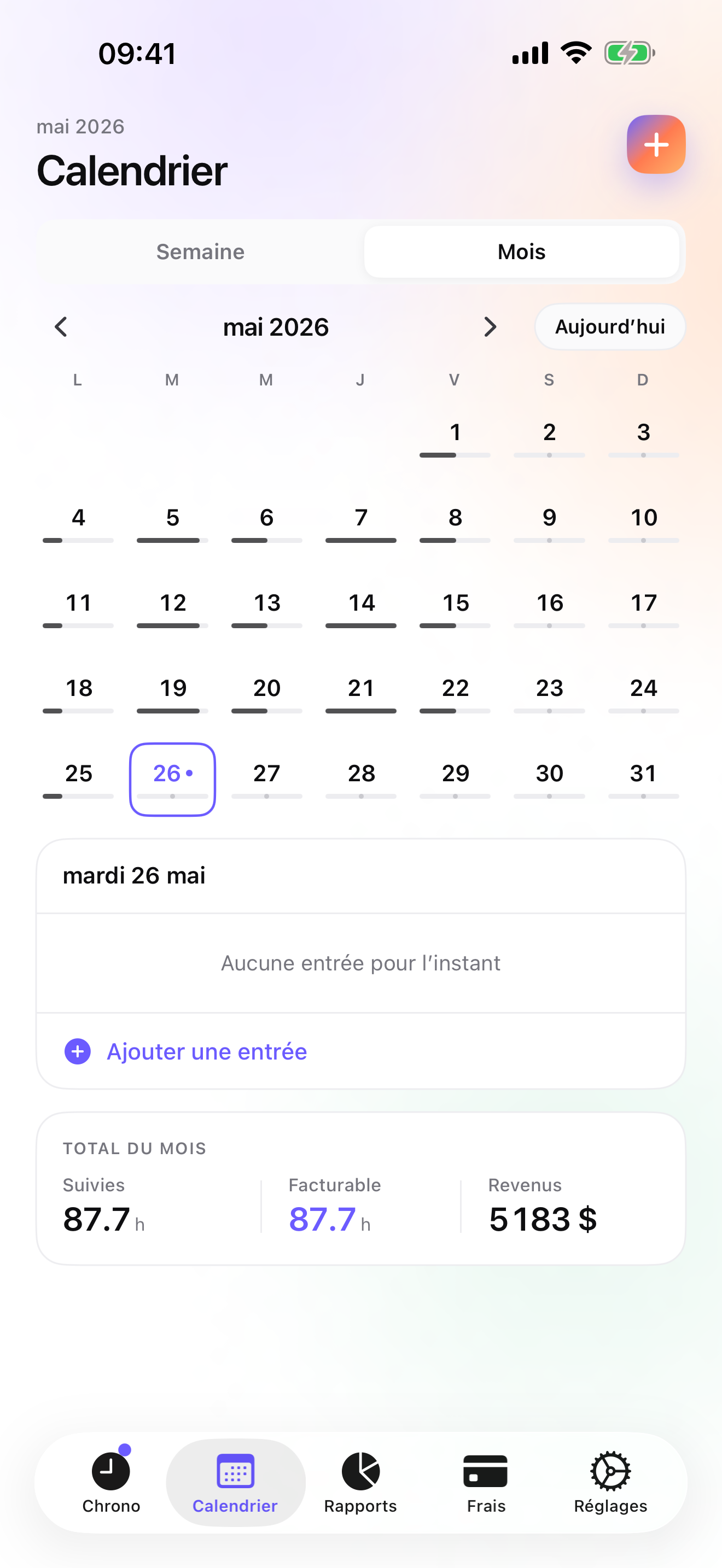
The Today screen shows the day per site. Week view shows what is left to invoice. Nothing to sync, because nothing left the phone.
Sunday evening
Invoices tab: Dubois shows the un-invoiced amount, hours plus the cable. One tap makes the PDF with your logo, the numbering and the bank details. Mark it paid when the transfer arrives; Reports shows due versus collected.
Questions people ask
Does iTimeSheet work in a basement with no signal?
Yes. Everything is stored on the phone, so the timer, the entries and the receipts work without any network. The Apple Watch also queues its taps and backdates them when it is back in range. The only time a connection matters is when you back up to iCloud or buy a subscription.
Can I send a quote, then a deposit invoice, then the final invoice?
On the Studio tier, yes. Quotes have their own numbering, a deposit invoice is 20, 30, or 50 percent of an accepted quote, and the final invoice is converted from the quote or built from the site's un-invoiced hours and expenses; it does not deduct the deposit automatically, so you account for it yourself. If something is wrong after it is sent, a credit note cancels it legally and the work is re-opened for invoicing.
Where are my clients' addresses stored?
In a local database on your iPhone. There is no account and no server on our side. If you turn on iCloud backup, the backup file goes to your own iCloud Drive, visible in the Files app. The App Store privacy label lists device identifier, purchases and usage data for app functionality only, none of it linked to you and none used for tracking.
What does it cost for one electrician?
The free tier covers 3 clients and 2 entries a day. Essential is $4.99 a month or $29.99 a year, Pro $7.99 or $59.99, Studio $9.99 or $89.99 on the US store. Studio is the one with invoicing. The subscription is through Apple and you cancel it from your Apple account settings.
I have two apprentices. Can they log their hours in my account?
No. iTimeSheet is single-user by design; there is no shared workspace. If each apprentice needs their own log, they can run the app on their phone and export CSV to you, but if you need dispatch or a team schedule, Jobber, ServiceM8 or Tradify are the honest recommendation.
Verdict
For the electrician who is also the business, iTimeSheet is the one I would install first: the hours land on the right site from the wrist, the receipts follow the site, and the invoice is one tap away on Studio, with nothing sitting on a server you do not control.
If you run a crew, start with ServiceM8 or Jobber and accept the subscription. If you are employed and just want proof of your hours, atWork or HoursTracker do that job well for very little.