The 7 best time tracking apps on iPhone for people who bill by the hour, ranked for 2026
If you bill by the hour, the hour you forgot to write down is the one you paid for. A consultant on a retainer, a tutor with six families, a bookkeeper with a dozen small clients: the day is the same problem. Something has to catch the start and the stop, put it on the right client at the right rate, and turn the month into a number a client will pay. This is the list I would hand a friend who asked.
In 2009 a user who described himself as a consultant, an employee, and the owner of a company at the same time wrote that he had tried all of the time keeping apps and that nothing came closer to footing the bill than iTimeSheet. I kept that review because it names the real job: one person, three hats, and a need to know where the hours went before anyone asks. Seventeen years later the apps look different and the job has not moved.
This guide is the general case. There are trade-specific lists on this site for electricians, lawyers, consultants, and others, and they go into the detail that matters there. Here I compare the apps that any hourly biller might install: cloud trackers built for teams, indie trackers built for one phone, and the few that produce an invoice at the end.
Two things to know before reading. All ratings are from the US App Store on the day printed above, so you can check them yourself. And I build the app in first place, and have since 2008. Where another app fits you better I say so, and I would rather you pick that one than install mine and stop using it.
How I ranked them
I scored the list on what one person needs between the first call of the morning and the invoice at the end of the month.
- Starting is cheaper than rememberingThe timer must be reachable from the wrist, the Lock Screen, or a widget. An app that needs the passcode and three taps gets skipped, and a skipped start becomes an estimate on the invoice.
- A hierarchy that matches how you billSome people bill per client, some per project, some per task inside a project. The app should let you collapse or expand that tree instead of forcing one shape on everyone.
- Rates that cascadeA retainer client at one rate, a rush task at another, a single Saturday entry at a third. Setting the rate once and overriding only the exception is the difference between a five-minute invoice and an evening of arithmetic.
- An exit that does not need a loginYour accountant wants CSV, a client wants a PDF with the detail, your calendar wants the same entries. Export formats you control beat a dashboard you can only look at.
- Expenses next to the hoursThe train ticket and the printing bill belong to the client they were spent on. If they live in a separate app, they get billed late or not at all.
- Data you ownWho you worked for, for how long, and at what price is the most sensitive file in your business. On-device storage with your own backup is the safest default; a vendor cloud is a trade you should make knowingly.
The ranking
App Store ratings checked on October 15, 2026 (US App Store).
iTimeSheet
One phone, one person, hours to invoice without a server in between
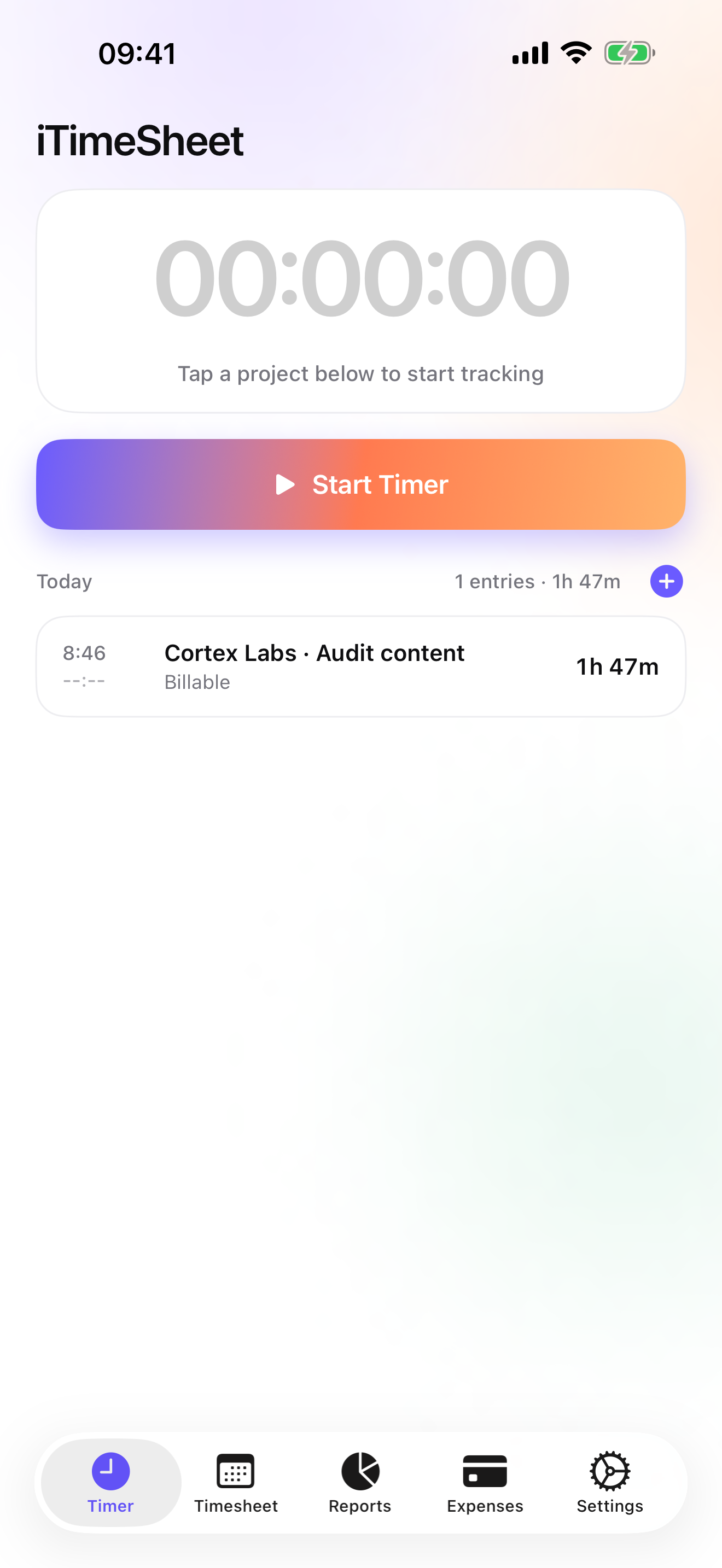
iTimeSheet stores a Client → Mission → Task tree and lets you collapse it to clients only or projects only if your billing is simpler than that. The rate cascades down the tree: set it on the client, override it on a mission or a task when needed, and override a single entry for the exception. The timer starts with one tap from the Today screen, the Home Screen widget, the Lock Screen, the Dynamic Island, or the Apple Watch, and switching to another mission saves the entry you were on. If you forgot to start it, you add the entry by hand from Today.
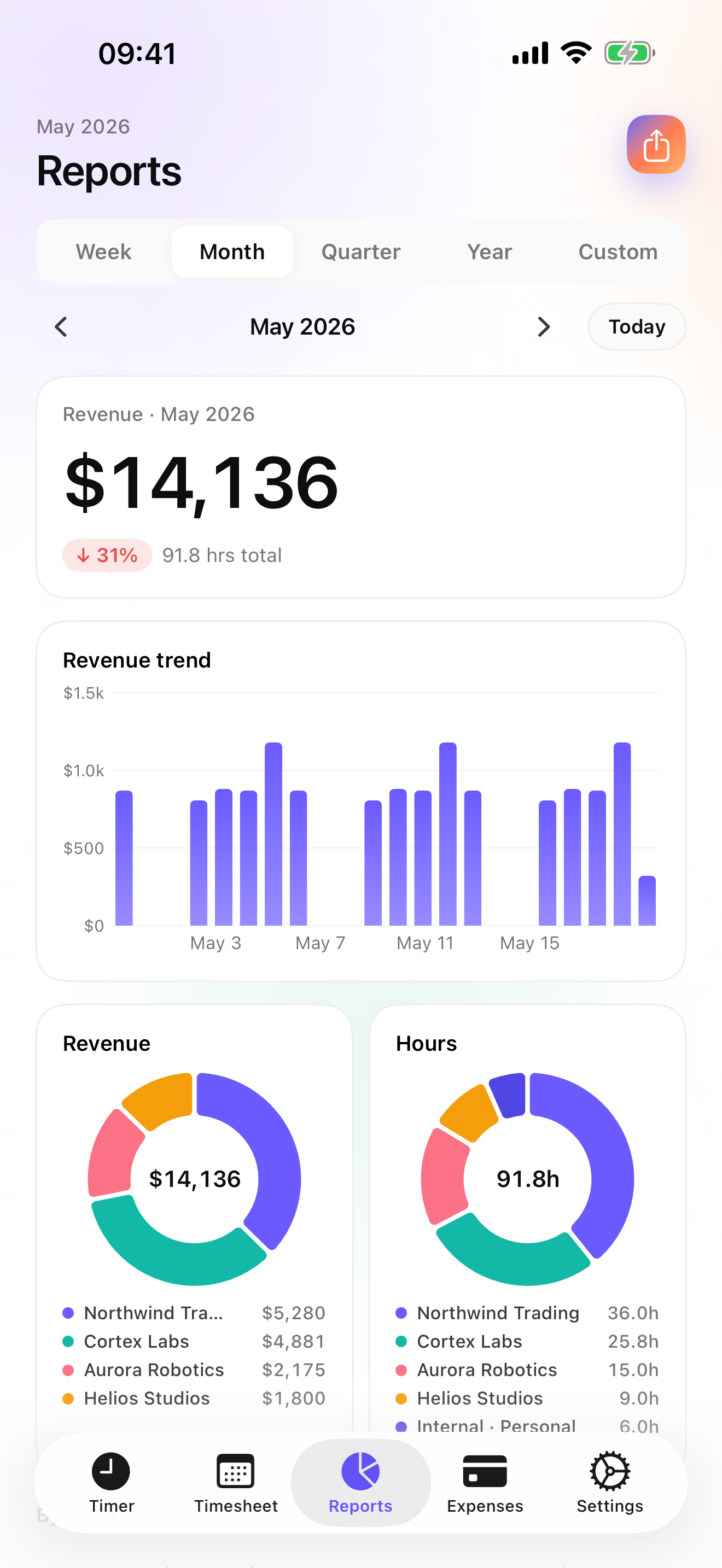
At the end of the period you have three ways out. Reports (from Essential) show revenue and hours by client with a drill into projects, over a week, a month, a quarter, a year, or any range you set, with the change against the previous period. Export is a CSV whose columns, order, and formats you choose, or a formatted PDF timesheet for a client who wants the detail, and entries can be pushed one-way to an Apple Calendar. On Studio, the Invoices tab shows what each client has not been billed yet and makes the PDF in one tap, with your logo, the numbering, the US invoice layout or the French, German, Spanish, or Japanese one, your bank details, and quotes, deposit invoices, credit notes, and overdue reminders when you need them. Expenses sit on the same mission as the hours, with photo receipts and fourteen ready-made categories on Pro.
There is no account and no server on my side. The database is a local SQLite file on the phone, the backup is a single file in your own iCloud Drive, daily and automatic from Essential. The honest limits: it runs on iPhone and Apple Watch only, there is no web dashboard, no iPad version yet, one user per database, and no accounting connector beyond CSV. If any of those is a deal-breaker, the next six apps are the ones to read.
Strengths
- Timer from the Watch, the Lock Screen, a widget, and the Dynamic Island; the Watch queues taps offline and backdates them
- Rate cascade client → mission → task with per-entry override; configurable CSV and PDF timesheet export
- Invoices, quotes, deposits, credit notes, and overdue chasing on Studio, with US, FR, DE, ES, and JP layouts
- No account, no vendor cloud, no analytics SDK; backup is a file in your own iCloud Drive
Limits
- iPhone and Apple Watch only; no web app, no iPad version yet, no Android
- Single user: no shared workspace, no approvals, no team reports
- No QuickBooks or Xero connector; you export CSV
- Back on the App Store since July 2026, so a single rating on the US store at the time of writing
Best for: A single professional who bills clients by the hour and wants the full chain, from timer to invoice, on an iPhone that keeps the data to itself.
Pricing: Free covers 3 clients and 2 entries a day with no export. Essential is $4.99/mo or $29.99/yr for unlimited entries, reports with drill-down, CSV and PDF export, and daily iCloud backup. Pro is $7.99/mo or $59.99/yr and adds the widgets, the Lock Screen complication, the Live Activity, and photo receipts. Studio is $9.99/mo or $89.99/yr for invoicing and quotes; it has no free trial, but a watermarked invoice preview shows you the PDF with your own data before you pay.
★★★★★ Best of Show« I've tried all of the time keeping apps. I work as a consultant. I work for a company. I run a company. I have several needs for a time keeping app. Nothing comes closer to footing the bill than iTimeSheet. Reporting and statistics are consice and to the point. App is easy to use - and quick! Let me tell you if an app is cumbersome and slow to respond, I ditch it. Developers are responsive. 10 versions in the past year - all with major improvements and new features. I expect more to come. »
13ill · App Store review · United States · 2009

Toggl Track
The cloud tracker most people have already tried
Toggl Track is the name that comes up first, and for a reason: the iPhone app is free, the timer is quick, and the client → project → tag model fits most billing. The catch is where the rest lives. The app syncs to a Toggl account, the serious reporting is in the web app, and there is no invoicing on the phone. If you spend your day at a desk with the browser open and the phone is the backup, it beats iTimeSheet on screen size and on team features. If the phone is the only computer you carry, you will be exporting and re-entering.
Strengths
- Free iPhone app with a fast timer and client, project, and tag structure
- Web reports and team workspaces when you grow
- Widely used, so clients and colleagues already know it
Limits
- Account required; your entries live on Toggl's servers
- No invoicing in the iPhone app
- The useful reporting lives in the web app and the paid plans
Best for: Someone who tracks on the phone but reports and bills from a desk, alone or inside a team.
Pricing: Free iPhone app, paid web plans

Harvest
Time, expenses, and invoices in the cloud, billed per seat
Harvest does the full chain: hours, expenses with a photo of the receipt, invoices sent from the account, and it keeps working offline until it can sync. It is the closest thing on this list to iTimeSheet's scope, with two differences that cut both ways. Everything is in Harvest's cloud, which means a web dashboard and access from any device, and the paid plans are billed per seat, which matters the day you add a second person. For a solo biller who wants the browser as much as the phone, it is a fair choice.
Strengths
- Hours, expenses with receipt photos, and invoices in one product
- Works offline on the phone, then syncs
- Web app and multi-device access
Limits
- Account and vendor cloud required
- Paid plans billed per seat
- The free tier is limited; the useful set is a subscription
Best for: A solo or small-team biller who wants invoices and a web dashboard and does not mind an account.
Pricing: Free plan, paid plans

Clockify
Free for unlimited users, built for the team timesheet
Clockify's pitch is a free plan with unlimited users, and it delivers that: timesheets, approvals, GPS, and a client → project → task tree on the phone. It is a team product first. Expenses and invoicing exist, but on the paid plans and in the web app, and the design assumes a manager somewhere approving the week. If you are an hourly biller inside a company that asks for timesheets, it is the one to suggest to them. For one person billing their own clients, it is more process than you need.
Strengths
- Free plan with unlimited users
- Timesheet approvals, GPS, and team reports
- Client → project → task hierarchy on the phone
Limits
- Account required; data on the vendor's servers
- Invoicing and expenses only on paid plans, in the web app
- Oriented toward managers, not toward the person billing
Best for: An hourly worker whose employer or agency wants shared timesheets and approvals.
Pricing: Free plan, paid plans

Timemator
One-time purchase, no account, a PDF report for the client
Timemator is the indie option I respect most on this list. You pay once, there is no account, the data syncs through your own iCloud, and the Live Activity keeps the timer on the Lock Screen. It knows hourly rates and earnings and produces a PDF report you can send to a client. What it does not do is invoice, and its hierarchy is folders and tasks rather than clients, so a quote, a deposit, or a credit note is out of scope. If you bill through another tool and just want a clean, private tracker, it is a strong pick.
Strengths
- One-time purchase, no account, iCloud sync
- Hourly rates, earnings, and a PDF report for clients
- Live Activity and Apple Watch
Limits
- No invoices, quotes, or expenses
- Folder / task model rather than client → project
- Small rating base on the US store so far
Best for: A privacy-minded freelancer who invoices elsewhere and prefers paying once to subscribing.
Pricing: One-time purchase
HoursTracker
The veteran hours log with a geofence
HoursTracker has more than fifty thousand US ratings and has been clocking people in since 2009. Jobs, clock in and out, breaks, pay, and a CSV export, plus a geofence that reminds you to start when you arrive at a saved location. The account is optional and only for cloud backup. It is a log of hours and pay, not a billing tool: no clients above the jobs, no invoices, no receipts. For someone paid by the hour by one or two employers, that is exactly enough.
Strengths
- Geofenced clock-in reminders per location
- Breaks, pay, and CSV export
- No account needed; cloud backup optional
Limits
- No invoicing, no receipts
- Flat job list, no client hierarchy
- Reporting is a timesheet, not revenue by client
Best for: Someone paid hourly by an employer or a contractor who wants an accurate, exportable record.
Pricing: Free with in-app purchase
atWork
Hours and pay with a Watch app and 22 languages
atWork does the hours-and-pay job cleanly: clock in from the phone, the Watch, or Siri, add forgotten hours later, and export CSV, Excel, or PDF timesheets with overtime. Backup is iCloud, there is no account, and the interface exists in 22 languages. It stops where billing starts, with no invoices and no expenses, and its job → client model is thinner than a project tree. If your need is a timesheet to hand to someone else, it is a good, inexpensive answer.
Strengths
- No account, iCloud backup, Apple Watch and Siri
- CSV, Excel, and PDF timesheets with overtime
- 22 interface languages
Limits
- No invoicing or expense tracking
- Simple job / client model
- Pro features are an in-app purchase
Best for: An employee or contractor who hands a timesheet to a payer and never sends an invoice.
Pricing: Free with in-app purchase
Side by side
| App | Account required | Where your data lives | Invoices | Receipt photos | Platforms | Pricing | Rating |
|---|---|---|---|---|---|---|---|
| iTimeSheet | No | Your iPhone (your iCloud for backup) | Yes (Studio) | Yes (Pro) | iPhone + Apple Watch | Free plan, paid plans | 5.0 ★ (1) |
| Toggl Track | Yes | Vendor's servers | No | — | iPhone + web/other | Free iPhone app, paid web plans | 4.8 ★ (9,593) |
| Harvest | Yes | Vendor's servers | Yes | Yes | iPhone + web/other | Free plan, paid plans | 4.5 ★ (2,708) |
| Clockify | Yes | Vendor's servers | — | — | iPhone + web/other | Free plan, paid plans | 4.6 ★ (4,471) |
| Timemator | No | Your iPhone (your iCloud for backup) | No | — | iPhone + Apple Watch | One-time purchase | 4.7 ★ (170) |
| HoursTracker | Optional | Your iPhone; optional cloud | No | — | iPhone + web/other | Free with in-app purchase | 4.8 ★ (56,323) |
| atWork | No | Your iPhone (your iCloud for backup) | No | — | iPhone + Apple Watch | Free with in-app purchase | 4.8 ★ (3,832) |
App Store ratings checked on October 15, 2026 (US App Store).
A day with iTimeSheet
Here is how a week runs for someone with a retainer client and two project clients, using only what ships today.
Monday, 8:50
You tap the Watch and the timer starts on the retainer client, at the rate set on that client. The widget on the Home Screen shows it running while you read e-mail.
Monday, 11:30
A call from the second client. Switch mission from the Lock Screen; the retainer entry is saved with its duration and the new one runs at its own project rate.
Wednesday, on the train
Photo of the ticket, pick the client's mission, choose the train category. The expense now sits next to that client's hours instead of in your wallet.
Friday, 17:00
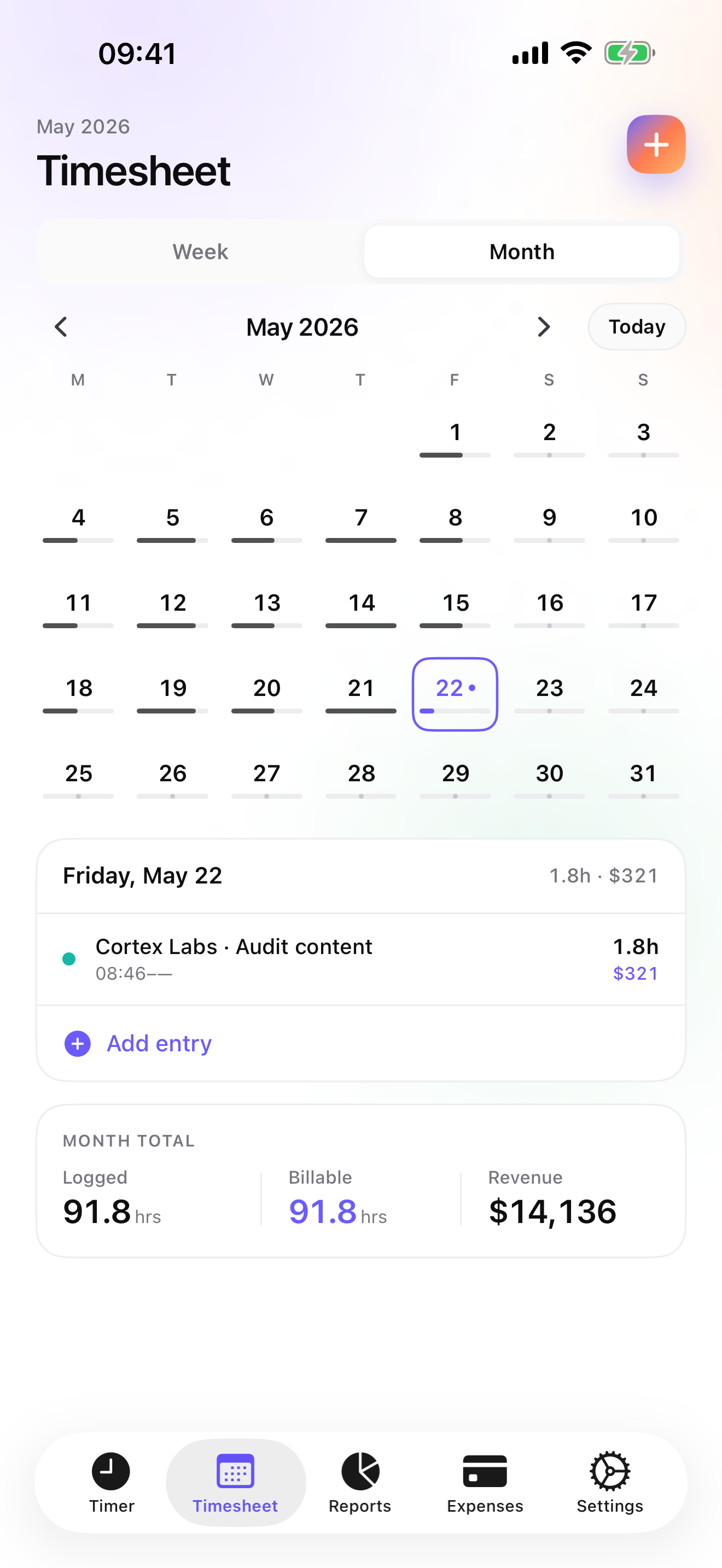
Week view shows the hours per client. The Reports tab compares the week with the previous one, and an entry you forgot on Tuesday goes in by hand from Today.
Last day of the month
Invoices tab: each client shows its un-invoiced amount. One tap per client makes the PDF, numbered and with your bank details; mark each one paid when the money arrives, and the overdue reminder handles the ones that do not.
Questions people ask
Does the timer keep running without a connection?
Yes. iTimeSheet does not talk to a server, so the timer, the entries, the expenses, and the reports all work in airplane mode. The Apple Watch keeps a queue of its own taps when the phone is out of range and backdates them once it reconnects. You only need a connection for the iCloud backup and to buy or renew a subscription through Apple.
Where is my client list stored?
In a local SQLite database on your iPhone. There is no account to create and no server of ours holding a copy. Backup is a single file written to your own iCloud Drive, which you can see in the Files app; from Essential it is written daily without you doing anything. The App Store privacy label lists device identifier, purchases, and usage data, all not linked to you and none used for tracking, which the anonymous subscription SDK needs.
What does a US invoice need, and does the app handle it?
A US invoice has no mandatory legal mentions beyond your business identity, but sales tax varies by state, and clients who pay contractors will often ask for a W-9 and issue a 1099. iTimeSheet ships a US layout with your company header, sequential numbering per year, your payment details, and a free-text instructions block where you can put tax notes or terms. It is not an accounting package: it produces the PDF and tracks Draft, Unpaid, and Paid; your tax filing stays with your accountant.
What does it cost for one person?
The free tier is usable for real work if you have up to 3 clients and log at most 2 entries a day. Essential is $4.99/mo or $29.99/yr, Pro is $7.99/mo or $59.99/yr, and Studio, the tier with invoicing and quotes, is $9.99/mo or $89.99/yr on the US store. Essential and Pro have free trials; Studio does not, but a watermarked preview shows the invoice PDF with your real figures. Subscriptions renew through Apple and are cancelled from your Apple account settings; cancelling never deletes or locks your data.
I am an employee with side clients. Can I keep both in one app?
Yes, and that is roughly how the 2009 reviewer used it. Make your employer a client with its projects at a rate of your choosing and your side clients with their real rates; the Reports tab then shows hours by client and revenue where it applies. Export the employer's hours as a CSV or PDF timesheet if they ask for one, and invoice the side clients from Studio. What you cannot do is share the database with a colleague; it is one user per phone.
Verdict
For one person who bills their own hours, iTimeSheet is the app I would install first: the timer is wherever your hand already is, the rates do the arithmetic, the expenses follow the client, and on Studio the invoice is a tap away, with the whole thing living on your phone rather than in someone's cloud.
If you work inside a team or want a web dashboard, Toggl Track or Clockify are the honest choices, and Harvest if you also want invoicing in the cloud. If you only need a record of hours and pay, Timemator, HoursTracker, or atWork will do it with less fuss and, in Timemator's case, for a single payment.