The 7 best time tracking apps for consultants on iPhone, ranked for 2026
A consultant placed through a firm lives by the monthly timesheet. The firm wants hours per project by the last working day, the end client wants them broken down by workstream, and your own records need to match both, including the travel day nobody remembers approving. The right app catches every hour on the right engagement as it happens and turns the month into a document you can send without retyping it into somebody's template.
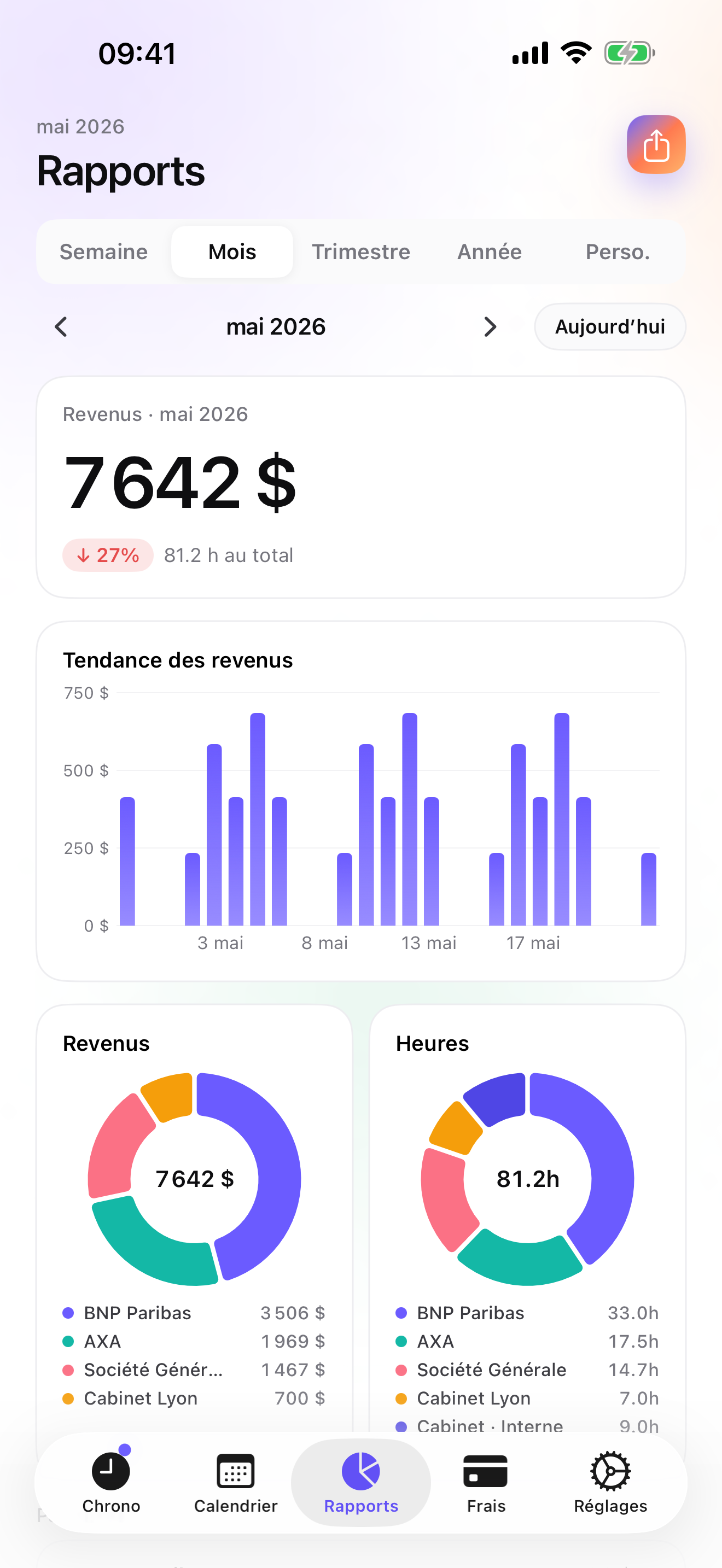
In 2009 a French consultant wrote after a month of use that the app was simply a time saver, and that his struggles with the monthly activity report were over. Every consulting firm has a name for that report and every consultant has spent a Friday evening reconstructing it from calendar invites. Logging as you go is the only cure I know of.
This list is for the consultant who works through a firm, or for a firm's client, and owes someone a timesheet every month. Independent consultants who invoice their own clients have a separate guide on this site.
I build the first app here and have since 2008. Ratings are the US App Store numbers on the date at the top, and facts about other apps come from their own listings.
How I ranked them
I ranked for the monthly timesheet: what it takes to produce one that two parties will accept.
- Engagement and workstream structureOne client, two engagements, several workstreams. The hours need to land at the level the end client reports on.
- Rates that cascadeThe firm's rate for one engagement, a different one for the next, an exception for the offsite. Set once at the top, override where needed.
- A timesheet in the shape they wantA PDF for the end client, a CSV in the column order the firm's back office expects. Export you control beats a screenshot.
- Travel next to the hoursFlights, trains, hotels, and per diems are billed to the engagement. They should sit on it.
- Your copy of the recordWhen the firm's system and yours disagree, yours is the one you can stand behind. Keep it on your own device.
The ranking
App Store ratings checked on October 15, 2026 (US App Store).
iTimeSheet
Your own record of every engagement, and a monthly timesheet in the format they ask for
For a consultant the Client → Mission → Task tree is End client → Engagement → Workstream. Rates cascade from the client to the engagement and the workstream, with a single-entry override for the day billed differently. The timer starts from the Watch, the Lock Screen, or a widget, switching workstreams saves the running entry, and per-weekday reminders at the hour you choose catch the days you forget.
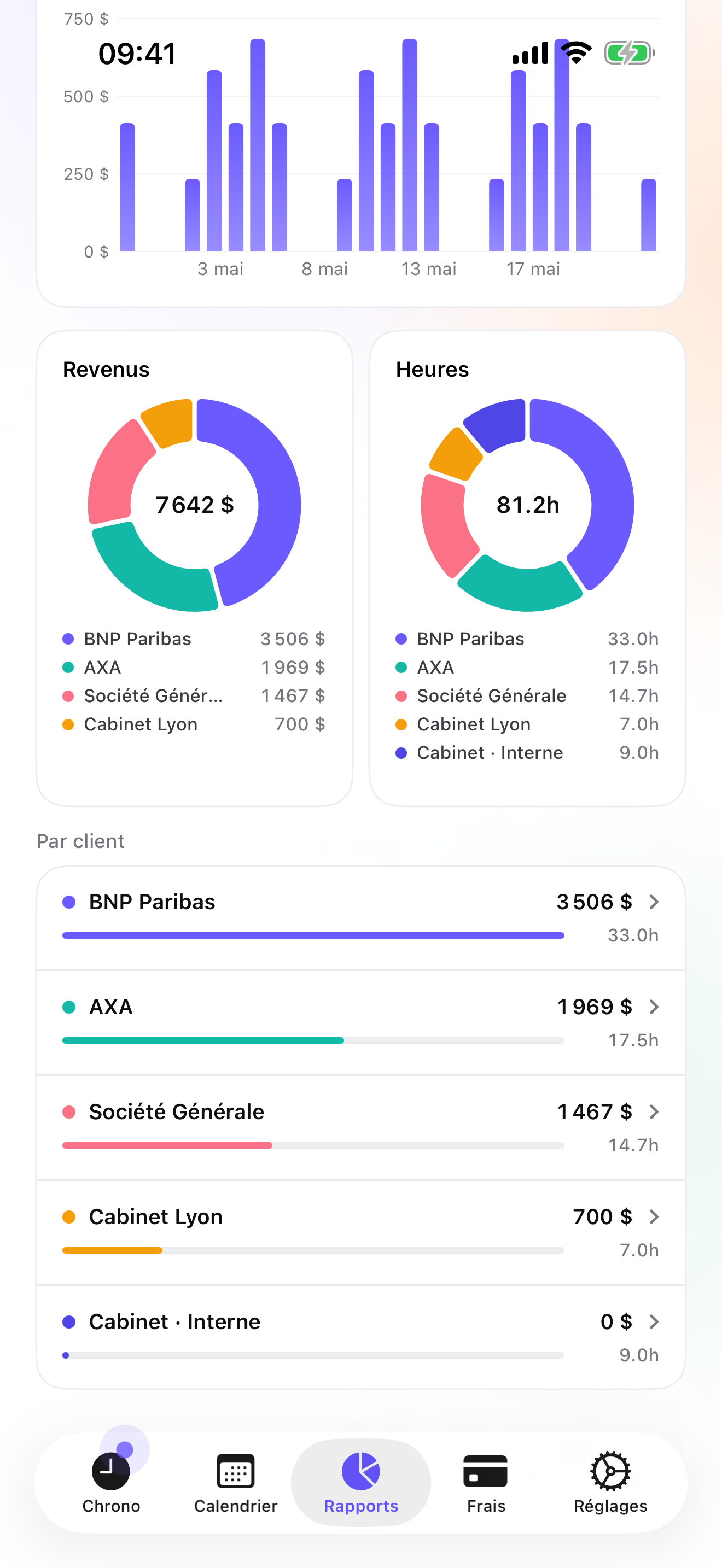
At month end, Essential gives you a formatted PDF timesheet for the end client and a CSV where you choose the columns, their order, the format of each one, and the separator, so it pastes into the firm's template. Entries can also be pushed one-way to an Apple Calendar. On Pro, flights, trains, taxis, hotels, and meals use the ready-made categories, with the receipt photographed and pinned to the engagement. If you also invoice directly, Studio adds invoices, quotes, and credit notes.
Data stays on your phone in a local database, with a backup file in your own iCloud Drive, daily from Essential; no account, no server on my side, which matters when the client's name is confidential. The limits: no shared workspace with the firm, no approvals, no web dashboard, iPhone and Apple Watch only with no iPad yet, and no combined hours-and-expenses export.
Strengths
- Client → engagement → workstream with cascading rates
- Formatted PDF timesheet and fully configurable CSV on Essential
- Travel presets and receipt photos on Pro
- No account or vendor cloud; confidential client names stay on the phone
Limits
- No shared workspace or approval flow with the firm
- Hours and expenses export separately, not in one file
- No web dashboard; iPhone and Apple Watch only, no iPad yet
- One US rating since the July 2026 relaunch
Best for: A consultant placed by a firm, or working on a client's site, who owes a monthly timesheet and wants their own reliable record.
Pricing: Free covers 3 clients and 2 entries a day, with no export, so a monthly timesheet needs Essential at $4.99/mo or $29.99/yr. Pro is $7.99/mo or $59.99/yr for travel receipts and widgets. Studio is $9.99/mo or $89.99/yr if you also invoice; it has no free trial, but a watermarked invoice preview shows the PDF with your data first.
★★★★★ Génial!I have been testing iTimeSheet for a month and it is simply a time saver! No more struggling with activity reports. A very fast app (loading, use), intuitive, complete, full of little features that make the difference!
translated from French ·« Cela fait 1 mois que je teste iTimeSheet, c'est tout simplement un gain de temps! Fini les galeres de CRA. Appli très rapide (chargement, utilisation), intuitive, complète, pleine de petites fonctionnalités qui font la différence! »
Mokuhi · App Store review · France · 2009

Toggl Track
The shared workspace many firms already use
Toggl Track's iPhone app is free and syncs to a Toggl account; the reporting lives in the web app. If your firm already has a workspace, logging straight into it saves a step iTimeSheet cannot save, because iTimeSheet has no shared workspace. There is no invoicing in the iPhone app.
Strengths
- Free iPhone app
- Shared workspaces and web reports
- Widely used
Limits
- Account required; data on Toggl's servers
- Reporting in the web app
- No invoicing on the phone
Best for: A consultant whose firm runs Toggl and wants hours in its workspace.
Pricing: Free iPhone app, paid web plans

Clockify
Team timesheets with approvals, free for unlimited users
Clockify offers a free plan for unlimited users with timesheet approvals and GPS; expenses and invoicing sit on paid plans in the web app. It is the tool a firm adopts to collect consultants' hours. As the consultant, you use it because they do.
Strengths
- Free for unlimited users
- Approvals
- Client → project → task
Limits
- Account and vendor cloud
- Invoicing only on paid plans
- Built for managers
Best for: A consultant whose firm requires approved timesheets in Clockify.
Pricing: Free plan, paid plans

Harvest
Time, expenses, and invoices in one cloud account
Harvest covers hours, expenses with receipt photos, and invoices, works offline and syncs, and is billed per seat. If your firm invoices clients from Harvest, logging there directly is the shortest path; it also beats iTimeSheet on web access.
Strengths
- Time, expenses, invoices
- Offline then sync
- Web app
Limits
- Account required
- Per-seat pricing
- Vendor cloud
Best for: A consultant in a firm that bills clients from Harvest.
Pricing: Free plan, paid plans

Timery
A better iPhone client for Toggl
Timery is an independent iPhone, Mac, and Watch app for Toggl Track, with saved timers, widgets, and Shortcuts. It needs a Toggl account. If your firm is on Toggl and you live on your phone, it is the nicest way in.
Strengths
- Saved timers and Shortcuts
- Widgets and Watch
- Indie, well rated
Limits
- Needs a Toggl account
- Data on Toggl's servers
- No invoicing
Best for: A consultant on a Toggl workspace who wants a faster phone experience.
Pricing: Companion app (needs the paid product)

TimeCamp
Team timesheet with location and expenses
TimeCamp is a team timesheet with a free plan that logs time, location, and expenses on the go and syncs offline entries later. Its US rating is 3.1 on 71 ratings as of the date above, the weakest on this list.
Strengths
- Free plan
- Expenses and location
- Offline sync
Limits
- 3.1 on the US store
- Account and vendor cloud
- Team-oriented
Best for: A consultant whose employer standardised on TimeCamp.
Pricing: Free plan, paid plans
atWork
Hours and overtime for a salaried consultant
atWork tracks hours and pay with an Apple Watch app and Siri, exports CSV, Excel, and PDF timesheets, backs up to iCloud, and needs no account; 22 languages. No invoicing and a simpler job / client model, but a good personal record.
Strengths
- No account
- CSV, Excel, PDF timesheets
- Watch and Siri
Limits
- No invoicing
- Job / client only
- Pro is an in-app purchase
Best for: A salaried consultant tracking overtime for themselves.
Pricing: Free with in-app purchase
Side by side
| App | Account required | Where your data lives | Invoices | Receipt photos | Platforms | Pricing | Rating |
|---|---|---|---|---|---|---|---|
| iTimeSheet | No | Your iPhone (your iCloud for backup) | Yes (Studio) | Yes (Pro) | iPhone + Apple Watch | Free plan, paid plans | 5.0 ★ (1) |
| Toggl Track | Yes | Vendor's servers | No | — | iPhone + web/other | Free iPhone app, paid web plans | 4.8 ★ (9,593) |
| Clockify | Yes | Vendor's servers | — | — | iPhone + web/other | Free plan, paid plans | 4.6 ★ (4,471) |
| Harvest | Yes | Vendor's servers | Yes | Yes | iPhone + web/other | Free plan, paid plans | 4.5 ★ (2,708) |
| Timery | Yes | Vendor's servers | No | — | iPhone + web/other | Companion app (needs the paid product) | 4.8 ★ (1,133) |
| TimeCamp | Yes | Vendor's servers | — | Yes | iPhone + web/other | Free plan, paid plans | 3.1 ★ (71) |
| atWork | No | Your iPhone (your iCloud for backup) | No | — | iPhone + Apple Watch | Free with in-app purchase | 4.8 ★ (3,832) |
App Store ratings checked on October 15, 2026 (US App Store).
A day with iTimeSheet
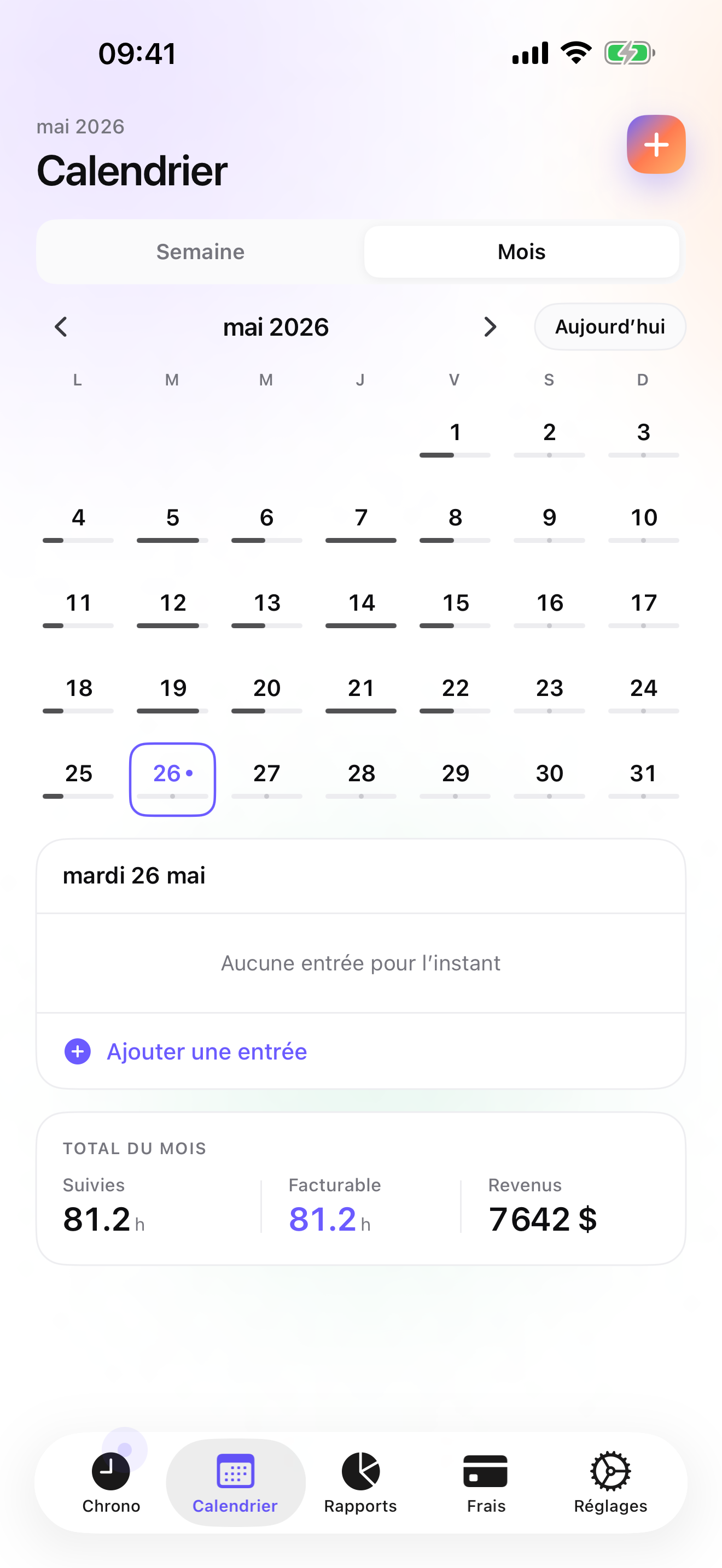
A month on two engagements, with shipped features only.
Monday, 9:00, client site
Watch tap: Engagement A, workstream Discovery, at the rate set on the engagement. The 11:00 steering meeting goes on Governance with one switch.
Wednesday, travel
Train ticket and taxi as Pro expenses with photos, pinned to Engagement B. The 18:00 weekday reminder catches the hour you forgot to log.
Last working day
Essential: PDF timesheet for the end client, CSV in the firm's column order. Both come from the same entries, so they agree.
The following week
Reports compare the month with the previous one by client and engagement, so you see where the hours went before your manager asks.
Questions people ask
Can I log hours on a plane or at a client site with locked-down Wi-Fi?
Yes. iTimeSheet does not talk to a server, so the timer and entries work with no network at all. The Apple Watch queues taps away from the phone and backdates them later. Only the iCloud backup and the App Store purchase need a connection.
Where are my client names stored? Some of them are confidential.
In a local SQLite database on your iPhone; there is no account and no server of ours, no analytics, and no ads. The backup is one file in your own iCloud Drive, daily from Essential. The privacy label lists device ID, purchases, and usage data, none linked to you and none used for tracking.
Can the export match my firm's timesheet template?
Often, yes. The CSV on Essential lets you choose which columns appear, their order, the format of each one, and the separator, which is usually enough to paste into a firm's spreadsheet. The PDF timesheet is a formatted document for the end client. Hours and expenses export separately; there is no single combined file yet.
What does it cost for one consultant?
Free covers 3 clients and 2 entries a day but has no export. Essential is $4.99/mo or $29.99/yr, Pro $7.99/mo or $59.99/yr, Studio $9.99/mo or $89.99/yr on the US store. Essential has a 7-day trial on monthly and 14 days on annual. Subscriptions run through Apple and cancelling never locks your data.
My firm uses Toggl. Should I use both?
Some consultants do: iTimeSheet as their private record, the firm's tool as the official one. If you only want one app and the firm requires Toggl, use Toggl or Timery; iTimeSheet cannot write into a shared workspace. If the firm only asks for a monthly file, iTimeSheet's CSV or PDF timesheet usually covers it.
Verdict
For the consultant who owes a monthly timesheet and wants a record of their own, iTimeSheet is the first install: hours land on the right engagement as you work, the rates cascade, and the month comes out as a PDF and a CSV that agree with each other, with confidential client names kept on your phone.
If your firm runs a shared workspace, Toggl Track, Clockify, or Harvest are where your hours are expected, and Timery makes Toggl nicer on the phone.