The 6 best time tracking apps for independent accountants on iPhone, ranked for 2026
An independent accountant's year has a shape: steady monthly bookkeeping for a dozen small businesses, then a busy season where every client wants their return at once and the hours double. Most fees are fixed, a few are hourly, and almost none get compared afterwards with the time they actually took. The right app records that time per client and per service, sends the monthly invoices on schedule, and shows in May which fees you need to raise.
A French professional wrote in 2011 that the app was great for the liberal professions and asked for one thing: to invoice clients directly from it, with the detail of the time spent attached. On the Studio tier today the invoice comes out of the same entries as the time, and the PDF timesheet can go with it. For an accountant whose client asks why the fee went up, that attachment is the answer.
This list is for the accountant or bookkeeper with their own clients. If you work inside a firm that already runs practice software, use what the firm uses.
I make the first app here and have since 2008. Ratings are the US App Store numbers on the date above, and facts about other apps come from their own listings.
How I ranked them
I ranked for a practice of recurring clients, fixed fees, and one season that tests everything.
- Time per client and per serviceBookkeeping, payroll, the annual return. Each needs its own hours to tell you which fixed fee is too low.
- Recurring invoices on timeTwelve monthly bookkeeping clients means twelve invoices on the first. A reminder that the month turned keeps the cash steady.
- Fee quotes that become invoicesThe fee you proposed for the year's return is the invoice later. One document, converted, not retyped.
- Busy season you can measureQuarter and year views with comparison to the previous period show whether this season was heavier, and for whom.
- Confidential client listYour client list is sensitive by profession. Know where it is stored.
The ranking
App Store ratings checked on October 15, 2026 (US App Store).
iTimeSheet
Hours per client and service, recurring invoices on the 1st, and a busy season you can measure
The Client → Mission → Task tree reads Client → Service → Task: monthly bookkeeping, payroll, annual return. Rates cascade from the client to the service, with a single-entry override. The timer starts from the Watch, a widget, or the Lock Screen, switching clients saves the running entry, and weekday reminders at the hour you choose catch the afternoon you forgot to log.
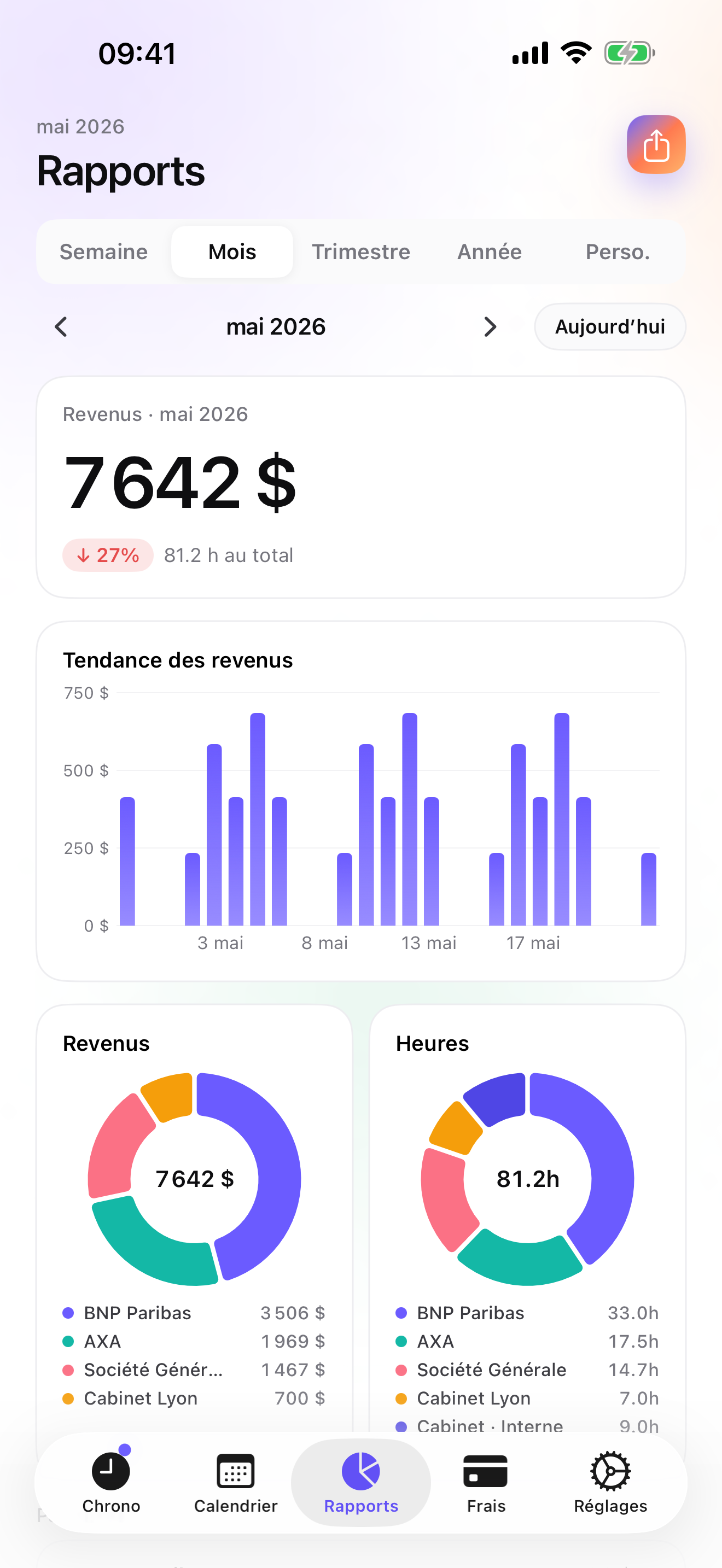
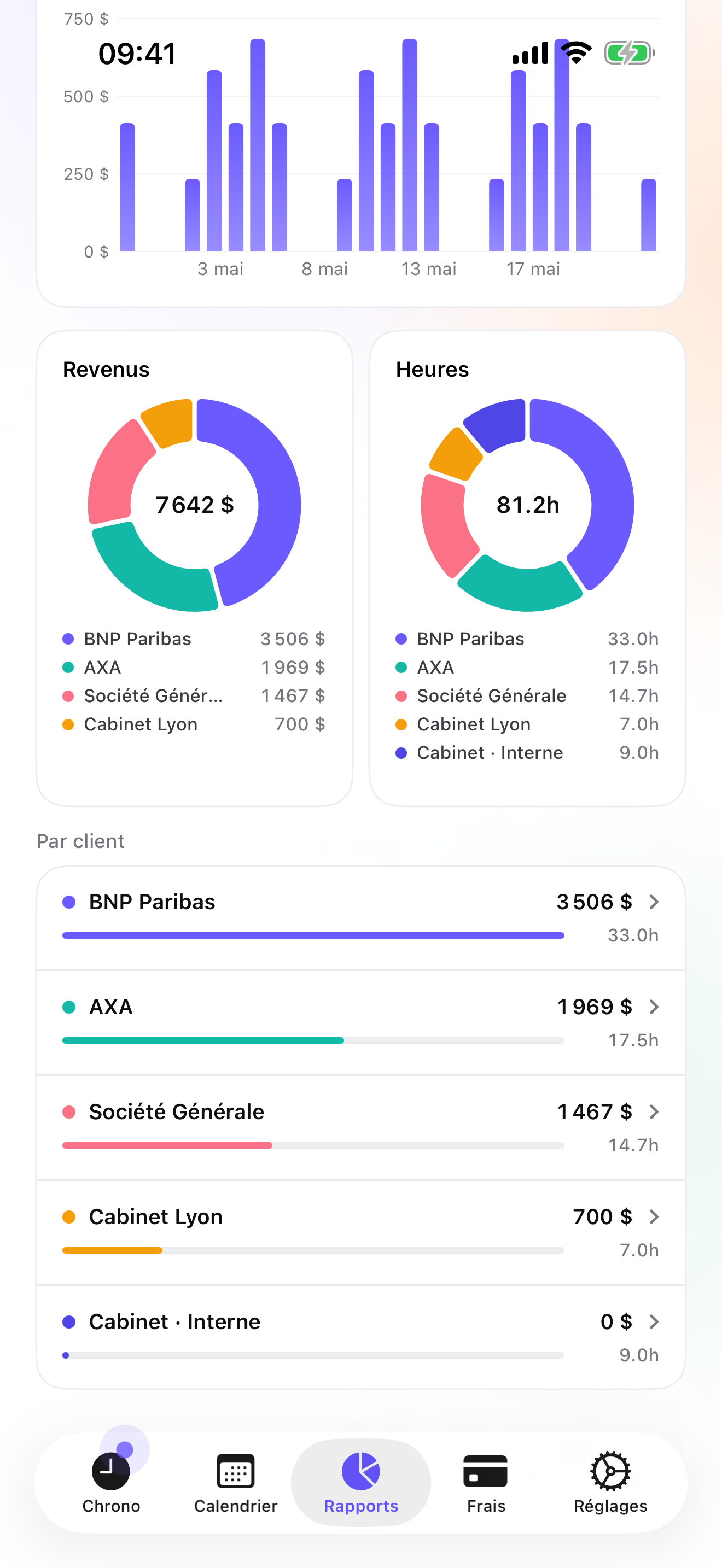
On Studio, a fee quote has its own ledger and converts to an invoice in one tap; the client billing profile holds address, legal form, and payment terms; and a monthly recurring-invoice notification reminds you to bill the clients you invoice every month. The Invoices tab shows un-invoiced amounts, overdue invoices come with a pre-filled chase e-mail, and Reports show Due versus Paid. Reports from Essential give revenue and hours by client with a drill into services, over a quarter, a year, or a custom range, with the change against the previous period: that is your busy-season post-mortem. A PDF timesheet per client can be sent alongside the invoice.
Data stays in a local database on the phone with a backup in your own iCloud Drive, daily from Essential; no account, no server on my side. The limits: it is not accounting software and has no QuickBooks or Xero connector, only CSV; recurring invoices are a reminder, not automatic; single user; iPhone and Apple Watch only, no iPad version yet.
Strengths
- Client → service → task with cascading rates
- Monthly recurring-invoice reminder and fee quotes on Studio
- Quarter and year reports with period-over-period change
- No account, no vendor cloud
Limits
- No QuickBooks or Xero connector; CSV only
- Recurring invoices are a reminder, not automatic
- Single user; no staff timesheets
- iPhone and Apple Watch only; one US rating since July 2026
Best for: An independent accountant or bookkeeper with recurring clients and fixed fees who wants to know which fees hold.
Pricing: Free covers 3 clients and 2 entries a day, no export. Essential is $4.99/mo or $29.99/yr for drill-down reports, CSV and PDF export, and daily backup. Pro is $7.99/mo or $59.99/yr for receipt photos and widgets. Studio is $9.99/mo or $89.99/yr for quotes, invoices, and the recurring reminder; no free trial, but a watermarked invoice preview with your own data.
★★★★★ SuperA great app for the liberal professions. One request to the developer: add the ability to invoice clients directly in the app, attaching the detail of the time spent. Thanks in advance and thanks again for this app.
translated from French ·« Application extra pour les professions libérales. Une demande au développeur : intégrer la possibilité de facturer directement dans l'application ses clients en leur mettant en annexe le détail du temps passe. Merci d'avance et encore merci pour cet appli. »
Tteegg · App Store review · France · 2011

Harvest
Time, expenses, and invoices in a cloud account
Harvest tracks time and expenses with receipt photos, invoices, works offline then syncs, and bills per seat. With a web dashboard, it suits an accountant who works mostly at a desk and wants the data in a browser.
Strengths
- Time, expenses, invoices
- Web app
- Offline sync
Limits
- Account required
- Per-seat pricing
- Vendor cloud
Best for: An accountant who wants cloud invoicing and a web dashboard.
Pricing: Free plan, paid plans

FreshBooks
Invoicing and accounting in one subscription
FreshBooks does invoicing and accounting, with receipts, mileage, and billable time added to invoices. For an accountant it can double as your own books. Subscription, account, vendor cloud.
Strengths
- Accounting plus invoicing
- Billable time on invoices
- Large US rating base
Limits
- Subscription and account
- Vendor cloud
- Time tracking is secondary
Best for: An accountant who wants their own books and invoices in the same tool.
Pricing: Subscription

Toggl Track
Track on the phone, report in the browser
Toggl Track is free on iPhone and syncs to a Toggl account, with deeper reports in the web app and no invoicing on the phone. Good if your reports live on a big screen.
Strengths
- Free iPhone app
- Web reports
- Client / project / tag
Limits
- Account required
- No invoicing on the phone
- Vendor cloud
Best for: An accountant who reviews time from a desktop browser.
Pricing: Free iPhone app, paid web plans

Timemator
Pay once, track privately
Timemator is a one-time purchase with no account, iCloud sync, rates and earnings, and a PDF report for clients. No invoicing. A private tracker for an accountant who bills from their own accounting software.
Strengths
- One-time purchase
- No account
- PDF client report
Limits
- No invoices
- Folder / task model
- Small US rating base
Best for: An accountant who invoices from accounting software and wants a private tracker.
Pricing: One-time purchase

Tyme
Design-led tracker across Mac, iPhone, iPad, and web
Tyme runs on Mac, iPhone, iPad, Apple Watch, and the web, with PDF and CSV export, a subscription with a 14-day trial, and an optional account. It covers the iPad and Mac that iTimeSheet does not. No invoicing.
Strengths
- Mac, iPad, iPhone, Watch, web
- PDF and CSV export
- 14-day trial
Limits
- No invoicing
- Subscription
- Small US rating base
Best for: An accountant who wants the same tracker on Mac, iPad, and iPhone.
Pricing: Subscription
Side by side
| App | Account required | Where your data lives | Invoices | Receipt photos | Platforms | Pricing | Rating |
|---|---|---|---|---|---|---|---|
| iTimeSheet | No | Your iPhone (your iCloud for backup) | Yes (Studio) | Yes (Pro) | iPhone + Apple Watch | Free plan, paid plans | 5.0 ★ (1) |
| Harvest | Yes | Vendor's servers | Yes | Yes | iPhone + web/other | Free plan, paid plans | 4.5 ★ (2,708) |
| FreshBooks | Yes | Vendor's servers | Yes | Yes | iPhone + web/other | Subscription | 4.7 ★ (10,978) |
| Toggl Track | Yes | Vendor's servers | No | — | iPhone + web/other | Free iPhone app, paid web plans | 4.8 ★ (9,593) |
| Timemator | No | Your iPhone (your iCloud for backup) | No | — | iPhone + Apple Watch | One-time purchase | 4.7 ★ (170) |
| Tyme | Optional | Your iPhone; optional cloud | No | — | iPhone + web/other | Subscription | 4.5 ★ (54) |
App Store ratings checked on October 15, 2026 (US App Store).
A day with iTimeSheet
A year in a small practice, with shipped features only.
The 1st of each month
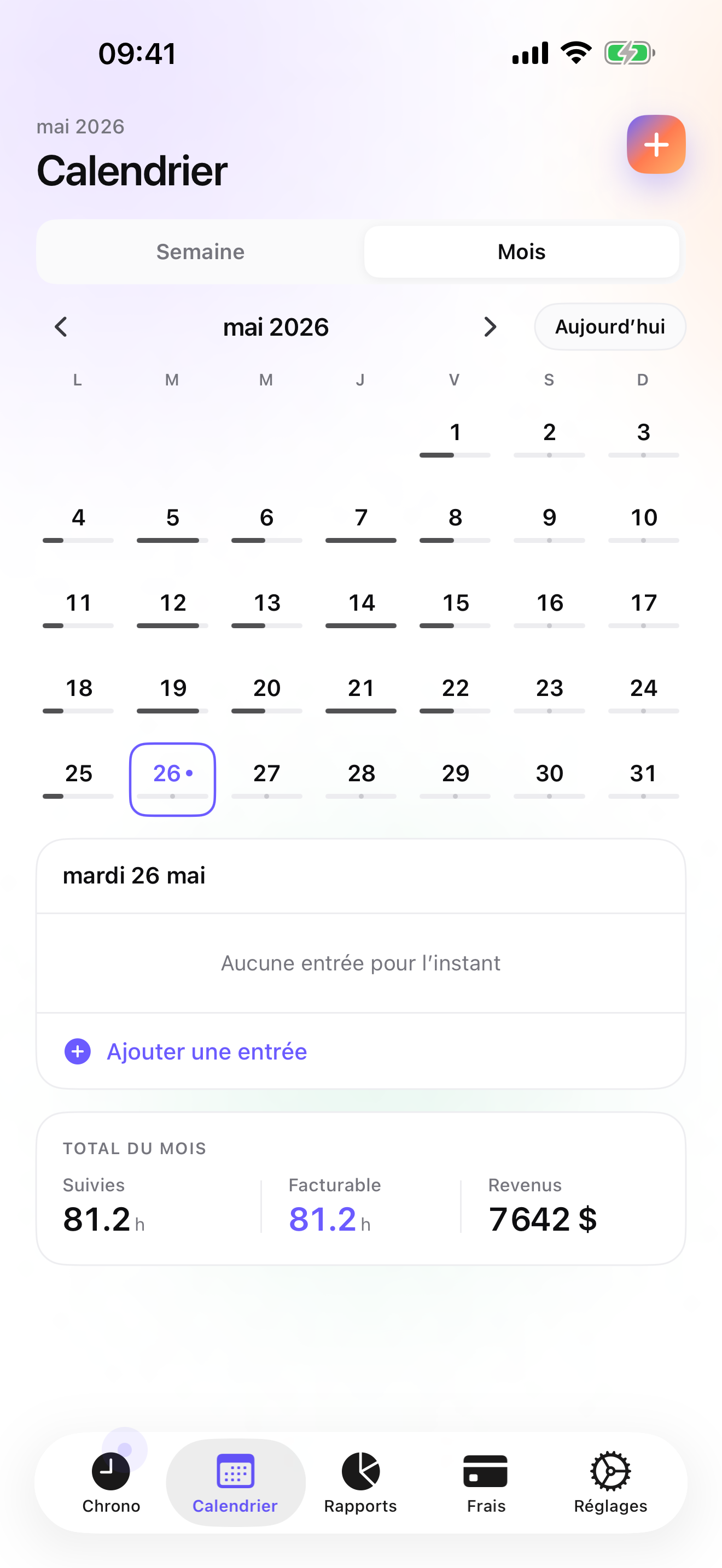
The recurring-invoice notification. Twelve bookkeeping clients, twelve one-tap PDFs from the Invoices tab.
January, fee quotes
Quotes for the annual returns, each in Studio's quote ledger. Accepted ones convert to invoices when the return is filed.
March and April
Watch taps between clients. Each return logged on its service, each phone call on the right client.
May, the post-mortem
Reports for the quarter, with the change against last year's season, drilled into services. Three returns took twice their fee in hours; next year's quotes change.
Questions people ask
Can I work at a client's office with no Wi-Fi?
Yes. iTimeSheet stores everything on the phone and never needs a server; timers and entries work offline. The Apple Watch queues taps and backdates them on reconnect. Only the iCloud backup and App Store purchases need a network.
Where is my client list stored?
In a local SQLite database on your iPhone; no account, no server of ours, no analytics, no ads. Backup is one file in your own iCloud Drive, daily from Essential. The privacy label lists device ID, purchases, and usage data, not linked to you and not used for tracking.
Can I attach the time detail to the invoice?
You can send a formatted PDF timesheet for the client and period (Essential) alongside the Studio invoice PDF. They are two documents, not one; the invoice itself carries your header, numbering, and payment details, and the timesheet carries the entries behind it.
What does it cost for one accountant?
Free: 3 clients, 2 entries a day, no export. Essential $4.99/mo or $29.99/yr, Pro $7.99/mo or $59.99/yr, Studio $9.99/mo or $89.99/yr on the US store. Studio has no trial but a watermarked invoice preview. Subscriptions go through Apple; cancelling never locks your data.
I hire a seasonal assistant for tax season. Can they log time?
Not in your database: iTimeSheet is single-user. The assistant can run the app on their own phone and send you a CSV, which you add to your records by hand. For a shared team timesheet, Harvest or Toggl Track are built for that.
Verdict
For the independent accountant, iTimeSheet is the first install: hours per client and service, monthly invoices prompted on the 1st, fee quotes that become invoices, and a busy season you can measure against last year, with the client list on your own phone.
If you want your invoicing in the cloud, Harvest or FreshBooks. If you want Mac and iPad as well, Tyme. If you invoice from accounting software, Timemator.