The 6 best time tracking apps for solo lawyers on iPhone, ranked for 2026
A lawyer's time leaks in small pieces: the eight-minute call in the hallway outside the courtroom, the e-mail answered from the car, the filing fee paid on a personal card. Each is a tenth of an hour that never reaches the bill. The right app catches those pieces on the right matter as they happen, holds the expenses that go with them, and lets you read the pre-bill before the client does, all without putting your client list on someone else's server.
In 2010 an American user left a long four-star review with three requests: default task lists, a way to log non-time expenses such as postage or filing fees, and an export Excel could read without fixing the duration column. It is one of the most useful reviews I have ever received, because each request was specific and right. Today postage has its own ready-made category, any expense category can be created for filing fees, and the CSV can export durations as 1:30 or as decimal hours.
This list is for the solo practitioner or the lawyer in a small office who keeps their own time. If your firm runs a practice-management suite, use its companion app; I say which ones are in this pool.
I build the first app here and have since 2008. Ratings are the US App Store numbers on the date at the top; facts about other apps come from their listings. Nothing here is legal or ethics advice about billing.
How I ranked them
I ranked for the way lawyers actually lose time: in fragments, away from the desk, between other things.
- Capture in seconds, away from the deskThe call in the corridor is logged from the wrist or not at all. Anything slower than a tap loses the tenth of an hour.
- Matter-level structureClient, matter, activity. A client with three matters needs three separate records and possibly three rates.
- Disbursements on the matterFiling fees, postage, couriers, travel. They belong to the matter and to the bill.
- A pre-bill you can readBefore an invoice goes out, you read the entries. A formatted timesheet for review is part of billing ethics, not a luxury.
- Where the client list livesA list of who you represent is confidential. Know whether it sits on your device or in a vendor's cloud, and choose.
The ranking
App Store ratings checked on October 15, 2026 (US App Store).

iTimeSheet
Matter-by-matter time from the wrist, a pre-bill to read, and a client list that stays on your phone
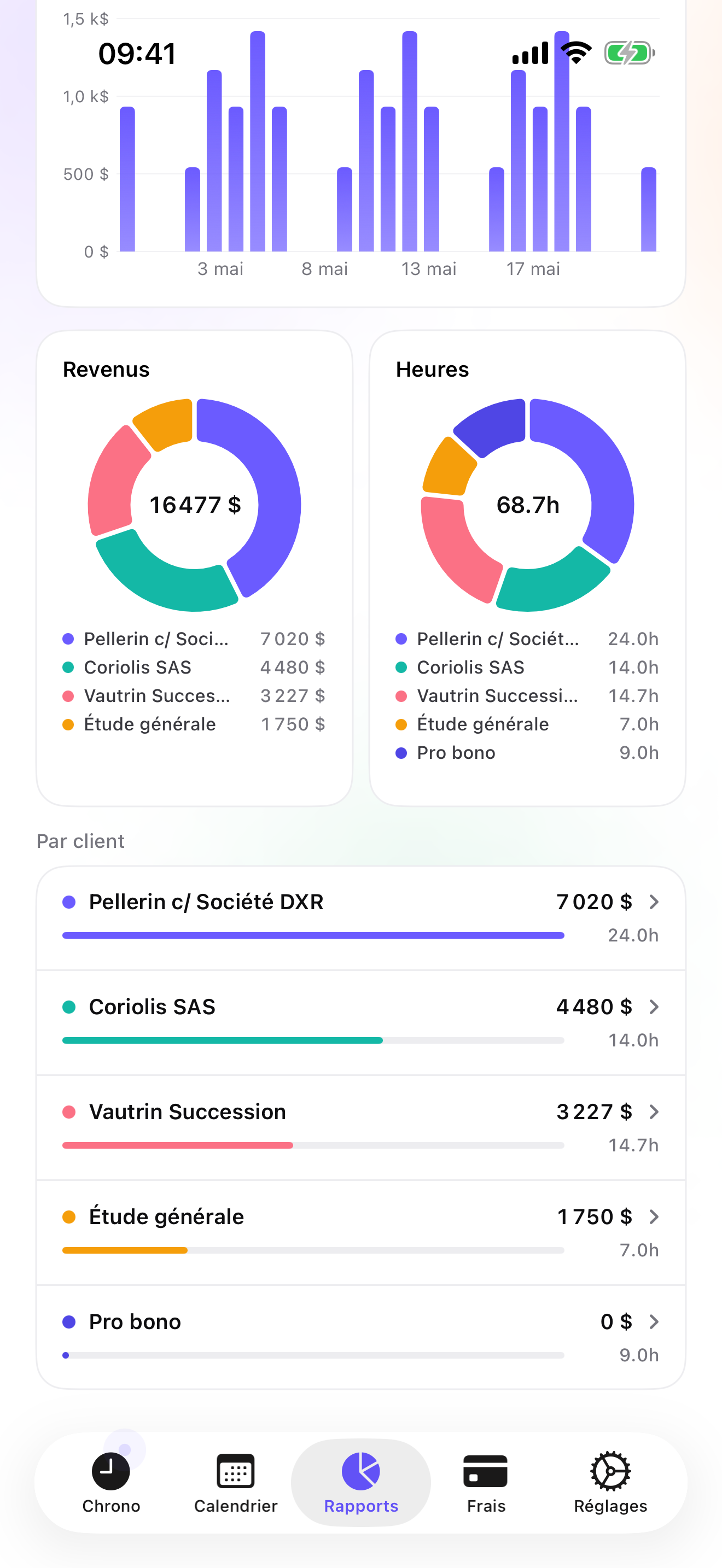
The Client → Mission → Task tree is Client → Matter → Activity: research, drafting, calls, hearing. Rates cascade from the client to the matter and the activity, with a single-entry override for a pro bono hour or a different rate on one matter. The timer starts from the Apple Watch outside the courtroom, from the Lock Screen, or from the Dynamic Island; switching matters saves the running entry, and forgotten time goes in by hand from Today. Entries can be rounded to 5, 15, 30, or 60 minutes, but there is no six-minute (0.1-hour) unit.
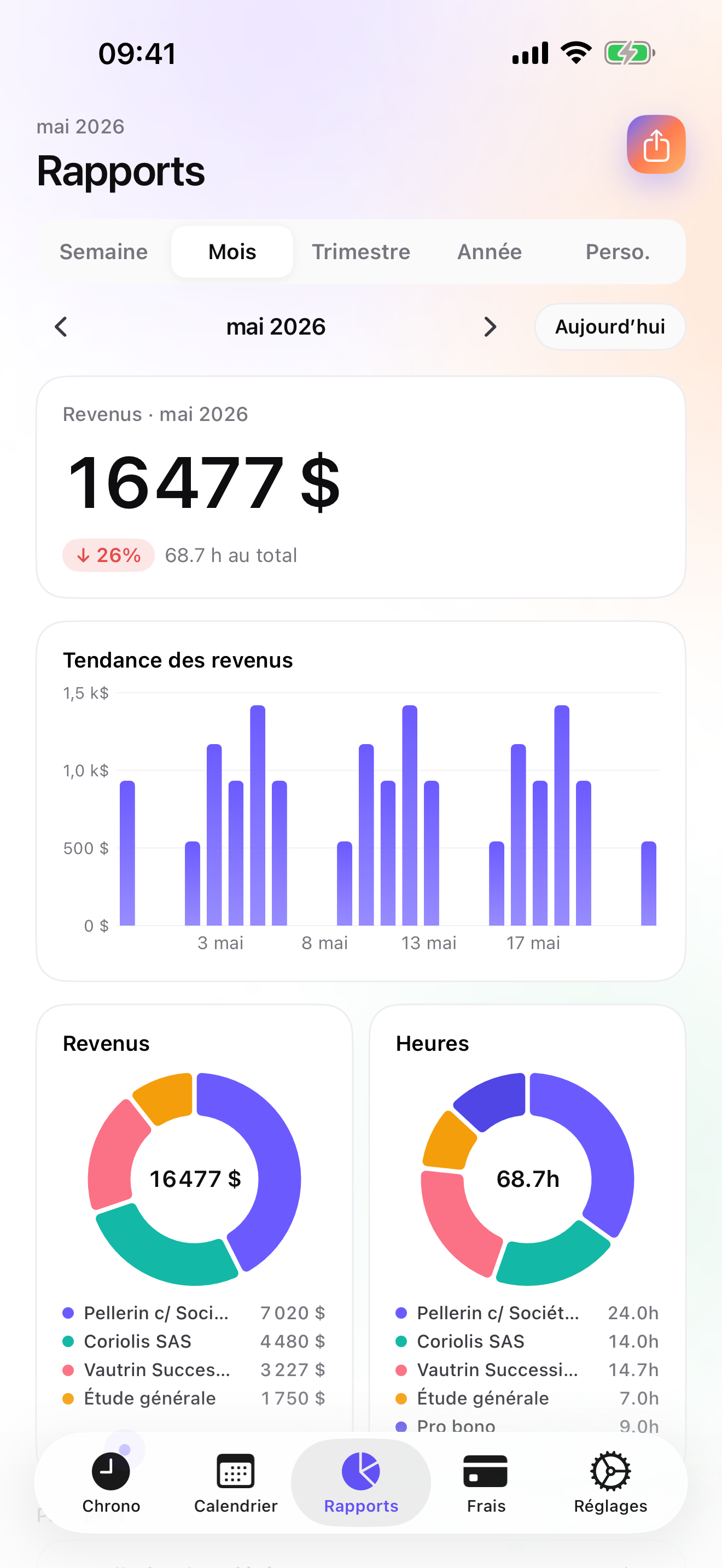
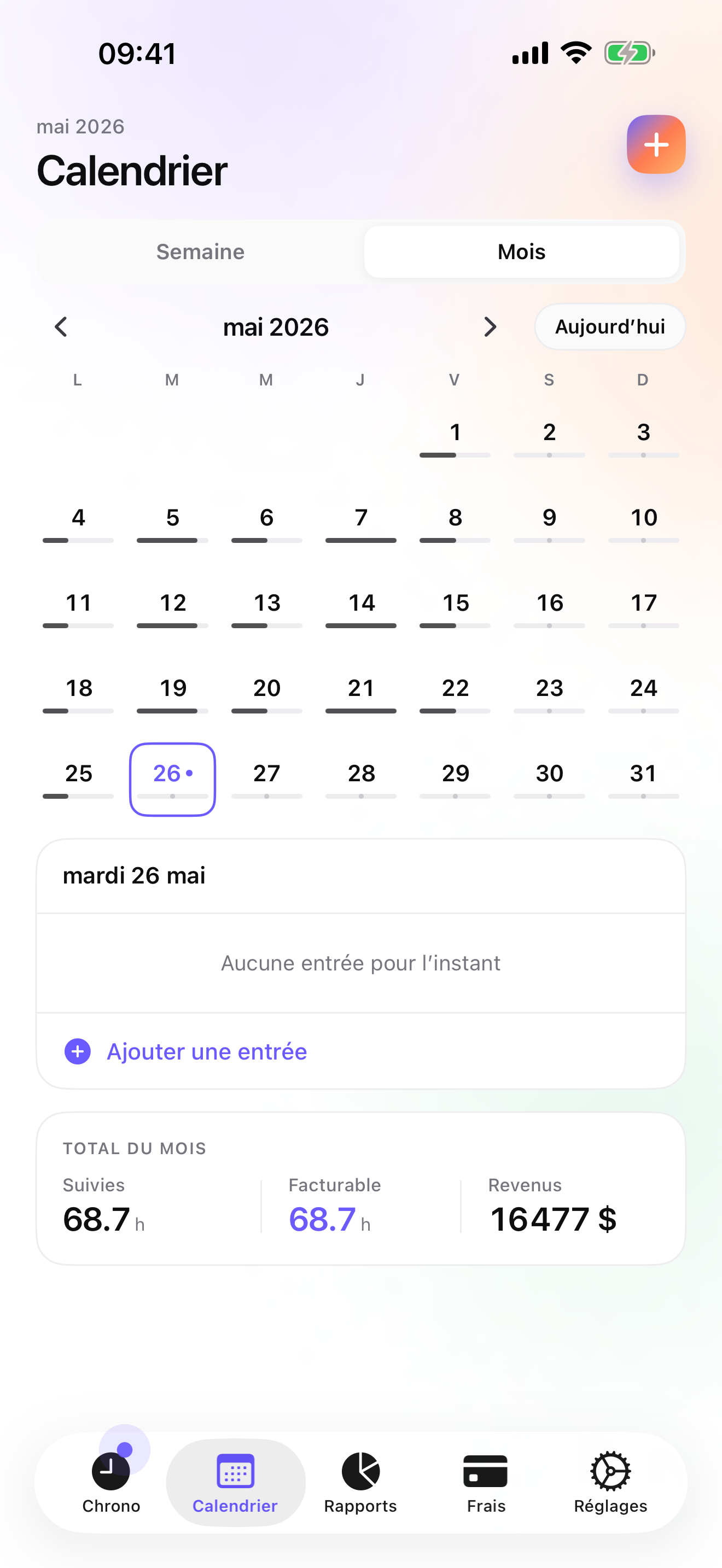
For billing, Essential gives you a formatted PDF timesheet per period you can review as a pre-bill, and a CSV where you choose columns, order, per-column format, and separator. On Pro, Postage & shipping, Mileage, Parking, and the travel presets cover most disbursements, with a photo of the receipt pinned to the matter; filing fees get a category you create once. On Studio the Invoices tab shows what each client has not been billed and makes the PDF with your letterhead, numbering, and payment details; drafts sit under a Draft filter until you are ready, and credit notes cancel an invoice that needs correcting.
The data is in a local database on the phone with a backup in your own iCloud Drive, daily from Essential; there is no account and no server on my side. That is a fact about architecture, not a certification: assess it against your own professional obligations. The limits: no trust accounting, no conflict checks, no document management, no multi-user firm features, iPhone and Apple Watch only with no iPad version yet, and no connector to practice-management or accounting software.
Strengths
- Client → matter → activity with cascading rates and overrides
- PDF timesheet for pre-bill review and configurable CSV on Essential
- Postage, mileage, and travel presets plus receipt photos on Pro
- No account, no vendor server holding client names
Limits
- Rounding to 5, 15, 30, or 60 minutes, but not to six-minute units
- No trust accounting, conflict checks, or document management
- Single user; no firm workspace
- iPhone and Apple Watch only; one US rating since July 2026
Best for: A solo or small-office lawyer who keeps their own time and bills their own clients.
Pricing: Free covers 3 clients and 2 entries a day, no export. Essential is $4.99/mo or $29.99/yr for the PDF timesheet, CSV, and daily backup. Pro is $7.99/mo or $59.99/yr for receipt photos and the widgets. Studio is $9.99/mo or $89.99/yr for invoices and credit notes; no free trial, but a watermarked invoice preview shows the PDF with your data before you pay.
★★★★ The best I have found so far.« Sorry that I have to rewrite this whole review, but the app store is no longer allowing the users to modify prior reviews. The only things that I would change on this app are: 1. Have the potential to create a default database of tasks and projects. As it stands now, I have to create a Default (dummy) client and put all task information into that client. Then, before I enter any information with respect to an actual client, I have to copy the information from the Default client into every client I am going to enter data for that day. It's not very efficient. 2. Have an option for non-time related expenses such as postage or filing fees. Understanding that this is primarily a timesheet program, allowing people to capture expenses would be great. 3. Modify the manner in which the data exports with regard to time. Currently the program exports the data in the form 0h48. Unfortunately, Excel requires the export to be in the following form 0:48 so that the user can manipulate it. I can work around the problem by exporting the start and end times, rather than duration, but it would be nice to have the data export into a format that Excel can actually use. Other than these points (and I hope I don't think of any others, because I really don't want to have to write this review again!!), this is an outstanding app. »
RickyMaveety · App Store review · United States · 2010

Clio
The companion to the practice-management suite many firms run
Clio's app is the mobile companion to Clio's practice management: billable time, expense categories, and custom rates, with a Clio subscription. It has more than nine thousand US ratings. If your firm is on Clio, your time belongs there, along with trust accounting and everything else the suite does that iTimeSheet does not.
Strengths
- Full practice-management suite behind it
- Billable time and expenses
- Large, well-rated user base
Limits
- Needs a Clio subscription
- Vendor cloud
- Firm-priced
Best for: A lawyer whose firm runs Clio.
Pricing: Companion app (needs the paid product)

Fract
Six-minute taps, no timer, no account
Fract, new in 2026, logs time by tapping six-minute increments instead of running a timer, keeps data on the device, needs no account, and archives the hours once you bill elsewhere. It had no ratings on the US store on the date above. If the six-minute unit is how you think, it fits that habit better than any timer.
Strengths
- Six-minute tap logging
- No account, on-device
- Simple
Limits
- No invoicing
- No ratings yet on the US store
- No timer at all
Best for: A lawyer who thinks in tenths of an hour and bills from another system.
Pricing: Free with in-app purchase

LEAP
The companion to LEAP legal software
LEAP Mobile gives access to matters, timed calls, and time entries synced to the desktop timesheet of LEAP's legal software. Useful if your firm runs LEAP; meaningless without it.
Strengths
- Timed calls on matters
- Syncs to the desktop timesheet
- Well rated
Limits
- Requires LEAP
- Account and vendor cloud
- Firm product
Best for: A lawyer whose firm runs LEAP.
Pricing: Companion app (needs the paid product)

Bill4Time
Billing companion with a timer, last updated in 2022
Bill4Time's app is a companion to its web billing: one-tap timer, receipts, invoice review, offline then sync. Its iOS app was last updated in September 2022 and shows 3.6 on 85 US ratings, so check it on your iOS version before committing.
Strengths
- Timer and receipts
- Invoice review
- Offline then sync
Limits
- Last updated September 2022
- 3.6 on the US store
- Needs the web service
Best for: A lawyer whose office already bills with Bill4Time.
Pricing: Companion app (needs the paid product)

It’s About Time
Pay-once tracker aimed at lawyers and consultants
It's About Time is $4.99 once, with local data, iCloud sync, and export, aimed at consultants and lawyers. No invoicing, and a single US rating on the date above.
Strengths
- One-time purchase
- Local data
- Export
Limits
- No invoicing
- One US rating
- iPhone only
Best for: A lawyer who wants a simple private tracker and bills elsewhere.
Pricing: One-time purchase
Side by side
| App | Account required | Where your data lives | Invoices | Receipt photos | Platforms | Pricing | Rating |
|---|---|---|---|---|---|---|---|
| iTimeSheet | No | Your iPhone (your iCloud for backup) | Yes (Studio) | Yes (Pro) | iPhone + Apple Watch | Free plan, paid plans | 5.0 ★ (1) |
| Clio | Yes | Vendor's servers | Yes | Yes | iPhone + web/other | Companion app (needs the paid product) | 4.8 ★ (9,044) |
| Fract | No | Your iPhone (your iCloud for backup) | No | — | iPhone | Free with in-app purchase | — |
| LEAP | Yes | Vendor's servers | — | — | iPhone + web/other | Companion app (needs the paid product) | 4.6 ★ (208) |
| Bill4Time | Yes | Vendor's servers | Yes | Yes | iPhone + web/other | Companion app (needs the paid product) | 3.6 ★ (85) |
| It’s About Time | No | Your iPhone (your iCloud for backup) | No | — | iPhone | One-time purchase | 5.0 ★ (1) |
App Store ratings checked on October 15, 2026 (US App Store).
A day with iTimeSheet
A court day for a solo practitioner, with shipped features only.
8:40, courthouse corridor
Watch tap on the Reyes matter, hearing activity. The opposing counsel's call at 9:05 goes on the Lee matter with one switch; Reyes is saved.
12:30, filing
Filing fee paid; receipt photographed and pinned to the Lee matter under your Filing fees category. The courier goes under Postage & shipping.
18:00, the reminder
Your weekday reminder fires. Two e-mails answered from the car go in by hand from Today.
Month end, pre-bill
PDF timesheet per client to review. Corrections made, then Studio invoices from the Invoices tab; Draft until you are satisfied, then sent.
Questions people ask
Does it work in a courthouse with no signal?
Yes. iTimeSheet never contacts a server; timers and entries are stored on the phone. The Apple Watch queues taps when away from the phone and backdates them on reconnect. Only the iCloud backup and App Store purchases need a connection.
Where are my clients' names and matters stored?
In a local SQLite database on your iPhone. No account, no server of ours, no analytics SDK, no ads. Backup is one file in your own iCloud Drive, daily from Essential. The privacy label lists device ID, purchases, and usage data, not linked to you and not used for tracking. Whether that meets your confidentiality duties is your judgement, not mine.
Does it round to six-minute increments?
No. The app records the duration you log. You can choose the format of each column in the CSV export, and entries can be rounded to 5, 15, 30 or 60 minutes in Settings, but there is no 0.1-hour (six-minute) increment. If six-minute units are central to how you bill, Fract is built around them; you can log there and bill elsewhere.
What does it cost for a solo lawyer?
Free: 3 clients, 2 entries a day, no export. Essential $4.99/mo or $29.99/yr, Pro $7.99/mo or $59.99/yr, Studio $9.99/mo or $89.99/yr on the US store. Studio has the invoices, with no trial but a watermarked invoice preview. Subscriptions go through Apple; cancelling never locks your data.
Can it handle trust accounting or retainers held in trust?
No. iTimeSheet tracks time and expenses and issues invoices, quotes, deposit invoices, and credit notes; it does not keep a trust ledger. If you hold client funds in trust, use your accounting system or a practice-management suite such as Clio for that part.
Verdict
For the solo lawyer who keeps their own time, iTimeSheet is the first install: the corridor call lands on the right matter from your wrist, filing fees and postage stay with the matter, the pre-bill is a PDF you read before the client does, and the client list stays on your phone.
If your firm runs Clio or LEAP, use the companion app. If you think in six-minute taps, Fract is the honest alternative.