The 7 best time tracking apps for independent consultants on iPhone, ranked for 2026
An independent consultant runs three businesses at once: the work, the selling, and the billing. A retainer client expects a monthly invoice and a summary of the hours behind it, a new prospect wants a quote by Friday, and the project you priced at ten days is quietly on day thirteen. The right app knows all three, from the same entries, and sends the invoice from the train home.
In 2010 an independent consultant wrote that invoicing his customers used to be a mess and that keeping track of all the hours had made his life much easier. Hours were half of his problem; the invoice was the other half. On the Studio tier today the invoice comes out of the same entries as the hours, and that is the main reason this guide exists.
This list is for the consultant who finds the clients, does the work, and sends the invoices. If you are placed through a firm and owe a monthly timesheet rather than an invoice, the consultants guide on this site is the better read.
I make the first app on this list and have since 2008. Ratings are the US App Store numbers on the date above; facts about other apps come from their listings.
How I ranked them
I ranked for the consultant's full loop: quote, work, invoice, get paid, and know which engagements are worth repeating.
- Quotes that become invoicesThe proposal you sent is the invoice minus a date. Retyping it is where mistakes come from.
- Retainers that do not slipA monthly retainer invoice that goes out on the 5th instead of the 1st is a month of float you gave away. A reminder helps.
- Overrun visible earlyA ten-day fixed fee on day thirteen is a conversation to have on day eleven, with the hours in front of you.
- Rates per client and per engagementYour old client's rate, the new client's rate, the discounted pilot. Set them once.
- Client data you ownWho pays you what is your business. On your phone, or in a cloud you chose knowingly.
The ranking
App Store ratings checked on October 15, 2026 (US App Store).
iTimeSheet
Quote, hours, invoice, and the retainer reminder, from one phone
The Client → Mission → Task tree reads Client → Engagement → Task. Rates cascade from the client to the engagement and the task, with a single-entry override. Rates are hourly; if you sell a day rate, you set its hourly equivalent, and Reports show the days' worth of hours per engagement. The timer starts from the Watch, the Lock Screen, or a widget, and switching engagements saves the running entry.
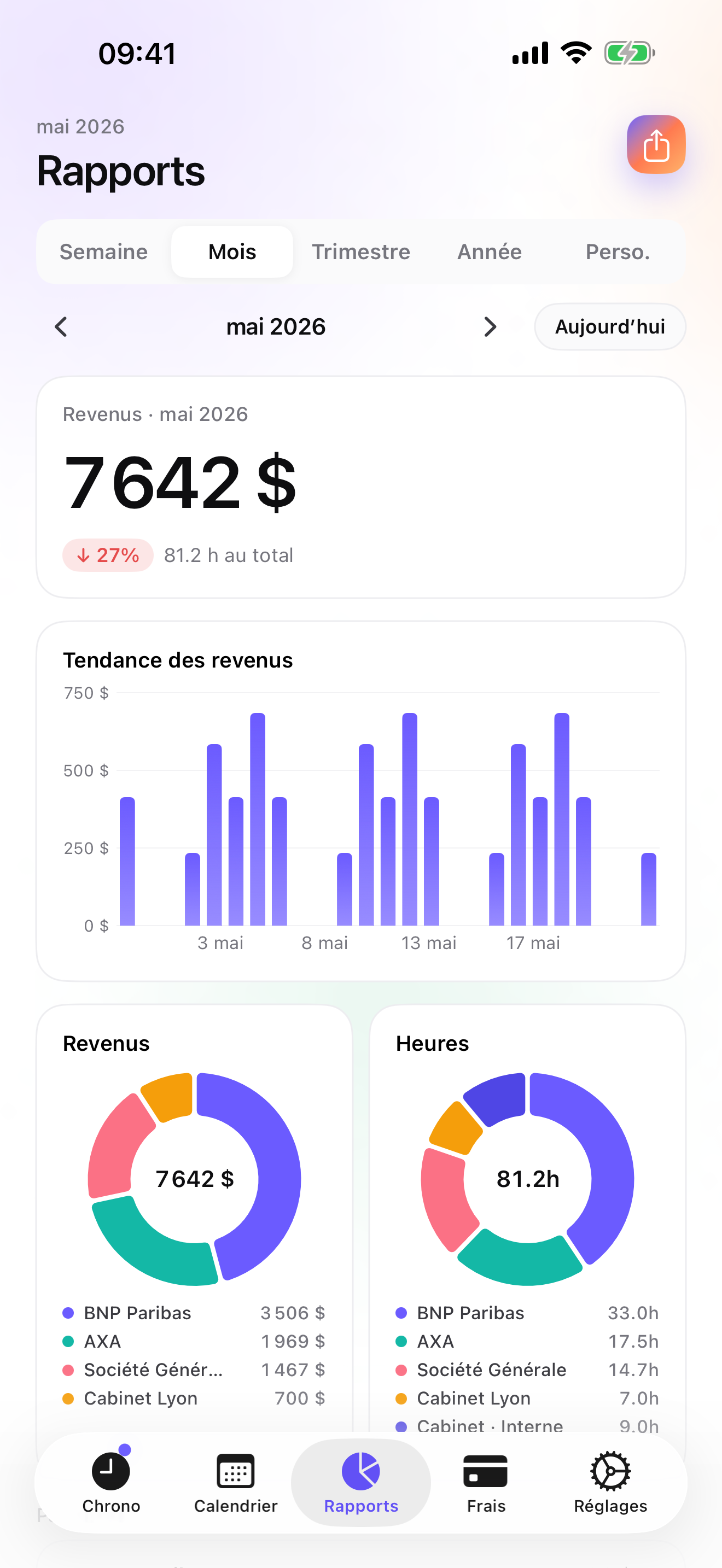
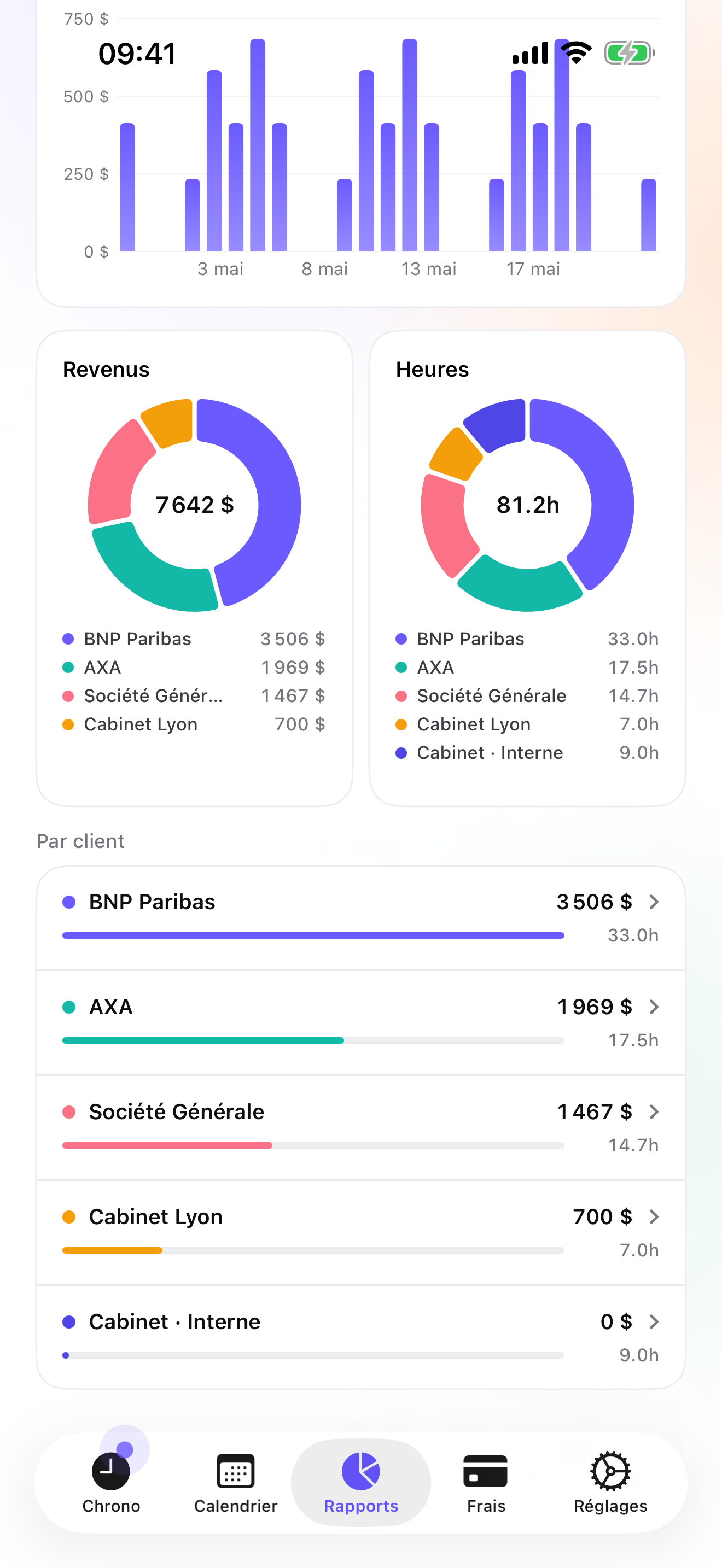
Studio is the tier for you. Quotes have their own ledger and convert to an invoice in one tap; a deposit invoice can take 20, 30, or 50 percent of an accepted quote up front. The final invoice does not deduct a deposit automatically; you account for it yourself. The Invoices tab shows what each client has not been billed, the PDF carries your logo, numbering, US layout, and bank details, and the client's billing profile holds their address and payment terms. A monthly recurring-invoice notification reminds you to bill retainers; overdue invoices get a pre-filled chase e-mail; credit notes undo a mistake cleanly. Reports compare periods and show revenue by client, which is how you see that the pilot client is not worth its discount.
The data stays in a local database on the phone with a backup in your own iCloud Drive, daily from Essential; no account, no server on my side. The limits: no online payment link, no client portal, no web dashboard, no customisable invoice templates yet, iPhone and Apple Watch only with no iPad version yet, and CSV rather than a QuickBooks connector.
Strengths
- Quotes, deposits, invoices, and credit notes from the same entries on Studio
- Monthly recurring-invoice reminder for retainers
- Revenue by client and period-over-period reports
- No account, no vendor cloud
Limits
- Rates are hourly; a day rate is entered as its hourly equivalent
- No online payment link or client portal
- No invoice templates yet; one layout per country
- iPhone and Apple Watch only; one US rating since July 2026
Best for: An independent consultant who quotes, delivers, and invoices their own clients and wants it all on the phone.
Pricing: Free covers 3 clients and 2 entries a day. Essential is $4.99/mo or $29.99/yr for reports and export, Pro $7.99/mo or $59.99/yr for travel receipts and widgets, and Studio $9.99/mo or $89.99/yr for quotes and invoices. Studio has no free trial, but a watermarked invoice preview shows the PDF with your own clients first.
★★★★★ Excellent application« I am an independent consultant and this application has made my life so much easier. Invoicing my customers used to be a mess. Now i keep track of all the hours and is so easy to use. Some minor things I want on it but over all 5/5. »
luisman69 · App Store review · United States · 2010

Harvest
The cloud version of the same loop
Harvest covers time, expenses with receipt photos, and invoices, works offline then syncs, and bills per seat. It is the closest in scope to iTimeSheet, with a web dashboard and multi-device access in exchange for an account and a vendor cloud.
Strengths
- Time, expenses, invoices
- Web app
- Offline then sync
Limits
- Account required
- Per-seat paid plans
- Vendor cloud
Best for: A consultant who wants invoices and a web dashboard.
Pricing: Free plan, paid plans

FreshBooks
Invoicing and accounting with billable time
FreshBooks is invoicing and accounting, with receipts, mileage, and billable time added to invoices, on a subscription. If you want your bookkeeping in the same place as your invoices, it does what iTimeSheet deliberately does not.
Strengths
- Invoicing plus accounting
- Receipts and mileage
- Large US rating base
Limits
- Subscription and account
- Vendor cloud
- Time tracking is secondary
Best for: A consultant who wants invoicing and accounting in one subscription.
Pricing: Subscription
Zoho Invoice
Free invoicing with a client portal
Zoho Invoice is free and offers estimates, payment reminders, a client portal, and project time tracking, with a Zoho account. Well rated on nearly fifteen thousand US ratings. Free is hard to beat; the trade is that your client data lives in Zoho's cloud.
Strengths
- Free
- Estimates, reminders, client portal
- Project time tracking
Limits
- Zoho account required
- Vendor cloud
- Time tracking less central
Best for: A consultant who wants free cloud invoicing with a portal.
Pricing: Free

Timemator
Pay once, track privately, report to the client
Timemator is a one-time purchase with no account, iCloud sync, hourly rates and earnings, a Live Activity, and a PDF report for clients. It does not invoice. A good fit if you bill from elsewhere and value privacy.
Strengths
- One-time purchase
- No account
- PDF client report
Limits
- No invoices or quotes
- Folder / task model
- Small US rating base
Best for: A consultant who invoices elsewhere and prefers to pay once.
Pricing: One-time purchase

It’s About Time
A pay-once tracker aimed at consultants and lawyers
It's About Time is a one-time purchase at $4.99 on the US store, with local data, iCloud sync, and export, aimed at consultants and lawyers. No invoicing. It had a single US rating on the date above, so there is little to go on beyond the listing.
Strengths
- One-time purchase
- Local data, iCloud sync
- Export
Limits
- No invoicing
- One US rating
- iPhone only
Best for: A consultant who wants a simple paid tracker with local data.
Pricing: One-time purchase

Toggl Track
The web dashboard option
Toggl Track is free on iPhone and syncs to a Toggl account, with serious reports in the web app. No invoicing on the phone. Choose it if you work mostly at a desk and invoice through another tool.
Strengths
- Free iPhone app
- Web reports
- Widely known
Limits
- Account required
- No invoicing on the phone
- Vendor cloud
Best for: A consultant who tracks on the phone and reports from a browser.
Pricing: Free iPhone app, paid web plans
Side by side
| App | Account required | Where your data lives | Invoices | Receipt photos | Platforms | Pricing | Rating |
|---|---|---|---|---|---|---|---|
| iTimeSheet | No | Your iPhone (your iCloud for backup) | Yes (Studio) | Yes (Pro) | iPhone + Apple Watch | Free plan, paid plans | 5.0 ★ (1) |
| Harvest | Yes | Vendor's servers | Yes | Yes | iPhone + web/other | Free plan, paid plans | 4.5 ★ (2,708) |
| FreshBooks | Yes | Vendor's servers | Yes | Yes | iPhone + web/other | Subscription | 4.7 ★ (10,978) |
| Zoho Invoice | Yes | Vendor's servers | Yes | Yes | iPhone + web/other | Free | 4.9 ★ (14,843) |
| Timemator | No | Your iPhone (your iCloud for backup) | No | — | iPhone + Apple Watch | One-time purchase | 4.7 ★ (170) |
| It’s About Time | No | Your iPhone (your iCloud for backup) | No | — | iPhone | One-time purchase | 5.0 ★ (1) |
| Toggl Track | Yes | Vendor's servers | No | — | iPhone + web/other | Free iPhone app, paid web plans | 4.8 ★ (9,593) |
App Store ratings checked on October 15, 2026 (US App Store).
A day with iTimeSheet
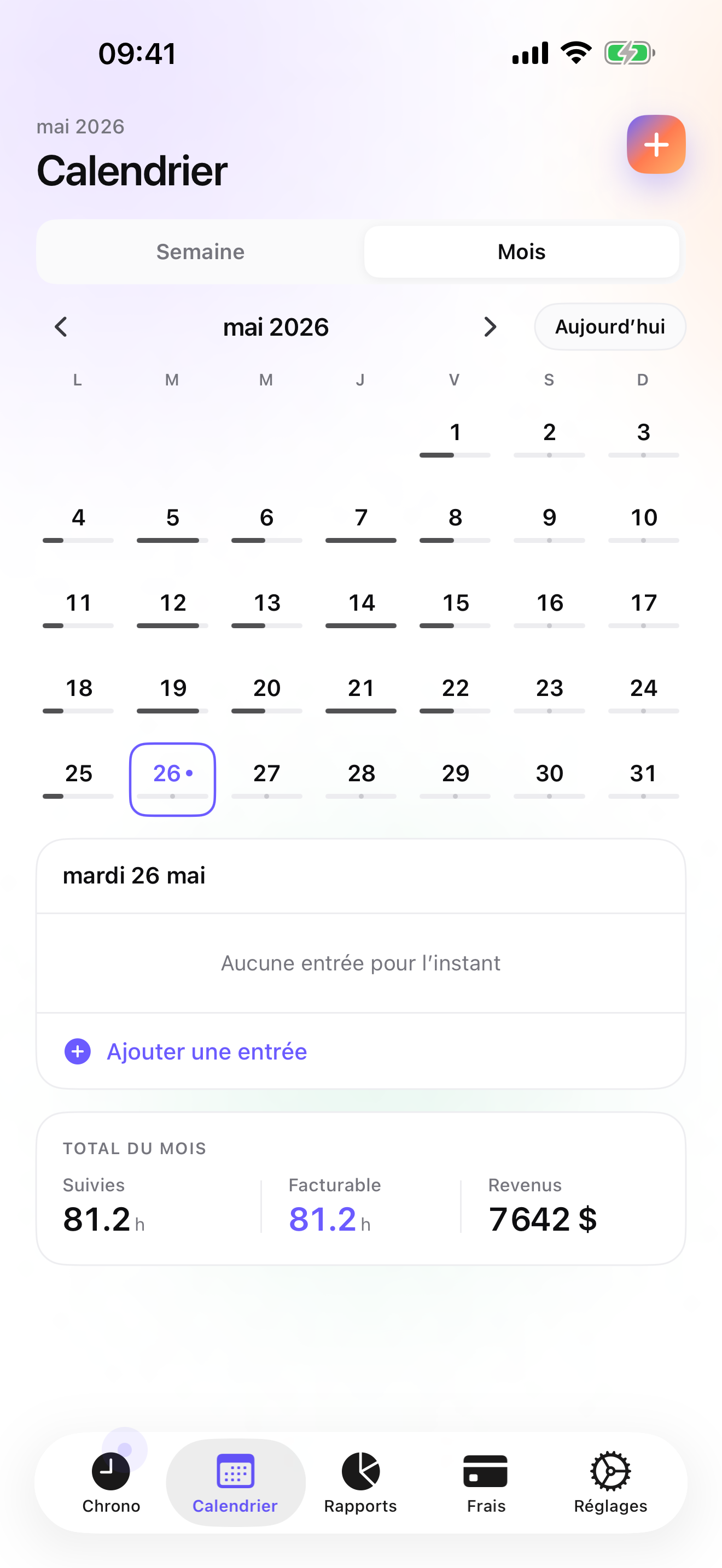
A month with one retainer and one fixed-fee project, with shipped features only.
The 1st, 8:30
The recurring-invoice notification: the retainer client is due. One tap in the Invoices tab, PDF sent before coffee.
The 3rd, new prospect
Quote written in Studio for a ten-day project. Accepted on the 5th; a deposit invoice goes out for a percentage of it.
The 18th, day eleven
Reports show the project at eleven days' worth of hours with two deliverables left. You call the client before day thirteen, not after.
The 28th, delivery
The quote converts to the invoice in one tap, and you account for the deposit already paid, since the app does not deduct it automatically. Due versus Paid in Reports shows the month.
Questions people ask
Can I work on a flight and log it?
Yes. iTimeSheet stores everything on the phone and never needs a server; the timer and entries work in airplane mode. The Apple Watch queues taps and backdates them when it reconnects. Only the iCloud backup and App Store purchases need a network.
Where are my clients and rates stored?
In a local SQLite database on your iPhone; no account, no server of ours, no analytics, no ads. Backup is a single file in your own iCloud Drive, daily from Essential. The privacy label lists device ID, purchases, and usage data, not linked to you and not used for tracking.
What goes on a US invoice, and what about 1099s?
A US invoice needs your business identity, and sales tax rules vary by state, so check yours. Clients that pay you as a contractor may ask for a W-9 and send a 1099. iTimeSheet's US layout carries your header, sequential numbering, payment details, and free-text instructions; tax filing stays with your accountant.
What does it cost for an independent consultant?
Free: 3 clients, 2 entries a day. Essential $4.99/mo or $29.99/yr, Pro $7.99/mo or $59.99/yr, Studio $9.99/mo or $89.99/yr on the US store. Studio, with quotes and invoices, has no trial but a watermarked invoice preview with your data. Subscriptions are through Apple; cancelling never locks your data.
Does the retainer invoice go out automatically?
No. Studio sends you a monthly notification reminding you to bill recurring clients, and the Invoices tab shows the amount; you generate and send the PDF yourself. Mark it paid when the money arrives, and if it does not, the overdue reminder has a chase e-mail ready.
Verdict
For the independent consultant who sells their own time, iTimeSheet is the first install: quote, hours, invoice, and the retainer reminder come from the same entries, and the overrun shows up while there is still time to talk about it, with your client list on your own phone.
If you want a web dashboard and online payments, Harvest, FreshBooks, or Zoho Invoice do it in the cloud. If you invoice elsewhere, Timemator or It's About Time are private and paid once.