The 7 best time tracking apps for freelance designers and developers on iPhone, ranked for 2026
A freelance designer or developer usually carries three kinds of client at once: the retainer that pays the rent, the fixed-price project that was supposed to take three weeks, and the hourly favour for a friend's startup. Scope creep lives in the second one, and you only notice it when you look at the hours. The right app keeps all three on the same timer, shows you the overrun while you can still raise it, and sends the right invoice to each.
A French user wrote in July 2026, after the relaunch, that he had used the app for fifteen years, and that the most tedious part of his day had become almost pleasant and above all efficient. Fifteen years is longer than most freelancers keep any tool. I think the reason is boring: the timer is where your hand already is, and the record is yours.
This list is for the solo designer or developer who sells their own time. If you lead a small studio with employees, the team tools below fit better.
I build the first app here and have since 2008. Ratings are the US App Store numbers on the date at the top; facts about other apps come from their own listings.
How I ranked them
I ranked for the mix most freelancers actually have: retainers, fixed fees, and hourly work.
- Proof of scope creepHours per project and per task, visible during the project, are the only argument a client accepts for a change request.
- Fixed price and hourly side by sideThe fixed-price project invoices the quote; the hourly client invoices the hours. One app should do both.
- Retainers billed on timeA reminder on the 1st beats remembering on the 9th.
- Starting the timer before opening the laptopA widget or a Watch tap catches the call that turned into an hour of work.
- Your client list, not a platform'sFreelancers change tools. Keep the record somewhere you can leave with.
The ranking
App Store ratings checked on October 15, 2026 (US App Store).
iTimeSheet
Retainer, fixed price, and hourly on one timer, with the scope creep in black and white
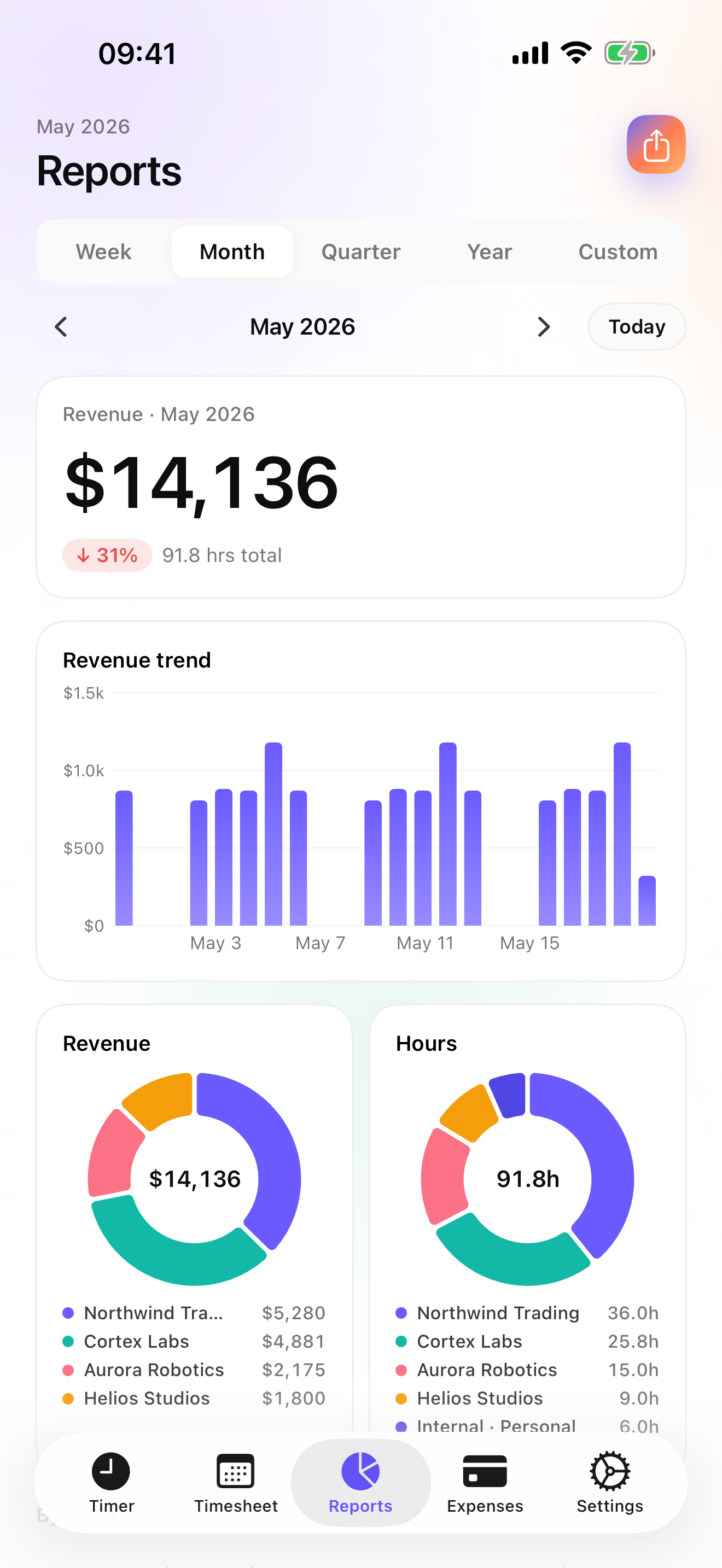
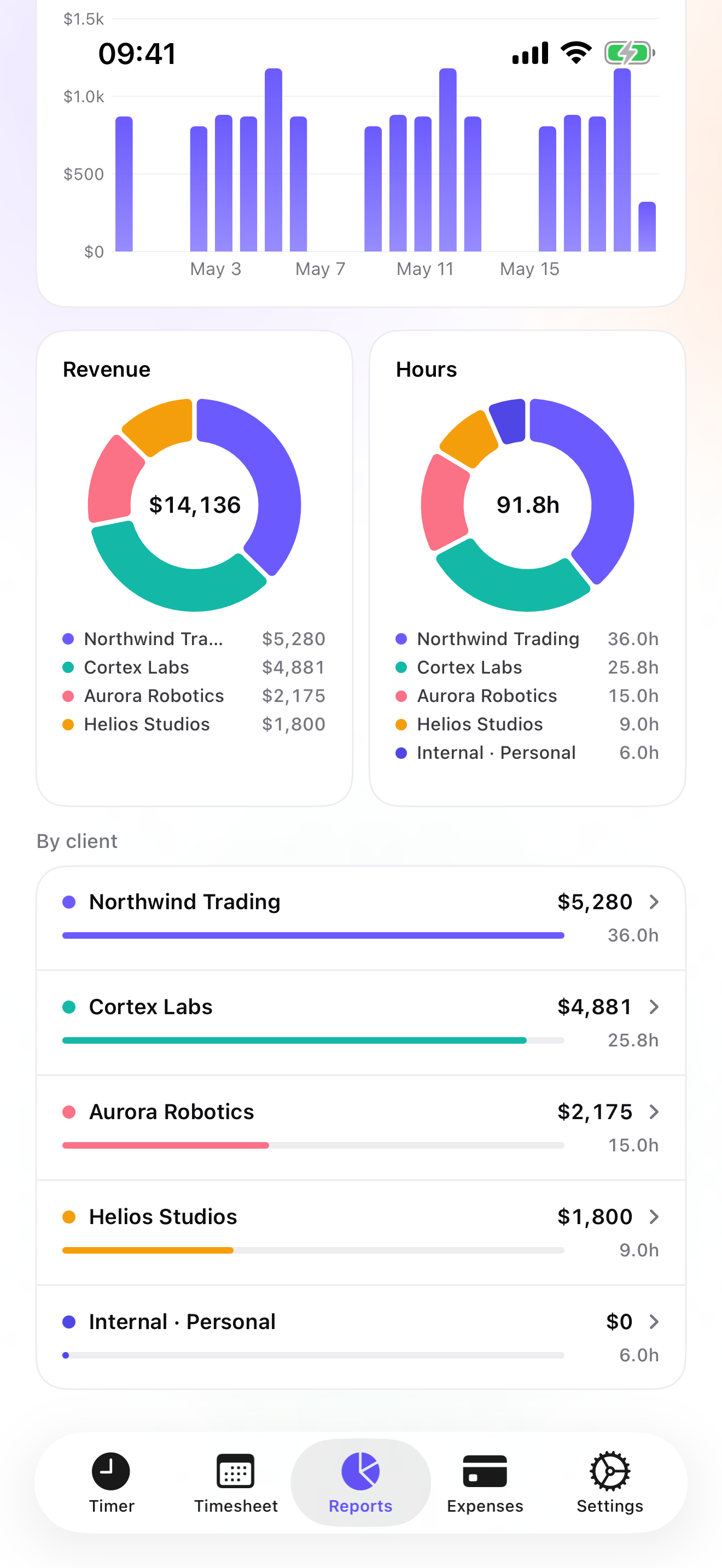
The Client → Mission → Task tree reads Client → Project → Task: the redesign, with its pages; the app build, with its sprints. Rates cascade from the client to the project and task, with a single-entry override. The timer starts from the widget, the Lock Screen, the Dynamic Island, or the Watch; switching projects saves the running entry. Reports from Essential show hours and revenue by client with a drill into each project, and a PDF timesheet of the hours makes a change request hard to argue with.
On Studio, the fixed-price project is a quote that converts to an invoice in one tap, with a deposit invoice for 20, 30, or 50 percent of it up front if you ask for one. The final invoice does not deduct a deposit automatically; you account for it yourself. The hourly client is invoiced from the un-invoiced amount in the Invoices tab. Retainers get a monthly recurring-invoice notification. Every invoice carries your logo, numbering, US layout, and payment details; overdue ones get a pre-filled chase e-mail. On Pro, Software subscription, Hardware, and Coworking / venue rental are among the expense presets, with receipt photos pinned to the client's project.
Data stays on the phone with a backup file in your own iCloud Drive, daily from Essential; no account, no server on my side. The limits: no Mac app or web dashboard, though you work on a laptop; no iPad version yet; no online payments or client portal; no invoice templates yet; and no integration with your project-management or accounting tools beyond CSV.
Strengths
- Hours per project and task to support change requests
- Quotes, deposits, invoices, and a retainer reminder on Studio
- Software, hardware, and coworking expense presets on Pro
- No account, no vendor cloud
Limits
- No Mac app or web dashboard
- No online payment link or client portal
- No invoice templates yet
- One US rating since the July 2026 relaunch
Best for: A solo freelance designer or developer with a mix of retainer, fixed-price, and hourly clients.
Pricing: Free covers 3 clients and 2 entries a day, no export. Essential is $4.99/mo or $29.99/yr for reports, export, and daily backup. Pro is $7.99/mo or $59.99/yr for widgets, the Live Activity, and receipt photos. Studio is $9.99/mo or $89.99/yr for quotes and invoices; no free trial, but a watermarked invoice preview shows the PDF with your data first.
★★★★★ Meilleur outil que j’ai testéI have been using it for 15 years and it is a tool that adapts and offers the best interface. The most tedious thing in my days becomes almost pleasant and, above all, very efficient.
translated from French ·« Je l’utilise depuis 15 ans et c’est un outil qui s’adapte et qui offre la meilleure interface. Le truc le plus pénible de mes journées en devient presque agréable et surtout très efficace. »
Damien94200 · App Store review · France · 2026

Toggl Track
The desk worker's tracker, with web reports
Toggl Track is free on iPhone, syncs to an account, and keeps its deeper reports in the web app, with no invoicing on the phone. If you live in a browser all day, it suits you better than a phone-only app.
Strengths
- Free iPhone app
- Web reports and desktop apps
- Widely used
Limits
- Account required
- No invoicing on the phone
- Vendor cloud
Best for: A freelancer who works at a desk and invoices elsewhere.
Pricing: Free iPhone app, paid web plans

Harvest
Time, expenses, and invoices in the cloud
Harvest covers time, expenses with receipt photos, and invoices, works offline then syncs, and bills per seat. Closest in scope to iTimeSheet, with a web app in exchange for an account.
Strengths
- Time, expenses, invoices
- Web app
- Offline sync
Limits
- Account required
- Per-seat pricing
- Vendor cloud
Best for: A freelancer who wants cloud invoicing and a dashboard.
Pricing: Free plan, paid plans

HoneyBook
Contracts, invoices, and payments for independents
HoneyBook manages the client workflow for independents: contracts, invoices, payments, and projects, on a subscription, with more than sixteen thousand US ratings. It handles signed contracts and online payment, which iTimeSheet does not; time tracking is not its centre.
Strengths
- Contracts and payments
- Client workflow
- Large US rating base
Limits
- Subscription and account
- Vendor cloud
- Not a time tracker first
Best for: A freelancer who wants contracts and online payment in one place.
Pricing: Subscription

FreshBooks
Invoicing and accounting with billable time
FreshBooks combines invoicing and accounting, with receipts, mileage, and billable time added to invoices, on a subscription. Useful if you want your books in the same place as your invoices.
Strengths
- Accounting plus invoicing
- Billable time on invoices
- Receipts
Limits
- Subscription and account
- Vendor cloud
- Time tracking is secondary
Best for: A freelancer who wants accounting and invoicing together.
Pricing: Subscription

Timery
The best iPhone client for Toggl
Timery is an independent iPhone, Mac, and Watch app for Toggl Track with saved timers, widgets, and Shortcuts. It needs a Toggl account and does not invoice. If you are on Toggl, it is the nicest way to use it.
Strengths
- Saved timers
- Shortcuts and widgets
- Mac and Watch
Limits
- Needs Toggl
- No invoicing
- Vendor cloud
Best for: A freelancer on Toggl who wants better widgets and Shortcuts.
Pricing: Companion app (needs the paid product)

Timemator
Pay once, track privately
Timemator is a one-time purchase with no account, iCloud sync, rates and earnings, a Live Activity, and a PDF report for clients. No invoicing. A strong choice if you invoice from another tool.
Strengths
- One-time purchase
- No account
- PDF client report
Limits
- No invoices
- Folder / task model
- Small US rating base
Best for: A privacy-minded freelancer who invoices elsewhere.
Pricing: One-time purchase
Side by side
| App | Account required | Where your data lives | Invoices | Receipt photos | Platforms | Pricing | Rating |
|---|---|---|---|---|---|---|---|
| iTimeSheet | No | Your iPhone (your iCloud for backup) | Yes (Studio) | Yes (Pro) | iPhone + Apple Watch | Free plan, paid plans | 5.0 ★ (1) |
| Toggl Track | Yes | Vendor's servers | No | — | iPhone + web/other | Free iPhone app, paid web plans | 4.8 ★ (9,593) |
| Harvest | Yes | Vendor's servers | Yes | Yes | iPhone + web/other | Free plan, paid plans | 4.5 ★ (2,708) |
| HoneyBook | Yes | Vendor's servers | Yes | — | iPhone + web/other | Subscription | 4.8 ★ (16,325) |
| FreshBooks | Yes | Vendor's servers | Yes | Yes | iPhone + web/other | Subscription | 4.7 ★ (10,978) |
| Timery | Yes | Vendor's servers | No | — | iPhone + web/other | Companion app (needs the paid product) | 4.8 ★ (1,133) |
| Timemator | No | Your iPhone (your iCloud for backup) | No | — | iPhone + Apple Watch | One-time purchase | 4.7 ★ (170) |
App Store ratings checked on October 15, 2026 (US App Store).
A day with iTimeSheet
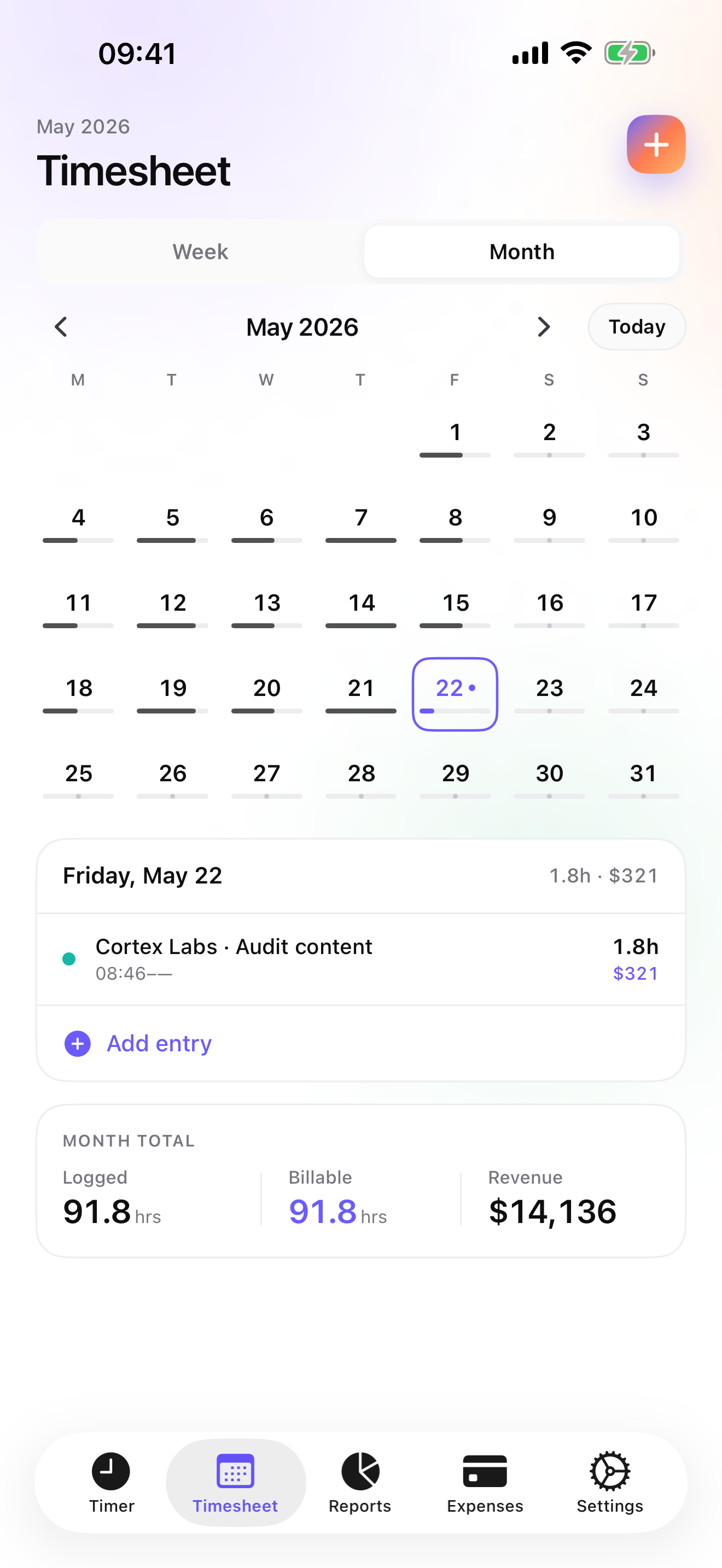
A month with three kinds of client, with shipped features only.
The 1st
The recurring-invoice notification: the retainer client is due. One tap in the Invoices tab.
Week 2, the fixed-price redesign
Widget taps per page. By Friday the checkout page has twice the hours it should; a PDF timesheet goes with your change request.
Week 3, the favour
An hourly hour for a friend's startup, at its own rate on that client. It shows up as un-invoiced at the end of the month.
Week 4, delivery
The redesign's quote converts to the invoice in one tap, plus the approved change. The friend gets an hourly invoice from the un-invoiced amount.
Questions people ask
Does it work on a train or a plane?
Yes. iTimeSheet stores everything on the phone and needs no server; the timer and entries work offline. The Apple Watch queues taps and backdates them later. Only the iCloud backup and App Store purchases need a connection.
Where are my clients stored?
In a local SQLite database on your iPhone; no account, no server of ours, no analytics, no ads. Backup is one file in your own iCloud Drive, daily from Essential. The privacy label lists device ID, purchases, and usage data, not linked to you and not used for tracking.
How do I handle a fixed-price project that grows?
Log the hours anyway. Reports show hours per project and the PDF timesheet lists them. On Studio, invoice the original quote when delivered and issue a separate quote for the change, converted to an invoice once accepted. If an invoice went out wrong, a credit note cancels it.
What does it cost for one freelancer?
Free: 3 clients, 2 entries a day, no export. Essential $4.99/mo or $29.99/yr, Pro $7.99/mo or $59.99/yr, Studio $9.99/mo or $89.99/yr on the US store. Studio has no trial but a watermarked invoice preview. Subscriptions go through Apple and cancelling never locks your data.
I work on a MacBook all day. Is there a Mac app?
No. iTimeSheet runs on iPhone and Apple Watch only, with widgets and a Live Activity on Pro so the timer is visible without opening the app. If you want the timer on your Mac, Toggl Track or Timery do that.
Verdict
For the solo freelancer with a mix of retainers, fixed-price, and hourly work, iTimeSheet is the first install: one timer for all three, hours that make a change request credible, and the right invoice for each client, with your client list on your phone.
If you live at a desk, Toggl Track or Timery. For contracts and online payment, HoneyBook. For accounting too, FreshBooks.