The 7 best time tracking apps for architects on iPhone, ranked for 2026
An architect's fee is agreed by phase and spent by the hour. Schematic design runs over because the client changed the brief twice, construction documents eat the margin, and construction administration turns into weekly site visits nobody priced. The right app shows hours against each phase while the phase is still open, invoices each phase as it closes, and records the site visit from the wrist while you are still wearing a hard hat.
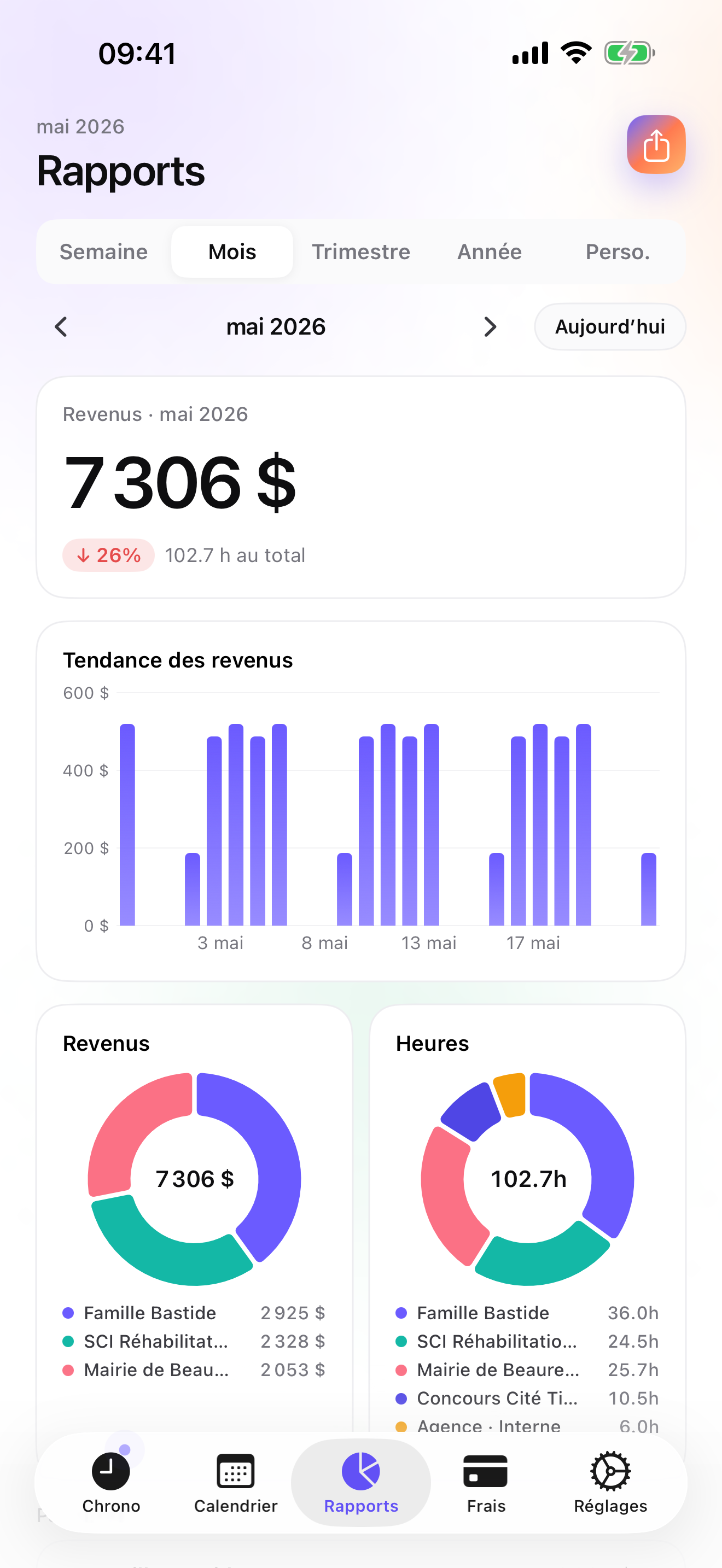
In 2010 a user wrote that the reporting was great, with drill-down graphing, and that he used and depended on the app every day. Drill-down is the architect's word for it: from the client, to the project, to the phase, until you see which phase is losing money. The rewrite kept it.
This list is for the sole practitioner or the two-person studio. If you run a firm with project managers and an admin who bills, the first app here is not your tool and I say which one is.
I build the first app here and have since 2008. Ratings are the US App Store numbers on the date above, and facts about other apps come from their own listings.
How I ranked them
I ranked for a fee structure built on phases and a working week split between desk, client, and site.
- Phases as a real levelSchematic, design development, documents, administration. Hours must land on the phase, not just the project.
- Invoice a phase when it closesFees by phase mean an invoice per phase. The fee agreed for that phase should become its invoice without retyping.
- Drill-down while the phase is openKnowing that documents are at 140 hours on a 100-hour fee is useful in week three, not at handover.
- Site visits from the wristOn site you carry drawings, not a phone in hand. A Watch tap logs the visit.
- Travel on the projectMileage and parking for site visits belong to the project, and often to the reimbursable column.
The ranking
App Store ratings checked on October 15, 2026 (US App Store).

iTimeSheet
Hours against each phase, an invoice when each phase closes
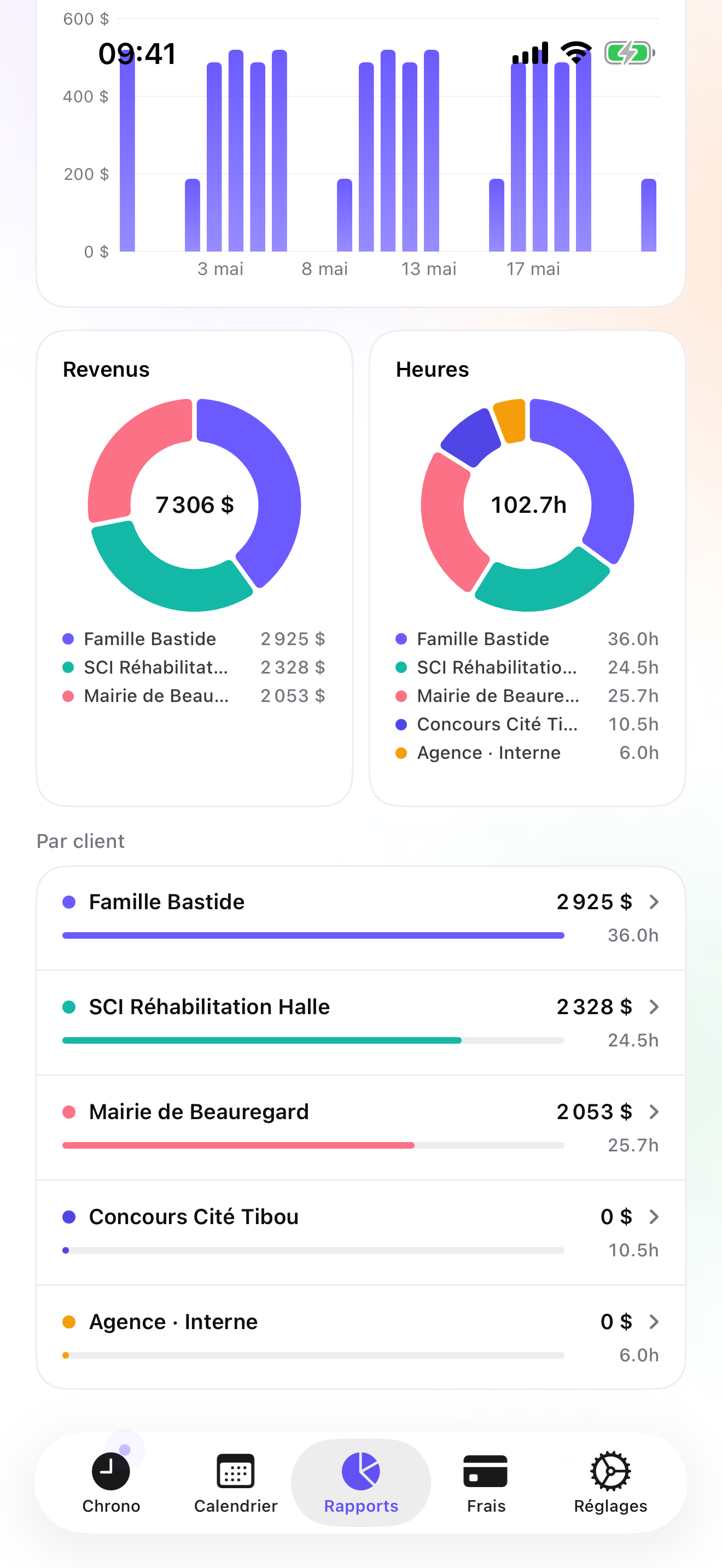
The Client → Mission → Task tree reads Client → Project → Phase. Rates cascade from the client to the project and the phase, with a single-entry override. The timer starts from the Apple Watch on site, the Lock Screen, or a widget at the desk; switching phases saves the running entry. Reports from Essential show revenue and hours by client with a drill into each project, over any period and against the previous one, and Search pulls up every entry of a given phase.
On Studio you can write one quote per phase, each in the quote ledger, and convert it to an invoice in one tap when the phase is delivered; a deposit invoice can take 20, 30, or 50 percent of an accepted quote up front. The final invoice does not deduct a deposit automatically; you account for it yourself. Invoices carry your logo, numbering, US layout, and payment terms from the client's billing profile; credit notes and overdue reminders handle the rest. On Pro, Mileage and Parking are among the fourteen expense presets, with receipt photos pinned to the project.
Data stays in a local database on the phone, with a backup in your own iCloud Drive, daily from Essential; no account, no server on my side. The limits: no iPad or Mac app, which architects will miss; no web dashboard; single user, so no staff utilisation; no budgets per phase as a number to compare against, only the hours you read in Reports; and CSV instead of an accounting connector.
Strengths
- Client → project → phase; drill-down reports by project and search by phase
- A quote per phase, converted to an invoice when the phase closes
- Mileage and Parking presets with receipt photos on Pro
- No account, no vendor cloud
Limits
- No iPad or Mac app
- No phase budgets to track against; you compare hours yourself
- Single user; no staff utilisation
- One US rating since the July 2026 relaunch
Best for: A sole practitioner or very small studio that bills fees by phase and wants to see each phase's hours as it goes.
Pricing: Free covers 3 clients and 2 entries a day, no export. Essential is $4.99/mo or $29.99/yr for drill-down reports, export, and daily backup. Pro is $7.99/mo or $59.99/yr for receipt photos and widgets. Studio is $9.99/mo or $89.99/yr for quotes and invoices; no free trial, but a watermarked invoice preview shows the PDF with your own data first.
★★★★★ Excellent app« Version 4 An excellent, flexible time management app.. The developer has been responsive to feature requests. The developer is resonsive to feature requsts. The reporting is great with drill down graphing. I have never had a data losing crash and bugs have been fixed promotly. A great app that I use and depend on every day? »
Stuchiner · App Store review · United States · 2010

Monograph
Built for architecture firms, phase by phase
Monograph's app is the companion to Monograph's practice software for architecture firms: time by project, phase, and activity, receipts, and notes for the admin who bills. It understands architects' phases natively and adds what iTimeSheet lacks for a firm: staff and budgets in the web software. It needs the firm's subscription.
Strengths
- Project / phase / activity
- Receipts
- Made for architecture firms
Limits
- Requires Monograph's software
- Account and vendor cloud
- Firm-oriented
Best for: An architect in a firm that runs Monograph.
Pricing: Companion app (needs the paid product)

Harvest
Cloud time, expenses, and invoices
Harvest tracks time and expenses with receipt photos and sends invoices, with a web app and per-seat plans. It gives you the browser dashboard and multi-device access iTimeSheet does not have.
Strengths
- Time, expenses, invoices
- Web app
- Offline then sync
Limits
- Account required
- Per-seat pricing
- Vendor cloud
Best for: A small studio that wants web reports and cloud invoicing.
Pricing: Free plan, paid plans

Toggl Track
A free iPhone timer with web reports
Toggl Track is free on iPhone, syncs to an account, and keeps the deep reporting in the web app; no invoicing on the phone. Fine for an architect who reviews time at the desk.
Strengths
- Free iPhone app
- Web reports
- Widely used
Limits
- Account required
- No invoicing on the phone
- Vendor cloud
Best for: An architect who reports from a browser and invoices elsewhere.
Pricing: Free iPhone app, paid web plans

Tyme
The tracker that also runs on Mac and iPad
Tyme runs on Mac, iPhone, iPad, Watch, and the web, with client / project / task, PDF and CSV export, and a subscription with a 14-day trial. For an architect who draws on an iPad and a Mac all day, that coverage matters. No invoicing.
Strengths
- Mac, iPad, iPhone, Watch, web
- Client / project / task
- PDF and CSV
Limits
- No invoicing
- Subscription
- Small US rating base
Best for: An architect who wants time tracking on the iPad and Mac they draw on.
Pricing: Subscription

Timemator
Pay once, keep it private
Timemator is a one-time purchase with no account, iCloud sync, rates and earnings, a Live Activity, and a PDF report for clients. No invoices; a clean tracker if you bill elsewhere.
Strengths
- One-time purchase
- No account
- PDF client report
Limits
- No invoices
- Folder / task model
- Small US rating base
Best for: An architect who wants a private, pay-once tracker.
Pricing: One-time purchase

EARLY
One-tap activity tracking, with an optional physical tracker
EARLY, formerly Timeular, tracks activities with one tap and an optional physical tracker on the desk, on a subscription with an account. Its last iOS update was April 2025 and its listing is only in German. Good for understanding where design time goes; no invoicing.
Strengths
- One-tap activity tracking
- Optional physical tracker
- Reports
Limits
- Listing only in German
- Last updated April 2025
- No invoicing
Best for: An architect who likes a physical tracker on the desk.
Pricing: Subscription
Side by side
| App | Account required | Where your data lives | Invoices | Receipt photos | Platforms | Pricing | Rating |
|---|---|---|---|---|---|---|---|
| iTimeSheet | No | Your iPhone (your iCloud for backup) | Yes (Studio) | Yes (Pro) | iPhone + Apple Watch | Free plan, paid plans | 5.0 ★ (1) |
| Monograph | Yes | Vendor's servers | — | Yes | iPhone + web/other | Companion app (needs the paid product) | 4.6 ★ (88) |
| Harvest | Yes | Vendor's servers | Yes | Yes | iPhone + web/other | Free plan, paid plans | 4.5 ★ (2,708) |
| Toggl Track | Yes | Vendor's servers | No | — | iPhone + web/other | Free iPhone app, paid web plans | 4.8 ★ (9,593) |
| Tyme | Optional | Your iPhone; optional cloud | No | — | iPhone + web/other | Subscription | 4.5 ★ (54) |
| Timemator | No | Your iPhone (your iCloud for backup) | No | — | iPhone + Apple Watch | One-time purchase | 4.7 ★ (170) |
| EARLY | Yes | Vendor's servers | No | — | iPhone + web/other | Subscription | 4.5 ★ (148) |
App Store ratings checked on October 15, 2026 (US App Store).
A day with iTimeSheet
A house project through two phases, with shipped features only.
Week 1, schematic design
Desk hours from the widget on the Schematic phase. The client meeting goes on the same phase with a switch from the Lock Screen.
Week 4, phase delivered
The Schematic quote converts to an invoice in one tap. A search on the phase lists its entries, to read against the fee you agreed.
Week 9, site visit
Watch tap on Construction Administration. Mileage and parking logged with the Pro presets on the project.
Month end
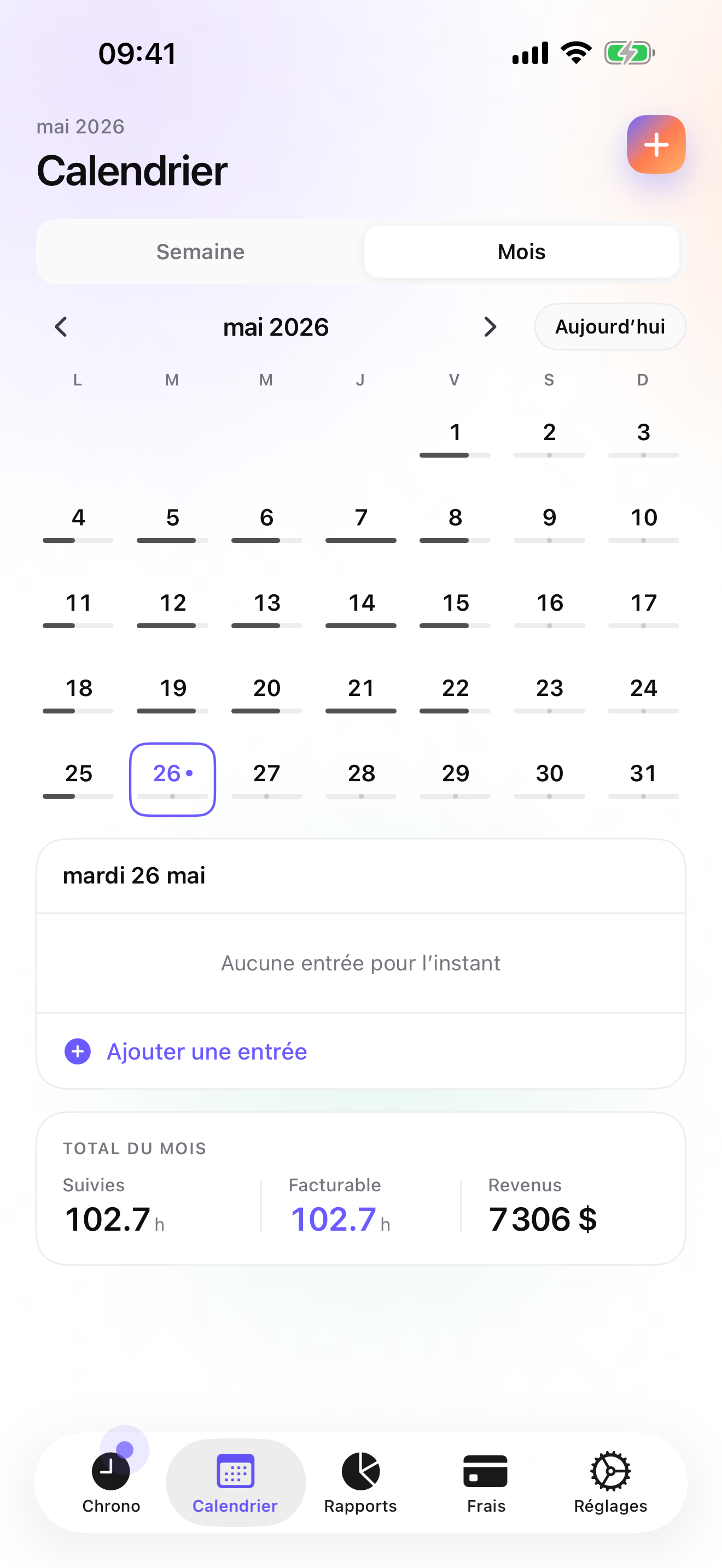
Reports by client, drilled into the project, against last month; a search on Documents shows that phase running heavy, and you know it before handover.
Questions people ask
Does the timer work on a construction site with no signal?
Yes. iTimeSheet stores everything on the phone and never waits for a server. The Apple Watch queues taps away from the phone and backdates them on reconnect. A connection is needed only for the iCloud backup and App Store purchases.
Where are my clients and projects stored?
In a local SQLite database on your iPhone; no account, no server of ours, no analytics, no ads. Backup is one file in your own iCloud Drive, daily from Essential. The privacy label lists device ID, purchases, and usage data, not linked to you and not used for tracking.
How do I invoice fees by phase?
On Studio, write a quote per phase with your agreed fee. When a phase is delivered, convert that quote to an invoice in one tap: numbered, with your logo, US layout, and payment details. If you take a retainer at signing, a deposit invoice can take a percentage of an accepted quote. The final invoice does not deduct a deposit automatically; you account for it yourself.
What does it cost for a sole practitioner?
Free: 3 clients, 2 entries a day, no export. Essential $4.99/mo or $29.99/yr, Pro $7.99/mo or $59.99/yr, Studio $9.99/mo or $89.99/yr on the US store. Studio has no trial but a watermarked invoice preview. Subscriptions run through Apple; cancelling never locks your data.
Is there an iPad version for the studio?
Not yet. iTimeSheet runs on iPhone and Apple Watch. If you need time tracking on the iPad or Mac you draw on, Tyme covers those, and Monograph does for firms on its software. There is no multi-device sync in iTimeSheet either; the data lives on one phone.
Verdict
For the sole practitioner who bills fees by phase, iTimeSheet is the first install: hours land on the phase, each phase's quote becomes its invoice when the phase closes, and the reports and search show which phase is eating the fee while you can still act.
In a firm on Monograph, use Monograph. If you need iPad and Mac, Tyme. For cloud invoicing, Harvest.