The 7 best time tracking apps for carpenters and joiners on iPhone, ranked for 2026
A built-in bookcase is forty hours in the workshop and six on site, and the client only ever sees the six. If your app does not separate the two, you will price the next one off the six. Add a hardwood order that has to be paid before the first cut, a deposit the client owes you before that, and a phone covered in sawdust, and the shape of the right tool becomes clear: hours by piece and by place, materials on the job, quote to invoice without a laptop.
A reviewer wrote this year, in French, that the app helps enormously to invoice clients for the time spent, without a headache at the end of the month. I quote it here because a joiner's end of month is exactly that headache: three pieces delivered, two installs, a pile of lumber-yard receipts, and a memory that says the walnut vanity took about a week. About a week is how you lose money on walnut.
This list is for the one-person or two-person shop: you measure, you quote, you buy the stock, you build, you install, you invoice. If you run a crew across several sites with staff timesheets, I point you to the tools built for that further down.
I build the first app on the list and have since 2008. Every rating is the US App Store number on the date in the pill at the top, every fact about another app is from its own listing, and where one of them suits you better I say it plainly.
How I ranked them
I ranked for a trade that works in two places, the shop and the site, and sells by the piece more often than by the hour.
- Shop hours and site hours on the same pieceThe bookcase is one job with two kinds of hours at two rates. The app needs a level under the job for workshop, install, and finish, with a rate on each.
- The quote is the contractMost joinery is sold at a price before a board is cut. The quote has to be a real document with its own number, convertible to an invoice without re-typing it.
- A deposit before the lumberHardwood and sheet goods are paid up front. A deposit invoice from the accepted quote should be two taps, not a separate spreadsheet.
- Material receipts on the jobThe lumber yard, the hardware, the finish. Each receipt belongs to one piece and should sit beside its hours so the true cost of that piece is visible.
- Starts with sawdust on the screenA tap on the Watch at the bench or a widget on the Lock Screen. If the timer needs a clean thumb and three taps, it will not be started at 7 am.
- A record you can take with youWhat each piece really cost you is how you price the next one. Keep that history on your own phone, in a file you control.
The ranking
App Store ratings checked on October 15, 2026 (US App Store).

iTimeSheet
Shop hours, site hours, and the lumber receipt on one piece, then the quote becomes the invoice
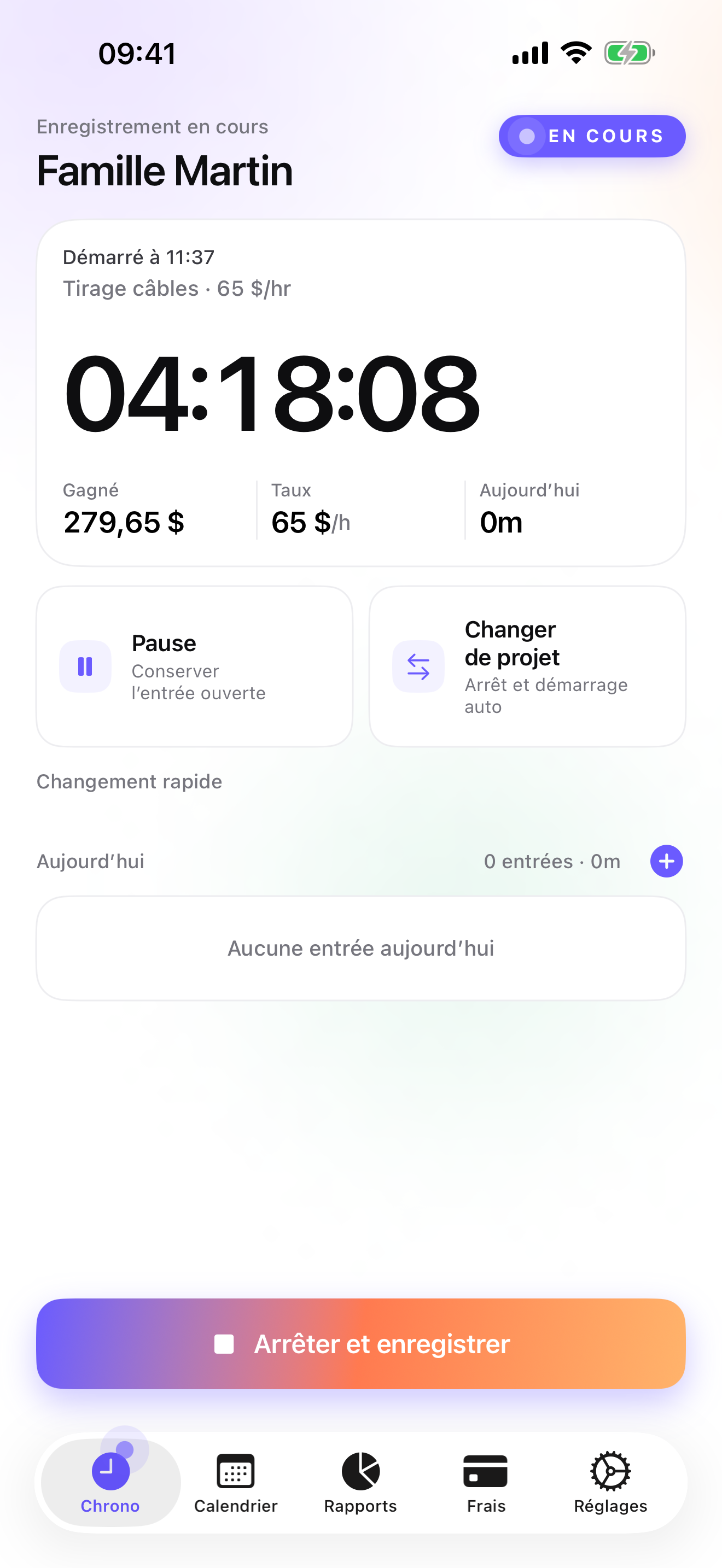
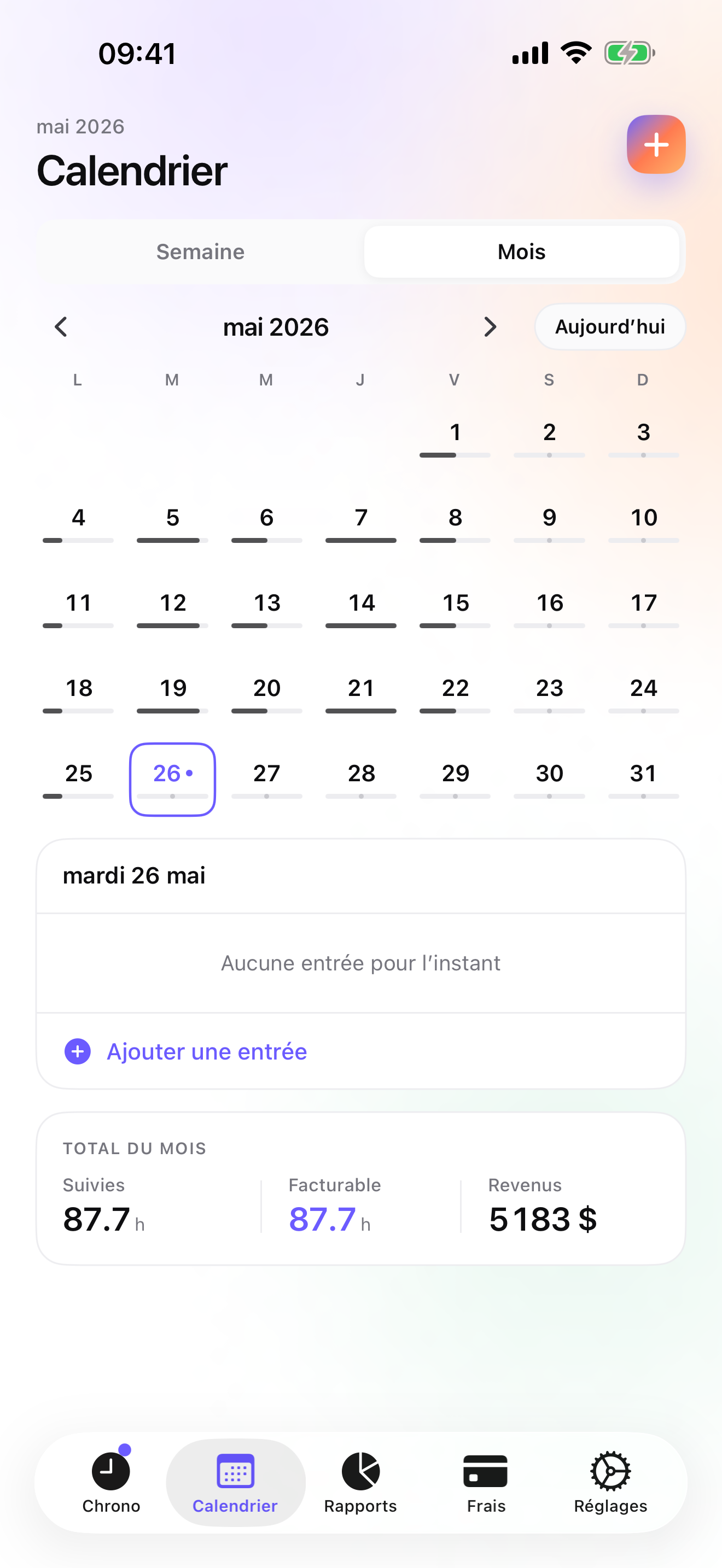
For a joiner the Client → Mission → Task tree becomes Client → Piece → Stage: workshop, finishing, install. Set the shop rate on the client, the install rate on the install task, and override a single entry when a Saturday delivery bills differently. The timer starts from the Apple Watch at the bench, from the Lock Screen, or from the Home Screen widget, and switching from the vanity to the bookcase saves the first entry with its hours. The Week and Month views show the hours per piece and per stage, which is how you find out that the walnut vanity took fifty-two hours, not about a week.
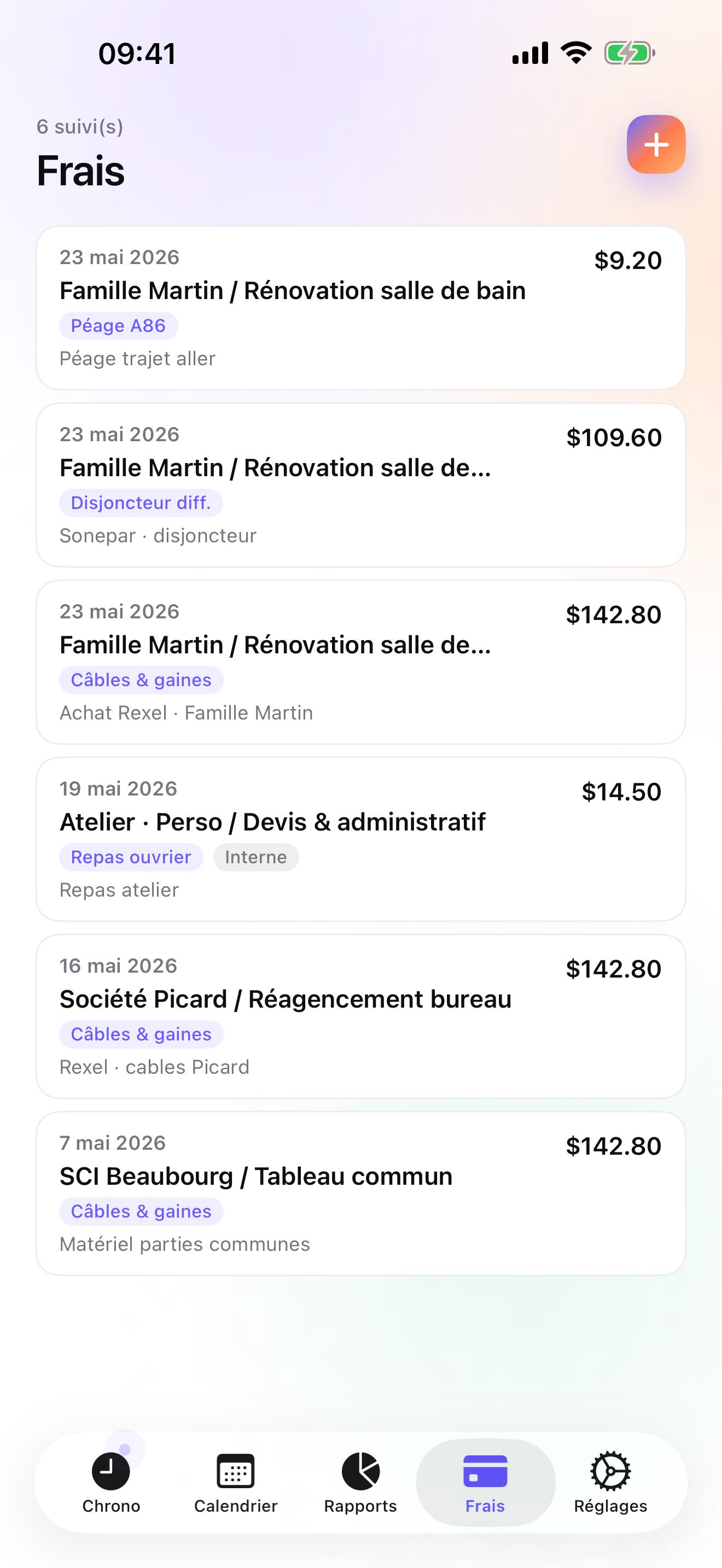
The money follows the piece. On Studio a quote has its own ledger and numbering; once the client accepts it, a deposit invoice for 20, 30, or 50 percent of the quote goes out before the hardwood is ordered, and when the piece is installed the quote converts to an invoice in one tap, with your logo, the sequential number, the US layout, and your bank details. The final invoice does not deduct a deposit automatically; you account for it yourself. The lumber-yard receipt, the hinges, the finish: each is an expense on that piece, photographed and categorised on Pro, so the real cost of the vanity sits next to what you quoted for it. Credit notes cover the invoice that had to be redone, and the overdue reminder sends a pre-filled chase e-mail to the client who is slow.
It all stays on the phone: a local database, no account, no server on my side, no analytics, and a backup file in your own iCloud Drive, daily from Essential. The limits, stated plainly: iPhone and Apple Watch only, no iPad version yet, one user with no staff timesheets, no costbook or materials catalogue for building estimates, no e-signature on the quote, and no accounting connector beyond CSV.
Strengths
- Stages under each piece with their own rates, so workshop and install hours stay separate on the same job
- Quote with its own ledger, deposit invoice off the accepted quote, one-tap conversion to invoice on Studio
- Lumber and hardware receipts photographed and pinned to the piece; 14 presets on Pro
- No account, no vendor cloud; backup is one file in your own iCloud Drive
Limits
- No costbook or materials catalogue for assembling estimates
- Single user: no staff timesheets, no scheduling
- iPhone and Apple Watch only; no web app, no iPad yet, no Android
- A single rating on the US store since the July 2026 relaunch
Best for: A carpenter or joiner working alone or with an apprentice who builds in the shop, installs on site, and sends their own quotes and invoices.
Pricing: Free covers 3 clients and 2 entries a day with no export. Essential is $4.99/mo or $29.99/yr for unlimited entries, expense lines, drill-down reports, CSV and PDF export, and daily iCloud backup. Pro is $7.99/mo or $59.99/yr for receipt photos, the expense presets, and the widgets. Studio is $9.99/mo or $89.99/yr for quotes, deposit invoices, invoices, and credit notes. No free trial on Studio; the watermarked invoice preview shows the PDF with your own figures before you pay.
★★★★★ Hyper pratiqueIt helps me enormously to invoice my clients for the time I spent, without racking my brains at the end of the month 😊
translated from French ·« Ça m aide énormément à facturer mes clients sur mon temps passé, sans me casser la tête en fin de mois 😊 »
Clemfree · App Store review · France · 2026

ContractorTools
Estimates from a costbook, signed on site, on Apple devices only
ContractorTools is the estimating tool on this list: estimates built from templates and costbooks, the client's signature on site, and the invoice from the same document. It is Apple-only, a subscription, and the account is optional. For a joiner who prices from a parts list rather than from hours, the costbook is a genuine advantage over iTimeSheet, which has no catalogue. It does not track time, so the shop hours that tell you whether the price was right have to live somewhere else.
Strengths
- Templates and costbooks for estimates
- On-site signature and invoices
- Apple-only, account optional
Limits
- No time tracking
- Subscription
- Estimates and invoices only; the hours live in another app
Best for: A carpenter who estimates from a price list and wants a signed estimate before buying stock.
Pricing: Subscription

Tradify
Quoting, scheduling, timesheets, and accounting sync for one to twenty people
Tradify describes itself as job management for one to twenty people: quoting, scheduling, invoicing, staff timesheets, and a sync to QuickBooks and Xero, on a subscription with an account. On the US store it is well rated on a small base. For a joinery shop with two or three on the payroll and jobs on several sites at once, it does the staff side iTimeSheet refuses to do. For one person it is a company's tool and a company's price.
Strengths
- Quotes, invoices, scheduling, and staff timesheets together
- QuickBooks and Xero sync
- Sized for one to twenty people
Limits
- Subscription and account; data on the vendor's servers
- Built around jobs and staff, not around one person's hours
- Small US rating base
Best for: A small joinery business with staff that wants quotes, timesheets, and accounting in one subscription.
Pricing: Subscription

Joist
The estimate and invoice maker, with no clock in it
Joist builds the estimate on the phone, gets the client's e-signature, takes the payment, and sends the invoice; there is a free tier, paid plans, and an account. For fixed-price joinery it covers the transaction from quote to payment. What it lacks is any sense of time: no timer, no hours, so it cannot tell you the vanity took fifty-two hours. Pair it with a tracker and you have the paperwork and the hours in two apps.
Strengths
- Fast estimates and invoices with e-signature
- Payments from the phone
- Free tier
Limits
- No time tracking
- Account required; documents on their servers
- Useful extras in the paid plans
Best for: A carpenter who sells by the piece and wants a signed estimate and a card payment quickly.
Pricing: Free plan, paid plans

Probuild
Projects, estimates, invoices, timesheets, and team chat in one contractor app
Probuild is the all-in-one for a contractor with a team: projects, estimates, invoices, timesheets, and messages between the people on the job, on a subscription with an account. It is very well rated on the US store, on a few hundred ratings. It thinks in projects rather than clients and pieces, which suits a crew building out a house more than a shop building a staircase. Where it beats iTimeSheet is the team: several people logging time on one project in one place.
Strengths
- Estimates, invoices, and timesheets in one account
- Team messaging on the project
- Highly rated on the US store
Limits
- Subscription and account; vendor cloud
- Project-centred, less suited to a shop selling pieces
- Small rating base so far
Best for: A carpentry contractor with a crew who wants project timesheets and team messages alongside the estimates and invoices.
Pricing: Subscription

Time Squared
Hours, photos, and mileage per project, to feed an invoice made elsewhere
Time Squared tracks hours per project with notes and photos, GPS punch in and out, mileage, and project reports designed to feed an invoice you make in another app. Individual use is free with ads; a premium subscription removes them and adds the rest; it is iOS-only and the account is optional. For a joiner who invoices from Joist or ContractorTools and wants the hours and the photos of each piece in one place, it is a good companion. It does not do quotes, deposits, or credit notes.
Strengths
- Projects with photos, notes, and mileage
- GPS punch in and out
- Project reports built for invoicing
Limits
- No invoices in the app
- Ads on the free tier
- Company features need a subscription and an account
Best for: A carpenter who already invoices elsewhere and wants hours and photos per job.
Pricing: Free with in-app purchase

atWork
Hours and pay with a Watch app, in 22 languages
atWork is the simple, well-made hours and pay tracker: clock in from the phone, the Watch, or Siri, add forgotten hours later, and export CSV, Excel, or PDF timesheets with overtime. It backs up to iCloud, has no account, and speaks 22 languages. It has no invoicing, no quotes, and no receipts, and its job → client model is flatter than piece and stage. For a carpenter on someone else's payroll who wants a personal record of hours, it is a good, cheap answer.
Strengths
- No account, iCloud backup, Apple Watch and Siri
- CSV, Excel, and PDF timesheets
- 22 interface languages
Limits
- No invoicing, quotes, or receipts
- Job / client model only
- Pro features are an in-app purchase
Best for: An employed carpenter keeping their own record of hours and overtime.
Pricing: Free with in-app purchase
Side by side
| App | Account required | Where your data lives | Invoices | Receipt photos | Platforms | Pricing | Rating |
|---|---|---|---|---|---|---|---|
| iTimeSheet | No | Your iPhone (your iCloud for backup) | Yes (Studio) | Yes (Pro) | iPhone + Apple Watch | Free plan, paid plans | 5.0 ★ (1) |
| ContractorTools | Optional | Your iPhone; optional cloud | Yes | — | iPhone | Subscription | 4.8 ★ (1,764) |
| Tradify | Yes | Vendor's servers | Yes | — | iPhone + web/other | Subscription | 4.8 ★ (179) |
| Joist | Yes | Vendor's servers | Yes | — | iPhone + web/other | Free plan, paid plans | 4.8 ★ (14,324) |
| Probuild | Yes | Vendor's servers | Yes | — | iPhone + web/other | Subscription | 4.9 ★ (401) |
| Time Squared | Optional | Your iPhone; optional cloud | No | Yes | iPhone | Free with in-app purchase | 4.9 ★ (2,430) |
| atWork | No | Your iPhone (your iCloud for backup) | No | — | iPhone + Apple Watch | Free with in-app purchase | 4.8 ★ (3,832) |
App Store ratings checked on October 15, 2026 (US App Store).
A day with iTimeSheet
One walnut vanity, from quote to invoice, with the features that ship in v5.0.2.
Monday, 8:00, quote accepted
The client said yes to the quote you sent from the Invoices tab last week. You issue the deposit invoice as a percentage of it, and the walnut gets ordered when the transfer shows up.
Wednesday, the lumber yard
Walnut, Baltic birch for the carcass, and soft-close hinges. Three photos of three receipts, each pinned to the vanity, in the categories you set up for materials and hardware.
Thursday to the following Tuesday, bench
Timer from the Watch at the bench on the workshop stage, at the shop rate. Switching to the bookcase for a Friday afternoon glue-up saves the vanity entry with its hours.
Wednesday, the install
Switch to the vanity's install stage from the Lock Screen in the client's driveway, at the install rate. Week view shows forty-six shop hours and six on site; now you know what to quote the next one at.
Wednesday, 17:30, the truck
Convert the quote to the invoice in one tap, with your logo and sequential number. Account for the deposit already paid, since the final invoice does not deduct it automatically, and if the payment slips past the due date, the overdue reminder sends the pre-filled chase e-mail.
Questions people ask
Does the app work in a workshop basement with no reception?
Yes. iTimeSheet stores everything on the phone and never waits for a server, so the timer, the entries, the receipts, and the reports all work without signal. The Apple Watch queues its taps when the phone is out of range and backdates them when the two reconnect. A connection is only needed to write the iCloud backup and to buy or renew the subscription through Apple.
Where are my quotes, my clients, and my hours stored?
In a local SQLite database on your iPhone, with no account and no server on our side, no analytics SDK, and no ads. If you enable iCloud backup, one backup file goes to your own iCloud Drive and shows in the Files app; from Essential the backup runs daily by itself. The App Store privacy label lists device identifier, purchases, and usage data, none linked to you and none used for tracking, which the anonymous subscription SDK needs.
How does a fixed-price piece go from quote to invoice?
On Studio, you create the quote in its own ledger with its own numbering. Once accepted, you can issue a deposit invoice for a percentage of it. When the piece is delivered, one tap converts the quote into an invoice with the sequential number for the year, your logo and header, the US layout, and your payment details. Your shop and site hours stay logged on the piece for your own reports, so you can see whether the fixed price covered the fifty-two hours and price the next vanity from that. The final invoice does not deduct a deposit automatically; you account for it yourself.
What does it cost for a one-person shop?
Free gives you 3 clients and 2 entries a day, no export. Essential is $4.99/mo or $29.99/yr, Pro $7.99/mo or $59.99/yr, and Studio, the tier with quotes, deposits, and invoices, $9.99/mo or $89.99/yr on the US store. Essential and Pro have free trials; Studio does not, but a watermarked preview lets you see the invoice PDF with your own figures first. Subscriptions run through Apple and are cancelled from your Apple account settings, and cancelling never deletes or locks your data.
I have an apprentice. Can I log their hours against the piece as well?
Not as a separate person. iTimeSheet is single-user: one database, one set of hours, no staff timesheets or approvals. What works in a two-person shop is to log the piece's hours once, as the job's hours, and keep your apprentice's hours for payroll in another record, or have them run the app on their own phone and send you a CSV timesheet. If you need each person's hours on each project in one place, Tradify or Probuild do that for a company subscription.
Verdict
For the carpenter or joiner who quotes, builds, installs, and invoices, iTimeSheet is the first app I would install: shop hours and site hours stay separate on the same piece, the lumber receipt sits beside them, the deposit comes off the quote before the hardwood is ordered, and the quote becomes the invoice from the truck, with your history of what each piece really cost staying on your own phone.
If you estimate from a costbook, ContractorTools does something iTimeSheet does not, and Joist is the quick signed estimate; both need a tracker beside them. With staff on several sites, Tradify or Probuild are the honest choice at a company price. On someone else's payroll, atWork or Time Squared keep your hours for very little.