The 7 best time tracking apps for painters and decorators on iPhone, ranked for 2026
A painter quotes a house room by room and then finds out which room was priced wrong around the second coat on the hallway ceiling. The fixed price is the deal; the hours are how you learn. The app that fits this trade logs each room as its own line, keeps the paint-store receipt on the job, starts from a Watch because your thumbs are the wrong colour, and turns the accepted quote into the invoice without an evening at the kitchen table.
A freelancer wrote in 2010 that the app was a must-have, that he used it every day to keep track of his time for each individual client, and that it worked great on his iPhone 4. Nothing in that sentence is about a painter, and all of it is. Every day, each client, on the phone you already carry. The painter's version adds one twist: the client paid a price per room, so the hours are not the bill, they are the lesson.
This list is for the painter who is the business: the walkthrough, the per-room quote, the paint run, the three days of cutting in and rolling, the invoice. If you run several crews across several houses, the first app is not built for you and I say which kind of tool is.
Two rules. Every rating below is the US App Store number on the date at the top, checkable by anyone. And I build the app in first place, since 2008, so the other six are listed as what I would honestly suggest if mine does not fit.
How I ranked them
I ranked for a trade that sells fixed prices, works in someone's living room, and learns its real margins one ceiling at a time.
- Rooms as lines under the jobLiving room, hallway, two bedrooms, the trim. Each needs its own hours so the next quote can be priced from what the last one actually took.
- Fixed price on the invoice, hours in the reportThe client agreed a price; the invoice should say that price. The hours should still exist, for you, in a report nobody else sees.
- Paint and sundries on the jobTwo gallons of eggshell, tape, a drop cloth. The receipt belongs to that house, photographed at the counter and attached before you forget which job it was for.
- Starts without clean handsA tap on the Watch or a widget on the Lock Screen at the top of the ladder. Anything that needs the passcode and a clean thumb will not get tapped.
- Quote to invoice without re-typingThe quote the client accepted is the invoice minus a date. The app should convert one into the other, take a deposit on the way, and chase late payment.
- A history that stays yoursWhich houses, which rooms, how long, what price. That is how you quote the next one. Keep it on your phone, in a file you can take with you.
The ranking
App Store ratings checked on October 15, 2026 (US App Store).

iTimeSheet
Rooms as tasks, the fixed price on the invoice, the hours in your pocket
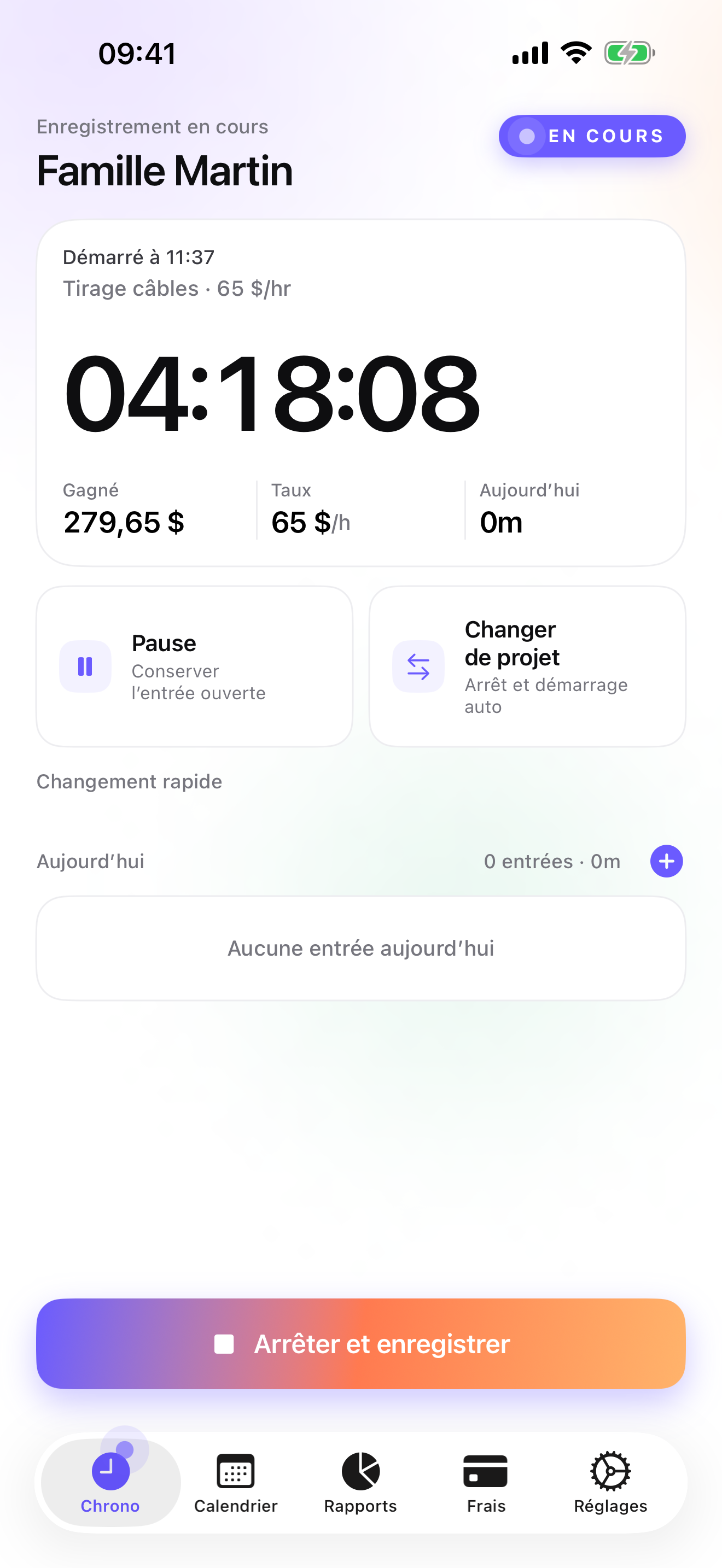
For a painter the Client → Mission → Task tree reads Client → House → Room, with trim and prep as rooms of their own if you want them. Rates cascade from the client, so a time-and-materials job bills at the client rate while a Saturday touch-up gets an override on that single entry. The timer starts from the Apple Watch, the Lock Screen, or the Home Screen widget; moving from the hallway to the master bedroom is one tap and the hallway entry is saved with its hours. At the end of a three-day job, Week view shows what each room took, and Reports show hours by client with a drill into each house.
Fixed-price work fits the Studio tier like this: the quote is created in its own ledger, the client accepts it, a deposit invoice for 20, 30, or 50 percent goes out if you want paint money up front, and when the last coat is dry the quote converts to an invoice in one tap, with your logo, the sequential number for the year, the US layout, and your payment details. The final invoice does not deduct a deposit automatically; you account for it yourself. The hours you logged on each room stay in the app for your reports, which is the only place they belong on a fixed-price job. Paint-store receipts are expenses on the house, photographed and categorised on Pro, so the paint cost sits next to the hours of that house. Slow payers get an overdue reminder with the e-mail already written; a credit note cancels the invoice that was wrong.
It lives on the phone, in a local database with no account, no server on my side, no analytics, and a backup file in your own iCloud Drive, daily from Essential. The limits are real: iPhone and Apple Watch only, no iPad version yet, one user with no crew timesheets, no estimate priced from photos or from a catalogue, no e-signature on the quote, and no accounting connector beyond a configurable CSV.
Strengths
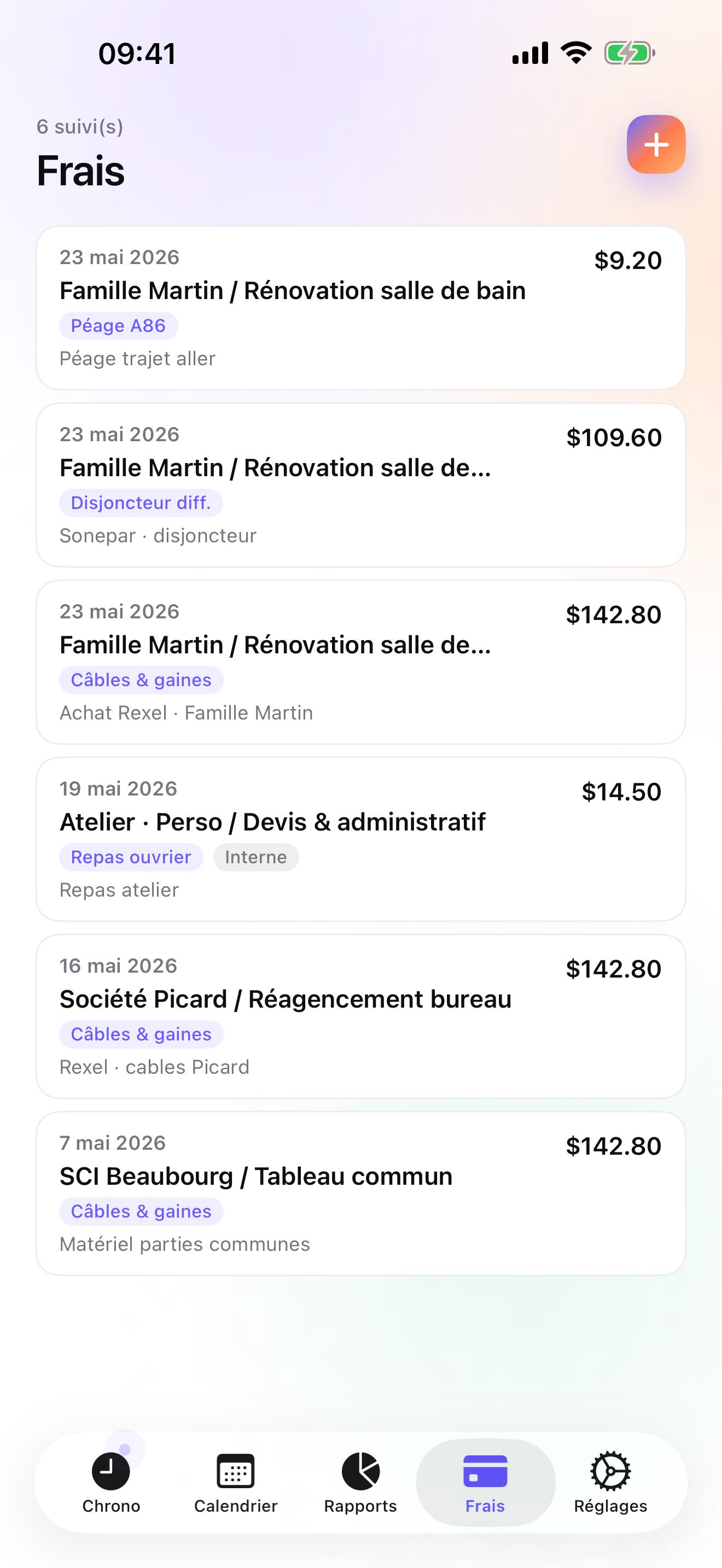
- Rooms as tasks under each house, with hours per room in Week and Month views
- Quote in its own ledger, deposit invoice off the accepted quote, one-tap conversion to invoice on Studio
- Paint-store receipts photographed and pinned to the house; 14 expense presets on Pro
- No account, no vendor cloud; Watch taps queue offline and are backdated
Limits
- No estimating from photos or from a catalogue
- Single user: no crew timesheets, no scheduling
- iPhone and Apple Watch only; no web app, no iPad yet, no Android
- A single rating on the US store since the July 2026 relaunch
Best for: A self-employed painter or decorator, alone or with one helper, who quotes per room, works fixed-price, and sends their own invoices.
Pricing: Free covers 3 clients and 2 entries a day, enough to log one house. Essential is $4.99/mo or $29.99/yr for unlimited entries, expense lines, drill-down reports, CSV and PDF export, and daily iCloud backup. Pro is $7.99/mo or $59.99/yr for receipt photos, the expense presets, and the widgets. Studio is $9.99/mo or $89.99/yr for quotes, deposit invoices, invoices, and credit notes. Studio has no free trial; a watermarked invoice preview shows the PDF with your own figures before you pay.
★★★★★ App works great« I have had this app for a while now. I am a freelancer and it is a must have. I use it everyday to keep track of my time for each individual client. It works great on my iPhone 4. »
LeeCope · App Store review · United States · 2010

Joist
The contractor's estimate, signed in the living room, paid on the spot
Joist is the estimate and invoice maker a lot of painters already carry: the per-room estimate built on the phone during the walkthrough, the client's e-signature, the payment, the invoice. Free tier, paid plans, account required. It has no timer, so it will never tell you the hallway ceiling took four hours instead of two. For a painter who only sells fixed prices and does not care to learn from the hours, it may be enough on its own.
Strengths
- Fast estimates and invoices with e-signature
- Payments from the phone
- Free tier
Limits
- No time tracking
- Account required; documents on their servers
- Useful extras in the paid plans
Best for: A painter who sells fixed-price jobs and wants a signed estimate before the first drop cloth goes down.
Pricing: Free plan, paid plans

Billdu
Invoices, estimates, and receipt capture, with a US focus
Billdu makes invoices and estimates and captures receipts, which is the one feature the other invoice makers here skip and the one a painter with a glovebox of paint-store slips will notice. It is a subscription, needs an account, runs on more than Apple, and is pitched at the US market, with more than twenty-six thousand US ratings. No time tracking, so the hours per room live elsewhere; next to iTimeSheet it matches on receipts, beats it on platforms, and loses on hours and on where the data lives.
Strengths
- Invoices and estimates with receipt capture
- Large, well-rated US user base
- Runs on more than iPhone
Limits
- No time tracking
- Subscription and account; data on the vendor's servers
- Invoicing tool first, nothing on hours per room
Best for: A painter who wants receipts captured inside the invoicing app and bills fixed prices.
Pricing: Subscription

FieldQuote
Quotes priced from photos, launched in December 2025
FieldQuote prices a quote from photos you take of the job, which for a painter walking through a house is a tempting idea, and it sends the invoice. It is iOS-only, a subscription with an account, and it launched in December 2025, so its 291 US ratings at 4.7 are a short track record. There is no time tracking. If the photo-priced quote works for your kind of job, it does something no other app on this list does; weigh that against how new it is.
Strengths
- Quotes priced from photos
- Invoicing included
- Focused on the field quote
Limits
- Launched December 2025; short track record
- Subscription and account; vendor cloud
- No time tracking
Best for: A painter who wants quotes drafted from photos and is comfortable with a young product.
Pricing: Subscription

Invoice Simple
The invoice maker with over a hundred thousand ratings, and no clock
Invoice Simple is exactly that: invoices, estimates, and receipts in seconds, with a free trial and then a subscription, an optional account, on more than Apple. It has more than a hundred and twenty thousand US ratings at 4.9 as of the date above, more than any other app on this page. It does not track time at all. For a painter who wants the fastest possible fixed-price invoice and keeps hours somewhere else, or nowhere, it is the safe pick.
Strengths
- Very fast invoices, estimates, and receipts
- Huge, well-rated user base
- Account optional
Limits
- No time tracking
- Subscription after the trial
- Nothing on hours per room or margins
Best for: A painter who wants the quickest invoice and estimate on the phone and bills by the job, never by the hour.
Pricing: Subscription

Time Squared
Hours and photos per house, feeding an invoice you make elsewhere
Time Squared tracks hours per project with notes and photos, GPS punch in and out, mileage, and project reports built to feed an invoice made in another app. Individual use is free with ads; a premium subscription removes them and adds the rest; iOS-only, account optional. For a painter who invoices from Joist or Invoice Simple and wants the before-and-after photos and the hours on the same job, it is the natural companion. No quotes, no deposits, no credit notes.
Strengths
- Projects with photos, notes, and mileage
- GPS punch in and out
- Project reports built for invoicing
Limits
- No invoices in the app
- Ads on the free tier
- Company features need a subscription and an account
Best for: A painter with an invoicing app in place who wants hours and job photos per house.
Pricing: Free with in-app purchase

atWork
Hours and pay with a Watch app, for the painter on a crew
atWork is the plain hours and pay tracker: clock in from the phone, the Watch, or Siri, add the hours you forgot, export CSV, Excel, or PDF timesheets with overtime. iCloud backup, no account, 22 languages. No invoices, no quotes, no receipts, and a job → client model rather than house and room. For a painter employed by a contractor who wants their own record of hours and overtime, it does the job cheaply and well.
Strengths
- No account, iCloud backup, Apple Watch and Siri
- CSV, Excel, and PDF timesheets
- 22 interface languages
Limits
- No invoicing, quotes, or receipts
- Job / client model only
- Pro features are an in-app purchase
Best for: An employed painter keeping a personal record of hours and overtime.
Pricing: Free with in-app purchase
Side by side
| App | Account required | Where your data lives | Invoices | Receipt photos | Platforms | Pricing | Rating |
|---|---|---|---|---|---|---|---|
| iTimeSheet | No | Your iPhone (your iCloud for backup) | Yes (Studio) | Yes (Pro) | iPhone + Apple Watch | Free plan, paid plans | 5.0 ★ (1) |
| Joist | Yes | Vendor's servers | Yes | — | iPhone + web/other | Free plan, paid plans | 4.8 ★ (14,324) |
| Billdu | Yes | Vendor's servers | Yes | Yes | iPhone + web/other | Subscription | 4.8 ★ (26,237) |
| FieldQuote | Yes | Vendor's servers | Yes | — | iPhone | Subscription | 4.7 ★ (291) |
| Invoice Simple | Optional | Your iPhone; optional cloud | Yes | — | iPhone + web/other | Subscription | 4.9 ★ (122,817) |
| Time Squared | Optional | Your iPhone; optional cloud | No | Yes | iPhone | Free with in-app purchase | 4.9 ★ (2,430) |
| atWork | No | Your iPhone (your iCloud for backup) | No | — | iPhone + Apple Watch | Free with in-app purchase | 4.8 ★ (3,832) |
App Store ratings checked on October 15, 2026 (US App Store).
A day with iTimeSheet
A three-day interior, from walkthrough to invoice, with the features that ship in v5.0.2.
Monday, 17:30, walkthrough
Living room, hallway, two bedrooms, trim. You create the house under the client with a task per room, write the quote in the Invoices tab, and send the PDF from the driveway.
Tuesday, 7:20, paint store
Four gallons, tape, two drop cloths. Photo of the receipt, pinned to the house, category of your choice. The paint now sits next to the hours of that job.
Tuesday to Thursday, rolling
Watch on the wrist, phone in the truck. Timer on the living room; switching to the hallway from the complication saves the living room with its hours. The hallway ceiling takes four hours, not two, and the app remembers that for you.
Thursday, 16:40, last coat
Convert the quote to the invoice in one tap: logo, sequential number, US layout, bank details. If you took a deposit, it is on record as its own invoice; the final invoice does not deduct it automatically, so you account for it.
The following week
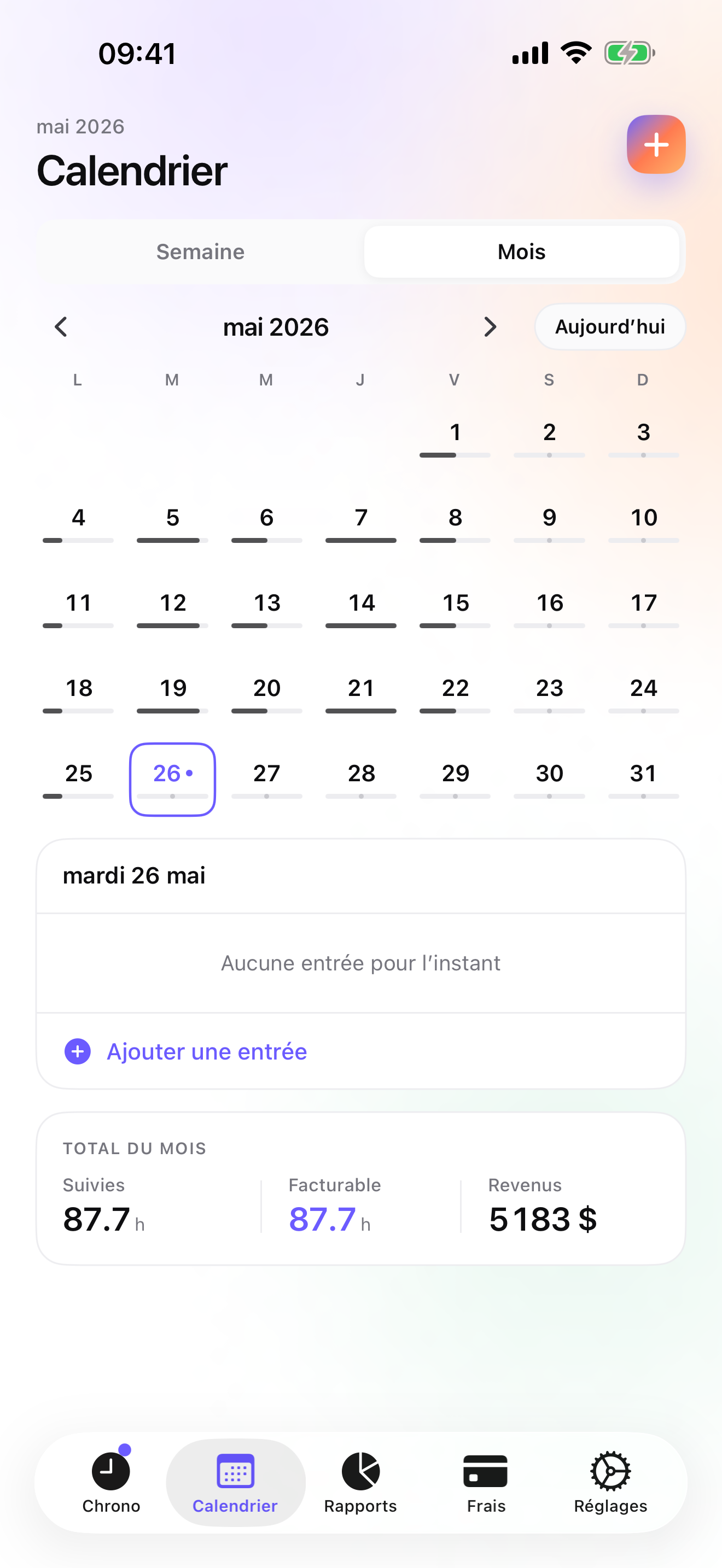
Week view shows the hours per room; the next hallway ceiling gets quoted from that, not from memory. Mark the invoice paid when the transfer lands, or let the overdue reminder send the pre-filled chase e-mail.
Questions people ask
Does the timer work in a house with no cell signal, or in a basement?
Yes. iTimeSheet keeps everything on the phone and never waits for a server, so the timer, the entries, the receipts, and the reports work without any signal. If the phone is in the truck and you only wear the Apple Watch, the Watch queues its taps while out of range and backdates them when the two reconnect. A connection is only needed for the iCloud backup and for the purchase through the App Store.
Where are my clients and my quotes stored?
In a local SQLite database on your iPhone. No account, no server on our side, no analytics SDK, no ads. If you turn on iCloud backup, a single file is written to your own iCloud Drive and is visible in the Files app; from Essential it runs daily without you. The App Store privacy label lists device identifier, purchases, and usage data, all not linked to you and none used for tracking, which the anonymous subscription SDK requires.
I quote per room at a fixed price. How does the invoice work?
On Studio you write the quote in its own ledger, with its own numbering. When the client accepts it, you can issue a deposit invoice for a percentage of it. When the job is done, one tap converts the quote to an invoice with the sequential number for the year, your logo and header, the US layout, and your payment details. The hours you logged per room stay in the app for your reports and your next quote. If the invoice has to change afterwards, a credit note cancels it and re-opens the work. The final invoice does not deduct a deposit automatically; you account for it yourself.
What does it cost for one painter?
Free covers 3 clients and 2 entries a day, no export. Essential is $4.99/mo or $29.99/yr, Pro $7.99/mo or $59.99/yr, and Studio, the tier with quotes and invoices, $9.99/mo or $89.99/yr on the US store. Essential and Pro come with a free trial; Studio does not, but a watermarked preview shows the invoice PDF with your own figures before you pay. Subscriptions are through Apple and are cancelled from your Apple account settings; cancelling never deletes or locks what you entered.
I hire a second painter for exteriors. Can we both log hours on the house?
Not in the same database. iTimeSheet is single-user: one phone, one set of hours, no crew timesheets, no scheduling. In practice, log the house's hours as the job's hours from your own wrist and keep the helper's pay in a separate record, or have them run the app on their phone and send you a CSV. If you need two or three people's hours on each house in one place, none of the solo apps on this page do it; that is the moment to look at a field-service suite built for crews, at a company price.
Verdict
For the painter who is the business, iTimeSheet is the first install: each room is a line under the house, the hours per room tell you which price held, the paint-store receipt sits on the job, and the accepted quote becomes the invoice in one tap on Studio, with the whole history staying on your phone.
If your paperwork is only the fixed-price document, Joist, Billdu, or Invoice Simple make it faster than I do and ask nothing about hours; FieldQuote is the interesting newcomer if quoting from photos suits your jobs. If someone else invoices, Time Squared or atWork will keep your hours and photos for very little.