The 7 best time tracking apps for roofers on iPhone, ranked for 2026
A roof is the only job where the weather signs your timesheet. Three days quoted, a Wednesday of rain, scaffolding on hire by the week, and a pallet of shingles that needs paying for before the first one is nailed. The app that works for a roofer shows what the job is really costing while it is still open, takes the deposit before the materials, and sends the final bill from the truck the day the last ridge cap goes on.
A reviewer in France wrote in 2010 that the app was hyper practical for evaluating the time spent on a task, a project, a client, and for invoicing and evaluating profitability. Profitability is the word a roofer should underline. A tear-off and re-shingle quoted at three days that takes five because of weather and a rotten deck is a job you need to see going wrong while it is going wrong, not when the accountant calls in March.
This guide is for the roofer who runs their own jobs: the walkthrough, the quote, the materials order, the install with one or two helpers, and the invoice. If you have a sales team and crews, the first app on this list is not for you and I point you at the ones that are.
I make iTimeSheet and have since 2008, so read the first entry as the maker's case and the other six as what I would honestly suggest instead. Every rating is the US App Store number on the date at the top of the page, and every claim about another app comes from its own listing.
How I ranked them
I ranked for what a roofing job actually looks like: a deposit, a pile of materials, a few people on a roof, and a weather forecast.
- A deposit before the materialsA roofing job starts with money out: shingles, underlayment, flashing, a dumpster. The app should turn an accepted quote into a deposit invoice without re-typing the job.
- Hire and materials on the job, not on a card statementScaffolding by the week, the dumpster, the lumber for the rotten deck. Each receipt belongs to one roof and should be visible next to that roof's hours.
- Hours against the quote while the job is openWeather days and surprises eat quoted days. You need hours per job in a week or month view while there is still time to talk to the client about the deck.
- Hands on the roof, phone in the truckNobody takes a phone out at the ridge. The timer has to start from the wrist, and an entry started late has to be fixable by hand.
- Final bill from the truckThe day the job is done is the day to invoice. Quote, deposit, final invoice, paid or chased, all from the same list.
- Data that stays with youWhich houses you re-roofed, what you quoted, and who paid late is the most useful file you own. Keep it on the phone, or at least in a format you can leave with.
The ranking
App Store ratings checked on October 15, 2026 (US App Store).

iTimeSheet
Deposit off the quote, receipts on the roof, hours against the days you quoted
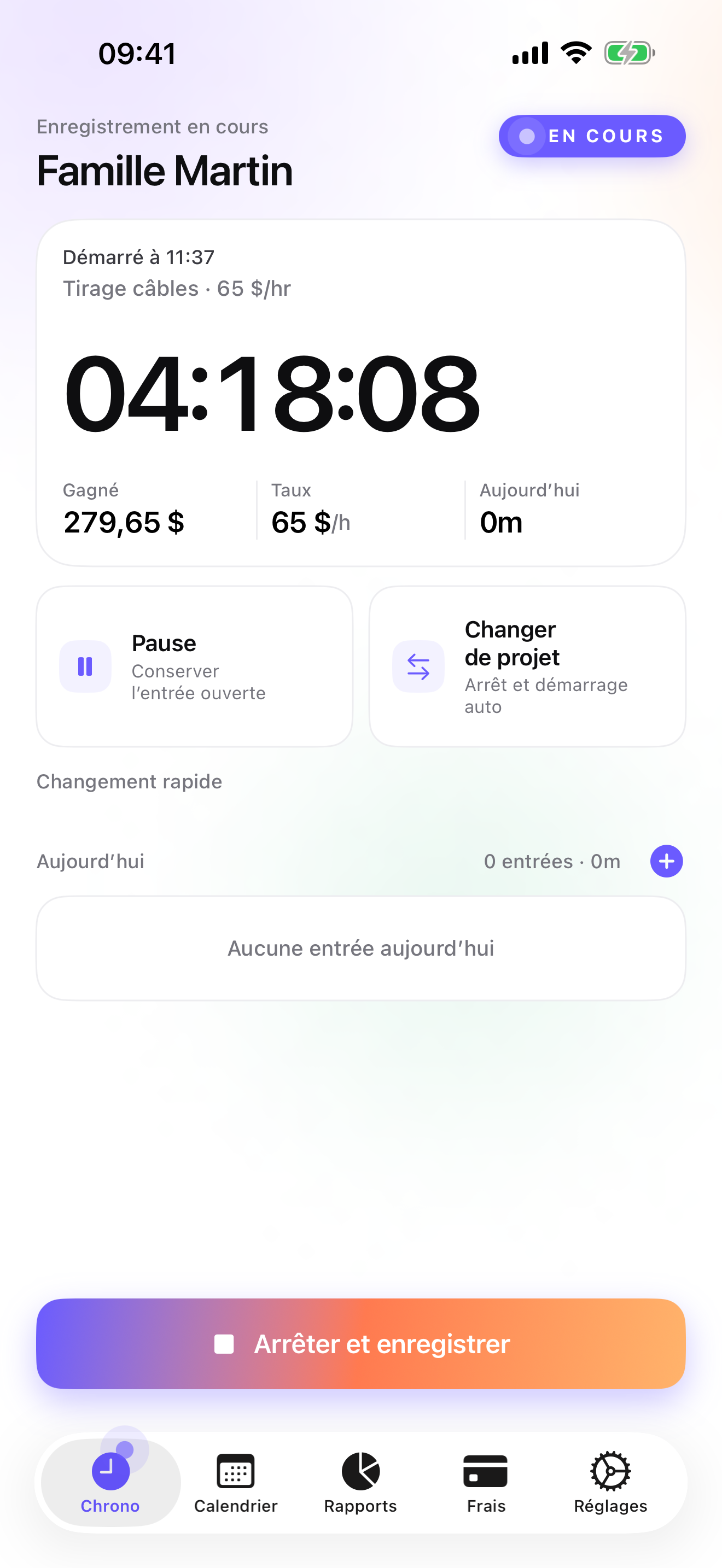
For a roofer the Client → Mission → Task tree reads Homeowner → Roof → Phase: tear-off, deck repair, underlayment, shingles, flashing, cleanup. You can collapse it to roofs only if phases are more detail than you want. The rate cascades from the client, with an override on a phase or a single entry for the day you charge differently. The timer starts from the Apple Watch, so the phone stays in the truck; a tap on the complication starts the last-used phase, and offline taps are queued and backdated when the Watch is back in range. Forgot to start on Monday morning? Add the entry by hand from Today with the real start time.
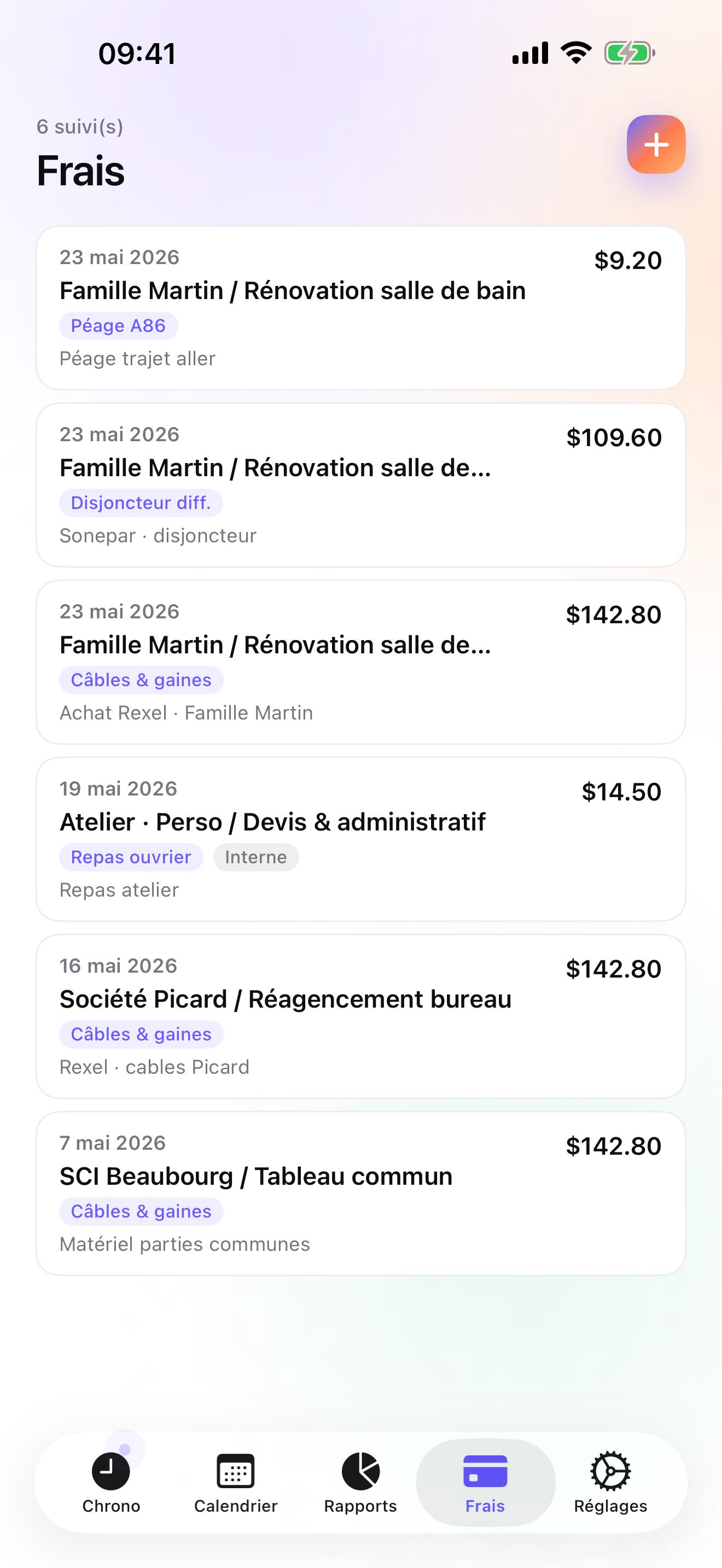
The money side follows the job. On Studio a quote has its own ledger; when the homeowner accepts it, a deposit invoice for 20, 30, or 50 percent of the quote goes out before you order the pallet, and when the last ridge cap is on, the quote converts to an invoice in one tap. The final invoice does not deduct a deposit automatically; you account for it yourself. Scaffolding hire, the dumpster, the lumber for the deck repair: each is an expense on that roof, with a photo of the receipt on Pro, under categories you create once (the fourteen presets cover things like mileage and parking, not materials). Reports show hours per client with a drill into each roof, so a job quoted at three days that is sitting at four and a half shows up on Thursday, not in March. Credit notes exist for the invoice that has to be redone, and overdue reminders come with a pre-filled chase e-mail.
All of it lives in a local database on your phone, with a backup file in your own iCloud Drive, daily from Essential; there is no account and no server on my side. The limits are real: iPhone and Apple Watch only, no iPad version yet, a single user with no crew timesheets, no customer-facing portal or e-signature on the quote, no card payments, and no accounting connector beyond a configurable CSV.
Strengths
- Quote to deposit invoice to final invoice on Studio, with credit notes and overdue chasing
- Receipts for scaffolding, dumpsters, and materials pinned to the roof they belong to; 14 presets on Pro
- Timer from the Watch complication, offline taps backdated; manual entry for the morning you forgot
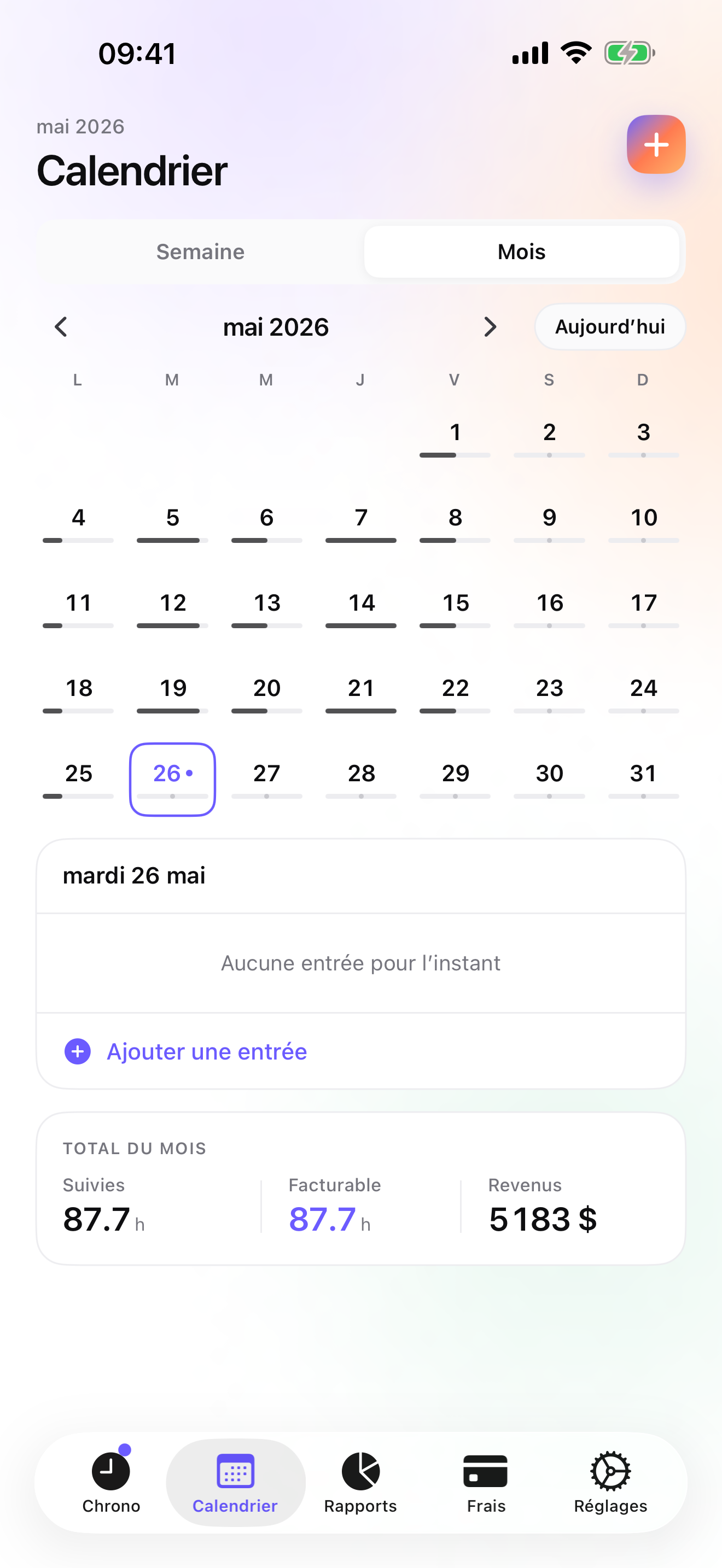
- Hours per roof in Reports, to compare with the days you quoted while the job is open
Limits
- No crew timesheets: single user, no dispatch, no scheduling
- No e-signature on quotes and no card payments in the app
- iPhone and Apple Watch only; no Android, no web app, no iPad yet
- A single rating on the US store since the July 2026 relaunch
Best for: A roofer who runs their own jobs with a helper or two and wants the quote, the deposit, the receipts, the hours, and the final invoice in one phone.
Pricing: Free covers 3 clients and 2 entries a day, no export. Essential is $4.99/mo or $29.99/yr for unlimited entries, expense lines, reports with drill-down, CSV and PDF export, and daily iCloud backup. Pro is $7.99/mo or $59.99/yr for receipt photos, the expense presets, and the widgets. Studio is $9.99/mo or $89.99/yr for quotes, deposit invoices, invoices, and credit notes. Studio has no free trial; a watermarked invoice preview lets you check the PDF with your own figures before paying.
★★★★ NickelAfter reinstalling, works perfectly. Easy to use, intuitive, hyper practical for evaluating the time spent on a task, a project, a client, and for invoicing and/or evaluating profitability
translated from French ·« Après réinstallation, fonctionne parfaitement. Facile a utiliser, intuitif, hyper pratique pour évaluer le temps passe sur une tache, un projet, un client et facturer et/ ou évaluer la rentabilité »
Topissime · App Store review · France · 2010

JobNimbus
The roofing CRM, from the first lead to the final bill
JobNimbus is written for roofing companies and says so in its name: marketing, a sales pipeline, production, and billing, in one account. It is a team product with a subscription to match, and it tracks a job through a company rather than a day through a person. If you have salespeople knocking doors after a hailstorm and crews to schedule, it does a job iTimeSheet does not attempt. If you are one roofer with a helper, most of its screens will stay closed.
Strengths
- Built for roofing: pipeline, production, billing
- Team product with a large, well-rated user base
- Covers the sales side as well as the job
Limits
- Subscription and account; data on the vendor's servers
- Company-scale setup and price
- Not a personal hours tracker
Best for: A roofing company with sales reps and several crews that wants pipeline, production, and billing in one system.
Pricing: Subscription

Jobber
Quotes approved online, crews dispatched, invoices paid by card
Jobber is the general field-service suite: a quote the homeowner approves online, scheduling and dispatch for crews, invoicing, card payments, and a QuickBooks sync. On the US store it is among the best-rated apps on this page. It assumes a business with people in it, and the monthly plans are priced that way. Next to iTimeSheet it wins on everything that involves more than one person and loses on everything that involves owning your data and paying a sole-trader price.
Strengths
- Online quote approval and card payments
- Scheduling and dispatch for several crews
- QuickBooks sync
Limits
- Monthly plans priced for a company
- Account required; customer list on their servers
- Heavy for a one-roof-at-a-time operation
Best for: A roofing contractor with crews and an office that wants quoting, dispatch, and payments in one place.
Pricing: Subscription

ContractorTools
Estimates from a costbook, signed on site, Apple-only
ContractorTools builds estimates from templates and costbooks, collects the homeowner's signature on the spot, and turns the estimate into an invoice. It runs on Apple devices only and it is a subscription; an account is optional. For a roofer whose paperwork is the estimate rather than the hour, it is a focused tool, and the costbook is something iTimeSheet does not have. It does not track time, so the hours against the quote have to come from somewhere else.
Strengths
- Estimates from templates and costbooks
- On-site signature and invoices
- Apple-only, account optional
Limits
- No time tracking
- Subscription
- Estimates and invoices only; the hours live in another app
Best for: A roofer who prices from a costbook and wants a signed estimate before ordering materials.
Pricing: Subscription

Joist
The contractor's estimate and invoice maker, no timer
Joist is the estimate and invoice maker a lot of contractors already have: build the estimate on the phone, get the e-signature, take the payment, send the invoice. It has a free tier and paid plans and needs an account. For a roofer it covers the fixed-price side well and the hourly side not at all, since there is no clock. If most of your jobs are a price per square and you never bill by the hour, it may be all the paperwork you need, with a plain hours log next to it for your own records.
Strengths
- Quick estimates and invoices with e-signature
- Payments on the phone
- Free tier
Limits
- No time tracking
- Account required; documents on their servers
- Paid plans for the useful extras
Best for: A roofer who sells fixed-price jobs and wants a fast, signed estimate and a card payment.
Pricing: Free plan, paid plans

Time Squared
Hours, mileage, and photos per project, feeding an invoice made elsewhere
Time Squared is the tracker that comes closest to iTimeSheet's job-centric idea without the invoice: projects with notes and photos, GPS punch in and out, mileage, and project reports built to feed an invoice you make in another app. Individual use is free with ads, a premium subscription removes them and adds the rest, and it is iOS-only. For a roofer who already invoices from Joist or ContractorTools, it is a sensible companion. It will not do the deposit or the credit note.
Strengths
- Projects with photos, notes, and mileage
- GPS punch in and out
- Project reports meant for invoicing
Limits
- No invoices in the app
- Ads on the free tier
- Company features need a subscription and an account
Best for: A roofer with an invoicing app already in place who wants photos, mileage, and hours per job.
Pricing: Free with in-app purchase
HoursTracker
The hours log with a geofence at the job address
HoursTracker is the plain log with the biggest rating base here, above fifty thousand on the US store. Jobs, clock in and out, breaks, pay, and CSV export, and a geofence that reminds you to clock in when the truck reaches a saved address, which for a roofer spending a week at one house is genuinely useful. No invoicing, no receipts; the account is optional and only for cloud backup. For a roofer on a crew who is paid by the hour, it is enough.
Strengths
- Geofenced clock-in reminders per job site
- Breaks, pay, CSV export
- Account optional, only for backup
Limits
- No invoicing, no receipt photos
- Jobs only, no client → roof → phase
- Billing happens somewhere else
Best for: A roofer employed by a contractor who needs a reliable, exportable record of hours per job.
Pricing: Free with in-app purchase
Side by side
| App | Account required | Where your data lives | Invoices | Receipt photos | Platforms | Pricing | Rating |
|---|---|---|---|---|---|---|---|
| iTimeSheet | No | Your iPhone (your iCloud for backup) | Yes (Studio) | Yes (Pro) | iPhone + Apple Watch | Free plan, paid plans | 5.0 ★ (1) |
| JobNimbus | Yes | Vendor's servers | Yes | — | iPhone + web/other | Subscription | 4.8 ★ (12,791) |
| Jobber | Yes | Vendor's servers | Yes | — | iPhone + web/other | Subscription | 4.8 ★ (21,250) |
| ContractorTools | Optional | Your iPhone; optional cloud | Yes | — | iPhone | Subscription | 4.8 ★ (1,764) |
| Joist | Yes | Vendor's servers | Yes | — | iPhone + web/other | Free plan, paid plans | 4.8 ★ (14,324) |
| Time Squared | Optional | Your iPhone; optional cloud | No | Yes | iPhone | Free with in-app purchase | 4.9 ★ (2,430) |
| HoursTracker | Optional | Your iPhone; optional cloud | No | — | iPhone + web/other | Free with in-app purchase | 4.8 ★ (56,323) |
App Store ratings checked on October 15, 2026 (US App Store).
A day with iTimeSheet
One re-roof, Monday to the following Tuesday, with the features that ship in v5.0.2.
Monday, 7:15, the quote is accepted
The homeowner said yes on Sunday. In the Invoices tab you create the deposit invoice as a percentage of the accepted quote and send the PDF; the shingles get ordered once the transfer lands.
Tuesday, delivery and scaffolding
The pallet arrives and the scaffolding company drops the towers. Two photos of two receipts, both on the Hernandez roof, each in the category you chose for materials and hire.
Wednesday, rain
Nothing logged, and that is the point. Week view shows one empty day on a three-day quote, which is the moment to tell the homeowner the schedule has moved.
Thursday and Friday, on the roof
Phone in the truck, Watch on the wrist. Tear-off on Thursday, deck repair and underlayment on Friday; switching phase from the complication saves the previous entry with its hours.
Tuesday, 16:30, last ridge cap
Convert the quote to the invoice in one tap: logo, sequential number, US layout, bank details. Mark the deposit paid, account for it on the final invoice (it is not deducted automatically), chase the rest with the pre-filled e-mail if it slips past the due date, and Reports shows Due versus Paid for the month.
Questions people ask
Does the Watch work on a roof without the phone nearby?
The Watch has to be paired with the phone, but it does not need the phone within reach to take a tap. Start, pause, resume, and stop apply to the last-used task; if the Watch is out of range of the phone, the taps are queued and backdated once the two are back together. The complication on the watch face shows the running timer. There is no network requirement at any point, because nothing is sent to a server.
Where are my customers and quotes stored?
In a local SQLite database on the iPhone. No account, no server on our side, no analytics SDK, no ads. If you enable iCloud backup, a single backup file is written to your own iCloud Drive and is visible in the Files app; from the Essential tier the backup runs daily by itself. The App Store privacy label declares device identifier, purchases, and usage data, all marked not linked to you and none used for tracking, which the anonymous subscription SDK requires.
How does the deposit work, and what if the final amount changes?
On Studio, a quote has its own numbering and ledger. Once the homeowner accepts it, you issue a deposit invoice for a percentage of the quote. When the job is done, you either convert the quote to an invoice in one tap or invoice the un-invoiced hours and expenses from the Invoices tab, depending on whether you billed the quote or the actual time. If the deck repair added hours and lumber, those entries and expenses sit on the same roof. If an invoice has to be redone, a credit note cancels it and re-opens the work for a corrected one. The final invoice does not deduct a deposit automatically; you account for it yourself.
What does it cost for a roofer working alone?
Free covers 3 clients and 2 entries a day, which is enough to see whether the workflow suits you. Essential is $4.99/mo or $29.99/yr, Pro $7.99/mo or $59.99/yr, and Studio, which carries the quotes, deposits, and invoices, $9.99/mo or $89.99/yr on the US store. Essential and Pro come with a free trial; Studio does not, but a watermarked preview shows the real invoice PDF before you pay. Subscriptions are through Apple, cancelled from your Apple account settings, and cancelling never deletes or locks what you entered.
I have two guys on the roof with me. Can I track their hours too?
Not as separate people. iTimeSheet is one user, one database; there are no crew timesheets, no dispatch, and no approvals. What works for a small crew: log the roof's hours once from your own wrist as the job's hours and bill the job, while each helper keeps their own hours in whatever they like for payroll. If you need each person's hours on each roof in one place, JobNimbus or Jobber do that and charge a company price for it.
Verdict
For the roofer who runs their own jobs, iTimeSheet is the one I would put on the phone first: the deposit comes off the quote before the pallet is ordered, the scaffolding and the lumber sit on the roof they were bought for, the hours show up against the days you quoted while the weather is still eating them, and the final invoice leaves from the truck.
With sales reps and crews, JobNimbus or Jobber are the tools and the subscription is the cost of doing that business. If your paperwork is the fixed-price estimate and nothing else, ContractorTools or Joist with Time Squared or HoursTracker alongside will cover you.