The 6 best time tracking apps for masons and bricklayers on iPhone, ranked for 2026
Masonry is sold by the day and lost by the day. A retaining wall quoted at four days, a morning when the mortar will not cure below freezing, a pallet of block that the yard wants paid before it leaves, and a helper on a day rate whether the wall goes up or not. The right app records which days actually went into which wall, keeps the yard receipt with it, and asks for the deposit before the truck is loaded.
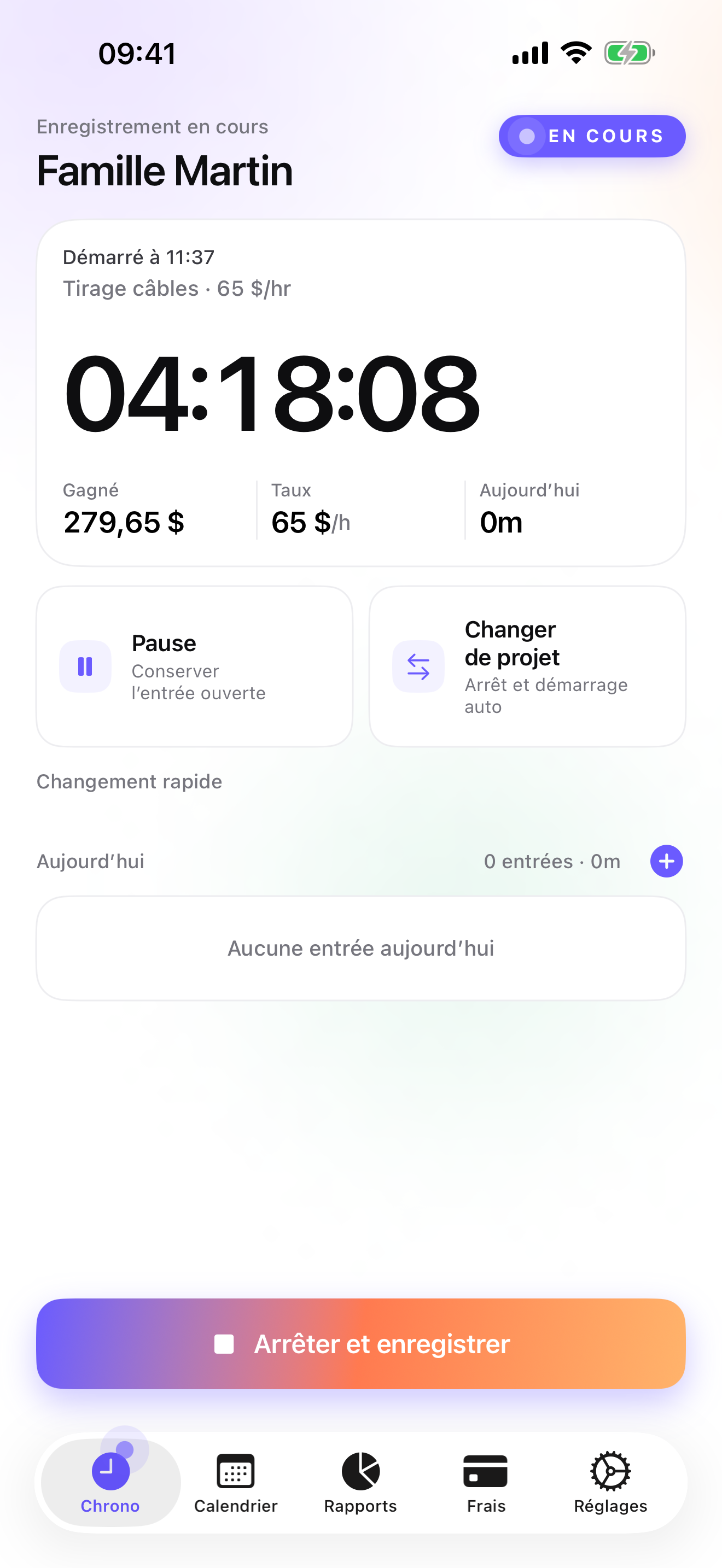
A Polish user wrote in 2010 that what he liked most was a working day with no holes in the record. That review was about the old version, but the point is a mason's point. A day with a footing in the morning and a chimney repair in the afternoon has to add up to the day you worked, or the hours you cannot account for become the hours you do not bill.
This list is for the mason who is the business: the walkthrough, the estimate, the block order, the wall, the invoice. If you run three crews, the ranking flips, and I say which tools to look at.
I build the first app on this page and have since 2008. The ratings are the US App Store numbers on the date at the top, the facts about other apps come from their own listings, and where another tool is better for you, I say so.
How I ranked them
I ranked for a trade that bills by the day, buys heavy material up front, and loses days to weather.
- Days that add upA footing in the morning and a chimney in the afternoon must sum to the day, with no holes. The app should switch jobs without losing the running entry, and let you fix a forgotten one by hand.
- A deposit before the palletBlock, brick, and mortar are paid at the yard. The accepted estimate should turn into a deposit invoice before you load the truck.
- Yard receipts on the wall they builtEach delivery belongs to one job. Pinned there, it ends up on the invoice; in the truck's door pocket, it does not.
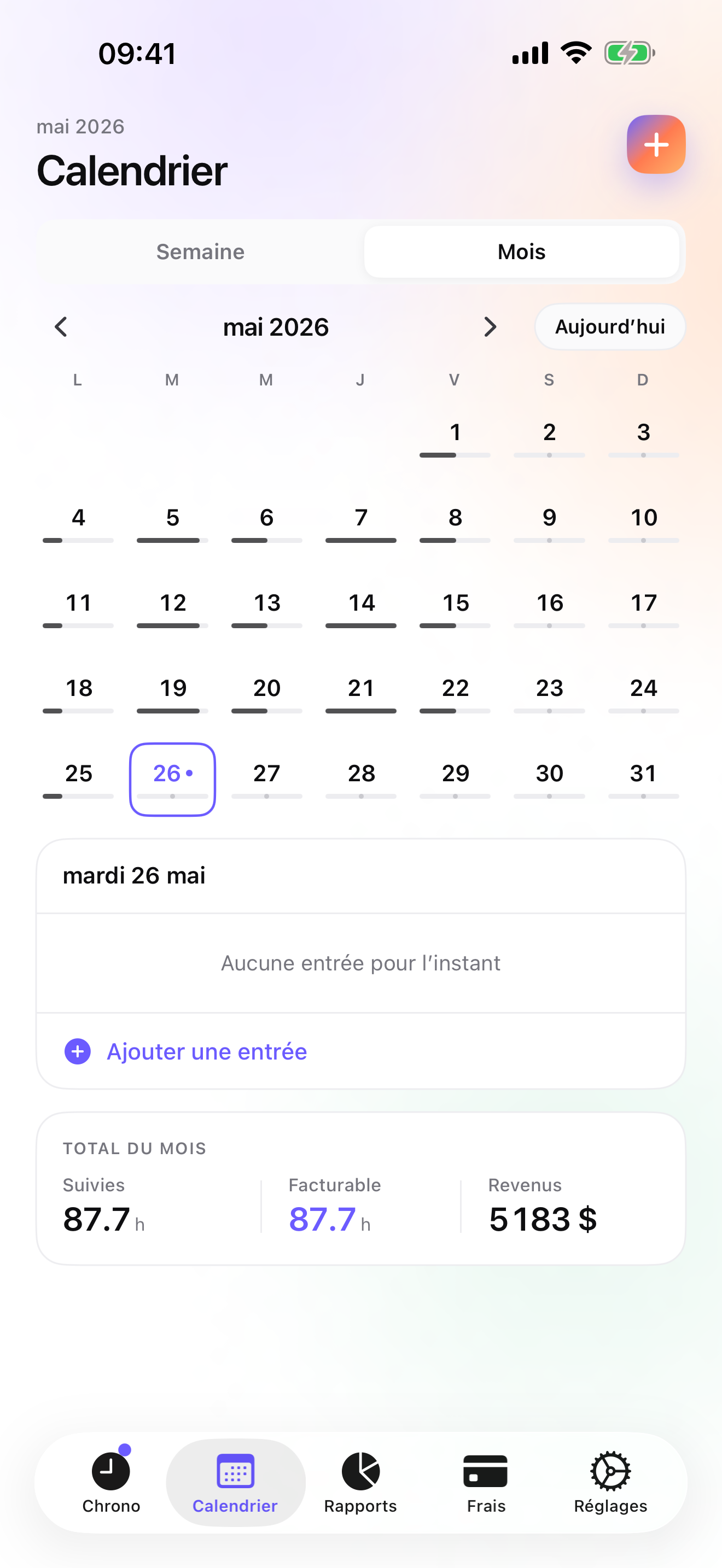
- Weather days visible while the job is openA four-day wall that took six because of frost is a conversation to have on day five, with the hours in front of you.
- Gloves on, phone awayStart and switch from the Watch. A timer that needs a clean thumb on a phone screen will not be started at 7 am on a scaffold.
The ranking
App Store ratings checked on October 15, 2026 (US App Store).

iTimeSheet
Days per wall, the yard receipt beside them, the deposit before the block arrives
For a mason the Client → Mission → Task tree reads Customer → Job → Stage: footing, block, cap, pointing. Set your rate on the customer, override it on a stage, or on a single entry for the Saturday you charge more. The timer starts from the Apple Watch, the Lock Screen, or a widget, and switching from the footing to the chimney saves the first entry with its duration. Forgot to start? Add the entry by hand from Today. Week view shows days per job, frost days included as the gaps they are.
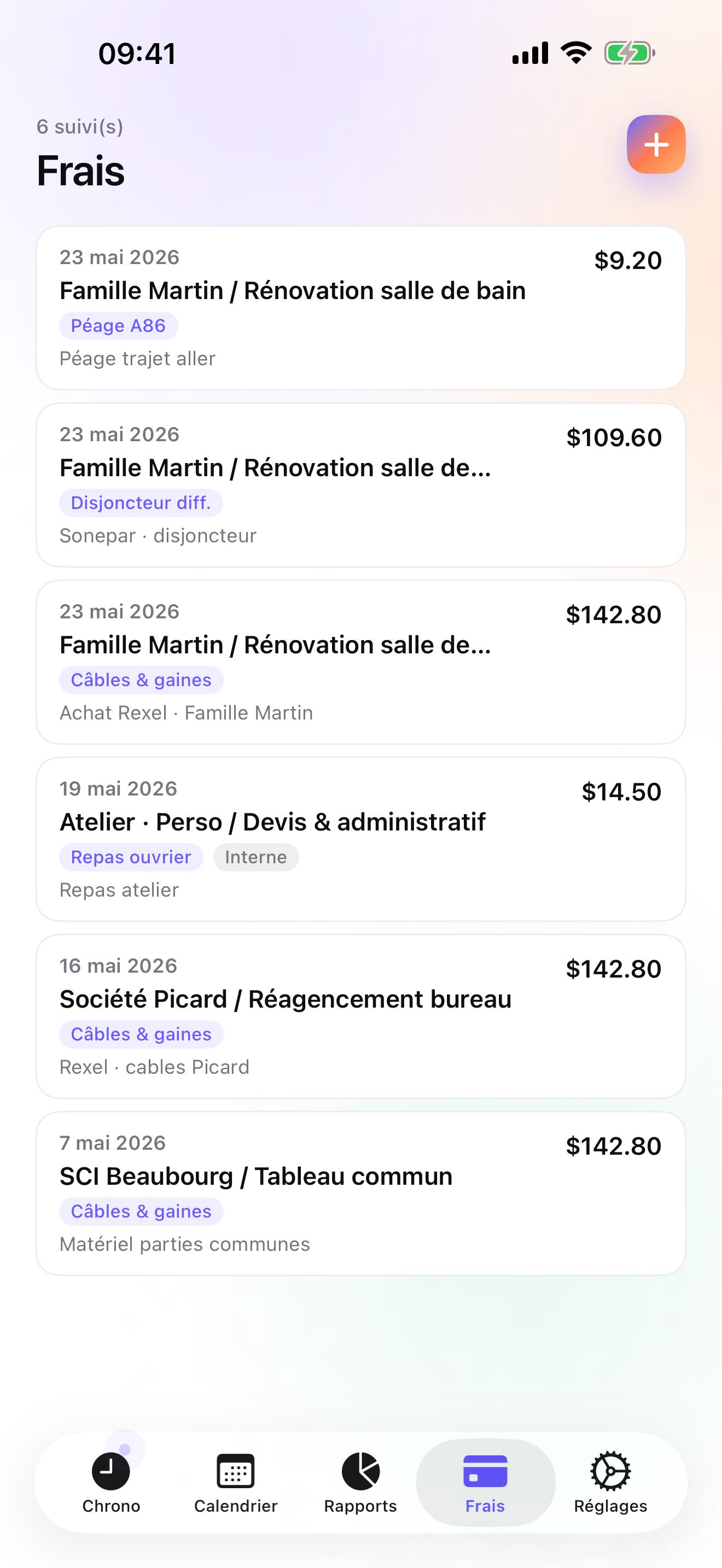
On Studio the estimate is a quote with its own ledger; once accepted, a deposit invoice for 20, 30, or 50 percent of it goes out before you order the block, and when the cap is on, the quote converts to the final invoice in one tap with your logo, numbering, US layout, and bank details. The final invoice does not deduct a deposit automatically; you account for it yourself. Yard receipts are expenses on the job: create a Materials category once (there is no materials preset among the fourteen on Pro), then photograph each ticket and pin it. Overdue invoices come with a pre-filled chase e-mail.
There is no account and no server on my side; the data sits in a local database with a backup file in your own iCloud Drive, daily from Essential. The limits: one user, so no crew time cards and no GPS check-in; iPhone and Apple Watch only, no iPad yet; no e-signature on quotes, no card payments, and no accounting connector beyond CSV.
Strengths
- Switching jobs saves the previous entry; forgotten ones go in by hand from Today
- Quote, deposit invoice, final invoice, and credit note on Studio
- Yard receipts photographed and pinned to the job on Pro
- No account, no vendor cloud; Watch taps queue offline and are backdated
Limits
- No crew time cards or GPS check-in: single user
- No materials preset; you create that category yourself
- iPhone and Apple Watch only; no web, no iPad yet, no Android
- One US rating since the July 2026 relaunch
Best for: A self-employed mason, alone or with one helper, who estimates, orders, builds, and invoices their own jobs.
Pricing: Free covers 3 customers and 2 entries a day, no export. Essential is $4.99/mo or $29.99/yr for unlimited entries, reports, CSV and PDF export, and daily iCloud backup. Pro is $7.99/mo or $59.99/yr for receipt photos and the widgets. Studio is $9.99/mo or $89.99/yr for quotes, deposits, and invoices; it has no free trial, but a watermarked invoice preview shows the PDF with your real data first.
★★★★★ ZnakomityPausing is already there. It works excellently for recording working time. The nice thing is that the next task is by default "pushed up" against the last one of the day, so there are no gaps. I recommend it.
translated from Polish ·« Pauzowanie już jest. Znakomicie sprawdza się do rejestrowania czasu pracy. Fajne jest to, że kolejne zadanie defaultowo "dosuwane" jest do ostatniego w danym dniu i nie ma dziur. Polecam. »
Majster · App Store review · Poland · 2010

Workyard
GPS time cards for a construction crew
Workyard is built for the owner who manages a crew: each worker clocks in on their phone, GPS confirms the site, and the time cards arrive ready for payroll. It is a subscription with an account and it does not invoice. Its US rating is 4.0 on 243 ratings as of the date above. If your problem is three helpers on day rates across two sites, it answers a question iTimeSheet does not even ask.
Strengths
- GPS time cards per worker and site
- Built for crew payroll
- Owner's view across sites
Limits
- No invoicing
- Subscription and account; vendor cloud
- Lower US rating than others here
Best for: A masonry contractor paying a crew by the day who needs verified time cards.
Pricing: Subscription

Probuild
Projects, estimates, invoices, timesheets, and team messages
Probuild puts a contractor's projects, estimates, invoices, timesheets, and team messages in one account, on a subscription. It is highly rated on the US store on a few hundred ratings. It thinks in projects shared by a team, which suits a mason with two or three people on a job better than one working alone.
Strengths
- Estimates, invoices, and timesheets in one place
- Team messages on the project
- Well rated on the US store
Limits
- Subscription and account required
- Data on the vendor's servers
- Heavier than a solo mason needs
Best for: A small masonry outfit with a team that wants estimates, invoices, and shared timesheets together.
Pricing: Subscription

Buildertrend
Construction management for builders, priced for firms
Buildertrend runs whole construction projects for builders, with portals for the client and the subcontractors. If you are the subcontractor, you may well be invited into someone else's Buildertrend; as a sole mason, buying it yourself would be paying a firm's price for a portal nobody else logs into.
Strengths
- Client and subcontractor portals
- Full project management
- Large US rating base
Limits
- Priced for firms
- Account and vendor cloud
- Not a personal time or invoice tool
Best for: A builder or general contractor coordinating subs and clients on full projects.
Pricing: Subscription

ContractorTools
Estimates from a costbook, signed on site
ContractorTools builds estimates from templates and costbooks, takes the signature on site, and invoices; Apple-only, subscription, account optional. A costbook of block, mortar, and rebar prices is something iTimeSheet does not have. It does not track time, so the days per wall come from another app.
Strengths
- Templates and costbooks
- On-site signature
- Invoices from the estimate
Limits
- No time tracking
- Subscription
- Apple-only
Best for: A mason who prices from a costbook and wants the estimate signed before ordering.
Pricing: Subscription

HoursTracker
A clock with a geofence, for the mason on someone else's crew
HoursTracker logs jobs, breaks, and pay, exports CSV, and can remind you to clock in when you reach a saved site. It has more than fifty thousand US ratings; the account is optional, only for backup. No invoices and no receipts, which is fine if someone else pays you.
Strengths
- Geofenced clock-in reminders
- Breaks, pay, CSV
- Account optional
Limits
- No invoicing
- No receipt photos
- Flat job list
Best for: An employed mason keeping proof of hours and overtime.
Pricing: Free with in-app purchase
Side by side
| App | Account required | Where your data lives | Invoices | Receipt photos | Platforms | Pricing | Rating |
|---|---|---|---|---|---|---|---|
| iTimeSheet | No | Your iPhone (your iCloud for backup) | Yes (Studio) | Yes (Pro) | iPhone + Apple Watch | Free plan, paid plans | 5.0 ★ (1) |
| Workyard | Yes | Vendor's servers | No | — | iPhone + web/other | Subscription | 4.0 ★ (243) |
| Probuild | Yes | Vendor's servers | Yes | — | iPhone + web/other | Subscription | 4.9 ★ (401) |
| Buildertrend | Yes | Vendor's servers | — | — | iPhone + web/other | Subscription | 4.5 ★ (5,109) |
| ContractorTools | Optional | Your iPhone; optional cloud | Yes | — | iPhone | Subscription | 4.8 ★ (1,764) |
| HoursTracker | Optional | Your iPhone; optional cloud | No | — | iPhone + web/other | Free with in-app purchase | 4.8 ★ (56,323) |
App Store ratings checked on October 15, 2026 (US App Store).
A day with iTimeSheet
A garden wall, estimate to invoice, with shipped features only.
Monday, estimate accepted
The customer agrees to the quote you sent from the Invoices tab. You issue a deposit invoice as a percentage of it; the block gets ordered when it is paid.
Wednesday, yard pickup
Photo of the yard ticket, pinned to the job under your Materials category. It now sits beside the job's hours.
Thursday, frost
Nothing logged; the empty day shows in Week view. Friday you start from the Watch, switch from footing to block at noon, and the morning entry is saved with its hours.
Next Wednesday, cap on
Convert the quote to the invoice in one tap and account for the deposit already paid, since it is not deducted automatically; the overdue reminder chases it if it is late.
Questions people ask
Does it work on a site with no signal?
Yes. Everything is stored on the phone, so the timer and entries never wait for a network. The Apple Watch queues taps when it is away from the phone and backdates them on reconnect. You need a connection only for the iCloud backup and the App Store purchase.
Where is my customer list kept?
In a local SQLite database on your iPhone. No account, no server of ours, no analytics, no ads. Backup is one file in your own iCloud Drive, visible in Files, written daily from Essential. The App Store label lists device ID, purchases, and usage data, not linked to you and not used for tracking.
How does a deposit before materials work?
On Studio, the quote has its own numbering. Once the customer accepts, you issue a deposit invoice for a percentage of it and send the PDF. When the job is finished, the quote converts to the final invoice in one tap; if something goes out wrong, a credit note cancels it and re-opens the work. The final invoice does not deduct a deposit automatically; you account for it yourself.
What does it cost for one mason?
Free: 3 customers, 2 entries a day. Essential $4.99/mo or $29.99/yr, Pro $7.99/mo or $59.99/yr, Studio $9.99/mo or $89.99/yr on the US store. Studio has the invoicing and no trial, but a watermarked preview shows your real invoice first. Subscriptions run through Apple and cancelling never locks your data.
I pay a helper a day rate. Can the app track his days?
Not as a second person: iTimeSheet is single-user. You can log the job's hours from your own wrist and keep the helper's days in a separate record, or he can run the app on his phone and send you a CSV. For several workers with verified time cards, Workyard is built for that.
Verdict
For the mason who is the business, iTimeSheet is the first install: the days per wall add up without holes, the yard ticket sits on the job, and the deposit goes out before the block does, all on your own phone.
With a crew on day rates, Workyard or Probuild do what a single-user app cannot. If you price from a costbook, ContractorTools is worth a look; if you work for someone else, HoursTracker is enough.