The 7 best time tracking apps for tilers on iPhone, ranked for 2026
A tiler sells square feet and spends hours. The shower quoted at a price per square foot looks the same on paper as the kitchen backsplash, until the shower turns out to need a full day of leveling, a niche, and cuts around a valve nobody mentioned. The price is what the client pays; the hours are how you find out whether that price was any good. The right app keeps both, plus the receipt for the thinset and the tile itself.
A user in Ireland wrote in 2009 that he intended to use the app for all his tracking because it worked really nicely, and that it was well worth the money. All his tracking is the right ambition for a tiler: not just the hourly jobs, but the fixed-price ones too, because those are the ones where the hours teach you something.
This list is for the tiler who measures, quotes, buys the tile, sets it, grouts it, and invoices. If you run a crew across several bathrooms at once, I name the tools built for that.
I make the first app on this list and have since 2008. Ratings are the US App Store numbers on the date above; facts about other apps come from their own listings.
How I ranked them
I ranked for a trade that quotes by area, works by the hour, and pays for material before the first tile is set.
- Hours per room and per stageDemo, leveling, setting, grout. Knowing which stage ate the day is how a square-foot price gets corrected.
- The fixed price on the invoice, the hours in the reportThe client agreed a price. The hours stay yours, in a report the client never sees.
- A deposit before the tile orderPorcelain is paid for at the showroom. The accepted quote should become a deposit invoice in a couple of taps.
- Receipts on the bathroom they went intoTile, thinset, membrane, trim. Pinned to the job, the real material cost sits next to the hours.
- Starts with wet handsThinset on your fingers, phone in the bucket of tools. A tap on the Watch is the only realistic way to start a timer.
The ranking
App Store ratings checked on October 15, 2026 (US App Store).

iTimeSheet
Square-foot prices on the invoice, real hours per stage in your pocket
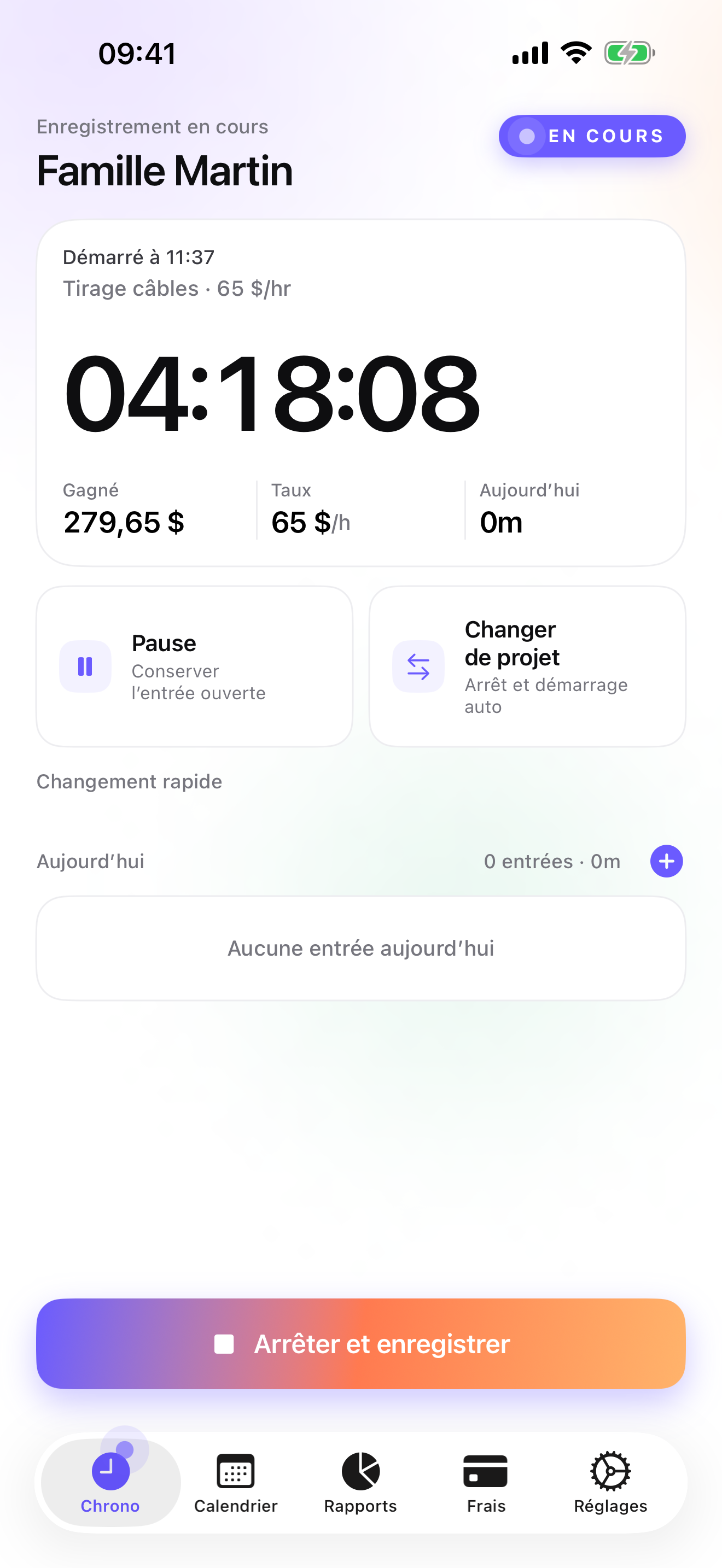
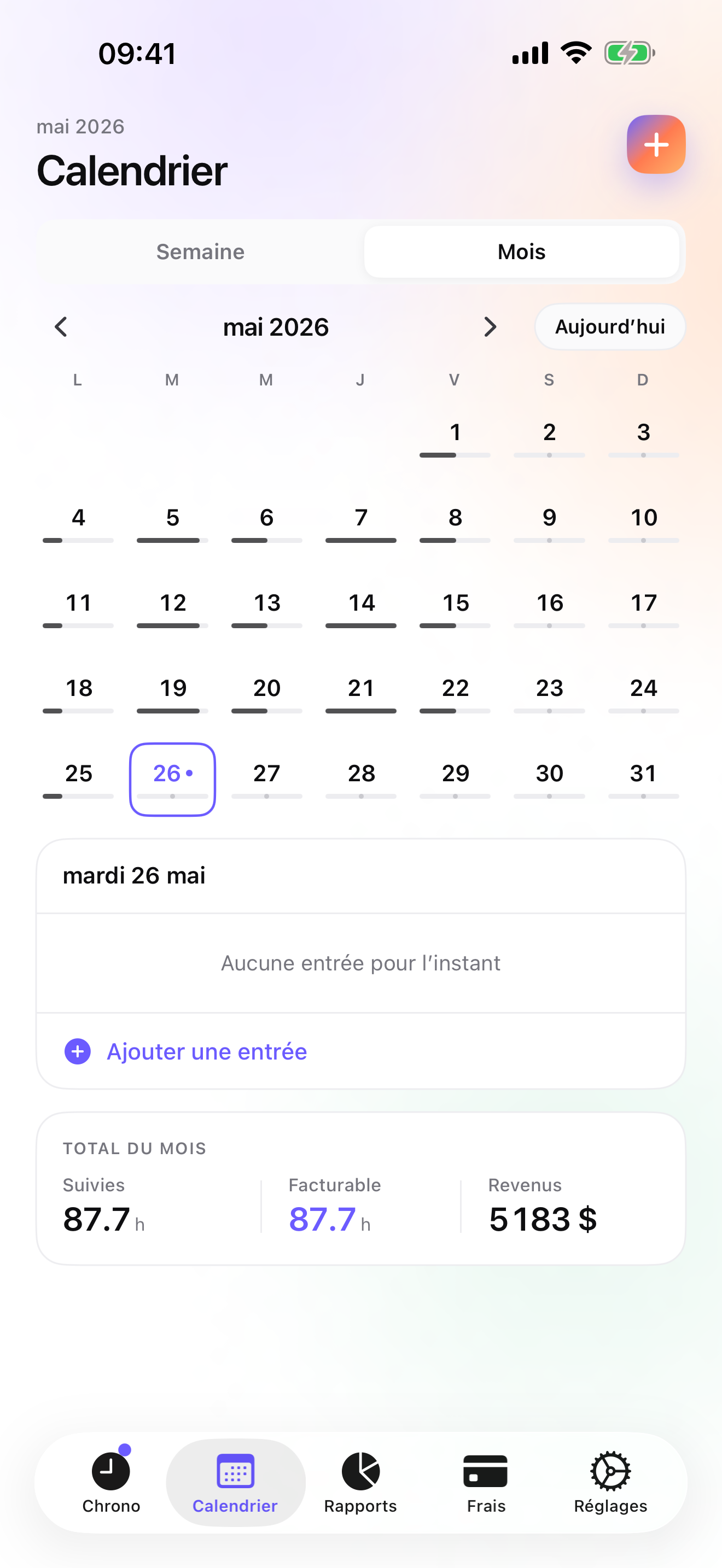
The Client → Mission → Task tree becomes Client → Room → Stage for a tiler: the shower, the floor, the backsplash, each with demo, prep, setting, and grout. Rates cascade from the client to the room and the stage, and a single entry can be overridden. The timer starts and switches from the Apple Watch, so the phone stays clean; each switch saves the previous stage with its hours. After a few jobs, Reports show hours by client with a drill into each room, which is the number you need to fix a square-foot price.
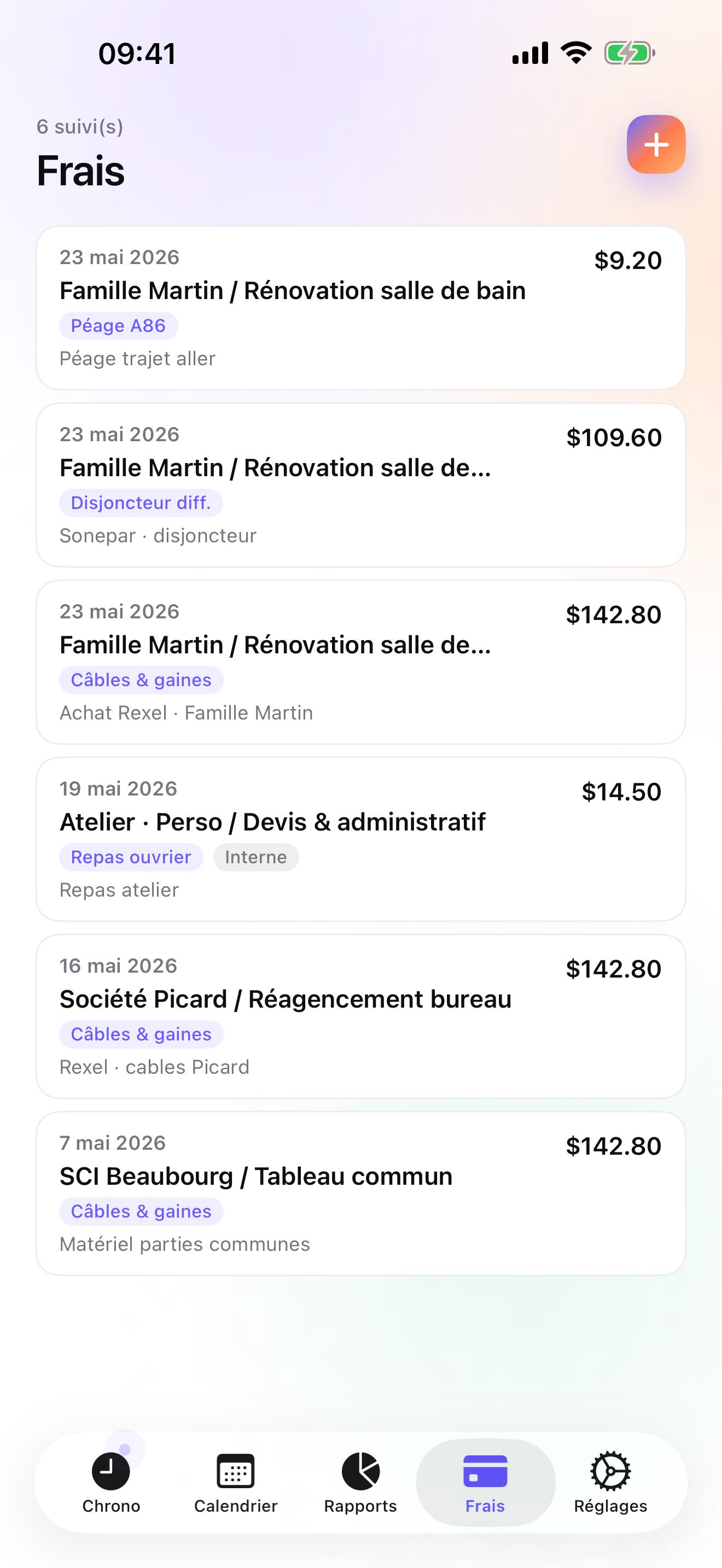
On Studio you write the quote at the price you worked out, in its own ledger with its own numbering. A deposit invoice for 20, 30, or 50 percent of the accepted quote pays for the tile, and the quote converts to the final invoice in one tap with logo, numbering, US layout, and bank details. The final invoice does not deduct a deposit automatically; you account for it yourself. Tile, thinset, and membrane receipts are photographed and pinned to the room on Pro, under a category you create once, since the fourteen presets cover things like mileage, parking, and hardware rather than tile. Credit notes and overdue chase e-mails are there when you need them.
Everything stays on the phone with a backup file in your own iCloud Drive, daily from Essential; no account, no server on my side. The limits: no area calculator or costbook, no e-signature, no card payments, one user, iPhone and Apple Watch only with no iPad version yet, and CSV rather than an accounting connector.
Strengths
- Hours per room and stage under each client, with drill-down reports
- Quote, deposit invoice, and one-tap conversion to invoice on Studio
- Material receipts photographed and pinned to the room on Pro
- No account, no vendor cloud; Watch taps work offline and backdate
Limits
- No square-foot calculator or costbook for building the quote
- No e-signature or card payments
- Single user; iPhone and Apple Watch only, no iPad yet
- One US rating since the July 2026 relaunch
Best for: A self-employed tiler who quotes fixed prices and wants to know, job by job, whether those prices hold.
Pricing: Free covers 3 clients and 2 entries a day, no export. Essential is $4.99/mo or $29.99/yr for unlimited entries, drill-down reports, export, and daily iCloud backup. Pro is $7.99/mo or $59.99/yr for receipt photos and widgets. Studio is $9.99/mo or $89.99/yr for quotes, deposits, and invoices; no free trial on Studio, but a watermarked invoice preview shows the PDF with your data first.
★★★★★ Easy to use, effective« I intend to use it for all my tracking as it works really nicely. Well worth the money. Nice. »
GaiusCoffey · App Store review · Ireland · 2009

Joist
The signed estimate, with no hours
Joist builds the estimate on the phone, gets the e-signature, takes payment, and sends the invoice; free tier, paid plans, account required. It covers the square-foot sale well and the hours not at all, which is the half that tells you whether the sale was good.
Strengths
- Estimates and invoices with e-signature
- Payments
- Free tier
Limits
- No time tracking
- Account required
- Extras on paid plans
Best for: A tiler who sells fixed prices and wants a signed estimate fast.
Pricing: Free plan, paid plans

ContractorTools
Costbook estimates, Apple-only
ContractorTools builds estimates from templates and costbooks, collects a signature on site, and invoices; subscription, account optional, Apple devices only. A costbook with your tile, setting, and grout prices is the thing iTimeSheet lacks. It does not track time.
Strengths
- Templates and costbooks
- On-site signature
- Invoices
Limits
- No time tracking
- Subscription
- Apple-only
Best for: A tiler who prices from a costbook and wants a professional estimate on site.
Pricing: Subscription

Billdu
Invoices and estimates with receipt capture
Billdu makes invoices and estimates and captures receipts, on a subscription with an account, aimed at the US market and well rated on more than twenty-six thousand US ratings. Receipts are covered; hours are not.
Strengths
- Receipt capture
- Invoices and estimates
- Large US rating base
Limits
- No time tracking
- Subscription and account
- Vendor cloud
Best for: A tiler who wants receipts and invoices in one app and bills fixed prices.
Pricing: Subscription

Tradify
Quotes and timesheets for a tiling business with staff
Tradify handles quoting, scheduling, invoicing, staff timesheets, and QuickBooks and Xero sync for businesses of one to twenty people, on a subscription. It does the staff side iTimeSheet does not. For a single tiler it is a company tool at a company price.
Strengths
- Quotes, scheduling, staff timesheets
- QuickBooks and Xero sync
- Sized for small teams
Limits
- Subscription and account
- Built around staff
- Small US rating base
Best for: A tiling business with a few employees and an accounting package.
Pricing: Subscription

HoursTracker
The hours log, if someone else sends the invoice
HoursTracker logs jobs, breaks, and pay, exports CSV, and can remind you to clock in at a saved site; more than fifty thousand US ratings, account optional. No invoices, no receipts.
Strengths
- Geofenced reminders
- Pay and CSV export
- Account optional
Limits
- No invoicing
- No receipts
- Flat job list
Best for: A tiler working for a contractor who needs proof of hours.
Pricing: Free with in-app purchase

Time Squared
Hours and photos per job, invoiced elsewhere
Time Squared tracks hours per project with photos, mileage, and GPS punch, and its project reports are meant to feed an invoice made elsewhere. Free with ads, premium subscription, iOS-only. Handy for before-and-after photos of a shower.
Strengths
- Photos and mileage per project
- GPS punch
- Project reports
Limits
- No invoicing
- Ads on free tier
- Team features cost extra
Best for: A tiler with an invoicing tool who wants hours and photos per job.
Pricing: Free with in-app purchase
Side by side
| App | Account required | Where your data lives | Invoices | Receipt photos | Platforms | Pricing | Rating |
|---|---|---|---|---|---|---|---|
| iTimeSheet | No | Your iPhone (your iCloud for backup) | Yes (Studio) | Yes (Pro) | iPhone + Apple Watch | Free plan, paid plans | 5.0 ★ (1) |
| Joist | Yes | Vendor's servers | Yes | — | iPhone + web/other | Free plan, paid plans | 4.8 ★ (14,324) |
| ContractorTools | Optional | Your iPhone; optional cloud | Yes | — | iPhone | Subscription | 4.8 ★ (1,764) |
| Billdu | Yes | Vendor's servers | Yes | Yes | iPhone + web/other | Subscription | 4.8 ★ (26,237) |
| Tradify | Yes | Vendor's servers | Yes | — | iPhone + web/other | Subscription | 4.8 ★ (179) |
| HoursTracker | Optional | Your iPhone; optional cloud | No | — | iPhone + web/other | Free with in-app purchase | 4.8 ★ (56,323) |
| Time Squared | Optional | Your iPhone; optional cloud | No | Yes | iPhone | Free with in-app purchase | 4.9 ★ (2,430) |
App Store ratings checked on October 15, 2026 (US App Store).
A day with iTimeSheet
One shower, quote to invoice, with what ships today.
Monday, measured and quoted
You send the quote from the Invoices tab at your square-foot price. The client accepts that evening.
Tuesday, showroom
Deposit invoice for a percentage of the quote, paid; tile ordered. The showroom receipt is photographed and pinned to the shower under your Tile category.
Wednesday to Friday
Watch taps for demo, leveling, setting, and grout. Leveling takes nine hours instead of three, and the app keeps that for you.
Friday, 17:00
Quote converted to the invoice in one tap. Next week's shower gets quoted with nine hours of leveling in mind.
Questions people ask
Does it work in a gutted bathroom with no Wi-Fi or signal?
Yes. All data is on the phone and the app never waits for a server. The Apple Watch queues taps when away from the phone and backdates them later. A connection is needed only for the iCloud backup and the App Store purchase.
Where are my clients and prices stored?
In a local SQLite database on your iPhone; no account, no server of ours, no analytics, no ads. The backup is a single file in your own iCloud Drive, daily from Essential. The App Store label lists device ID, purchases, and usage data, not linked to you and not used for tracking.
Can I quote a fixed price and still see my hours?
Yes. On Studio, the quote carries the price you agreed and converts to the invoice in one tap; the client sees that price. Your hours per room and per stage stay in the app, in Week, Month, and Reports, for you alone. That is how you check a square-foot price against reality.
What does it cost for one tiler?
Free: 3 clients, 2 entries a day. Essential $4.99/mo or $29.99/yr, Pro $7.99/mo or $59.99/yr, Studio $9.99/mo or $89.99/yr on the US store. Studio, the invoicing tier, has no trial but a watermarked invoice preview with your real data. Subscriptions go through Apple, and cancelling never locks your data.
Can I work out square footage in the app?
No. iTimeSheet has no area calculator and no costbook; you work out the price as you do today and enter it on the quote. What it adds is the other half: how many hours that area really took. If you want the estimate built from a price list, ContractorTools is designed for that.
Verdict
For the tiler who quotes and invoices their own jobs, iTimeSheet is the first install: the client sees the square-foot price, you see the hours per stage behind it, and the tile receipt and the deposit sit on the same room.
If you want the estimate built from a costbook, ContractorTools does it; Joist and Billdu are quick at the paperwork. With staff, Tradify. On someone else's job, HoursTracker.