The 7 best time tracking apps for photographers on iPhone, ranked for 2026
A photographer sells a day and works three. The wedding is eight hours on the clock, the culling and editing another fifteen at the desk, the drive and the scouting visit somewhere in between, and the deposit that held the date was paid six months ago. Packages hide the real hourly rate. The right app records the shoot and the edit separately on the same client, keeps mileage and the rented lens on the job, and turns the package quote into the final invoice.
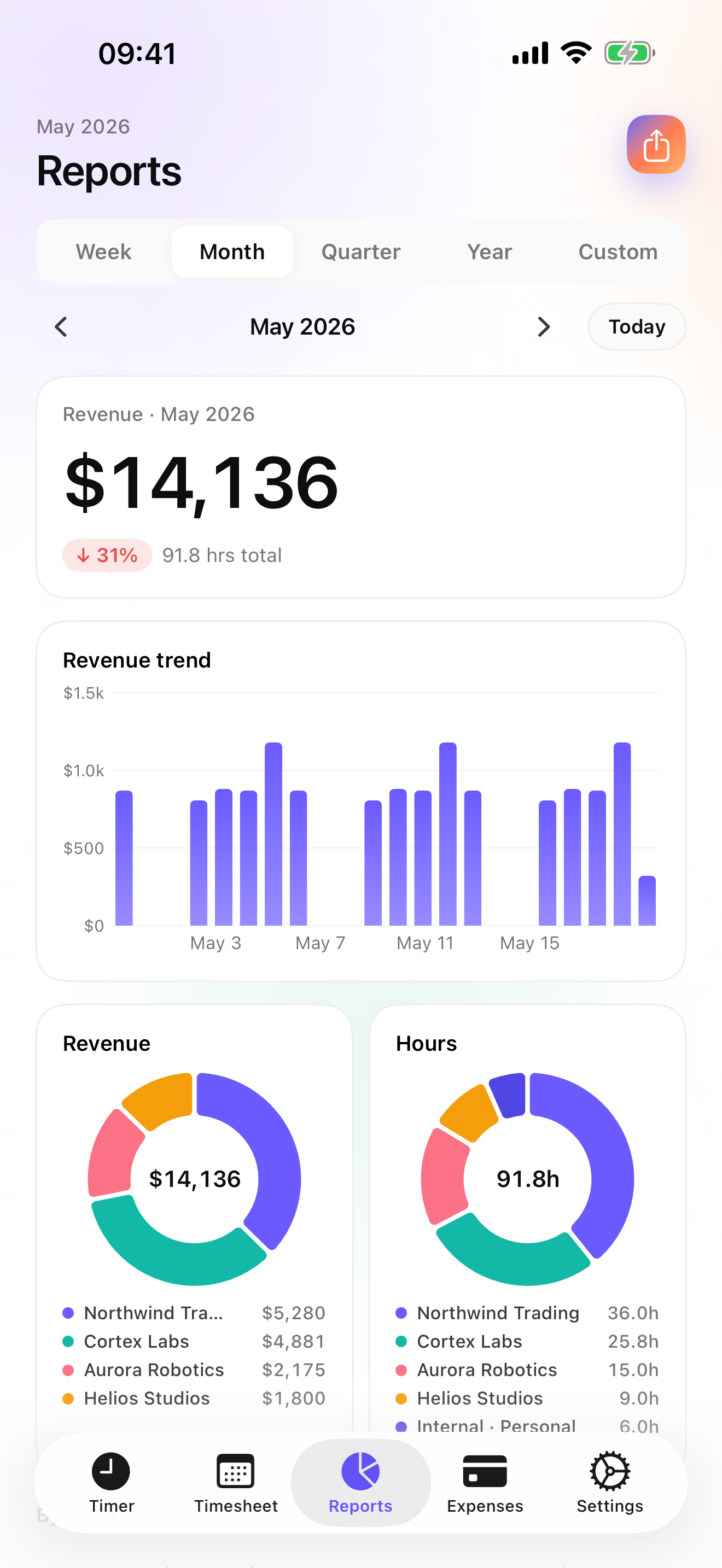
One of the very first reviews of iTimeSheet, in 2008, came from a French photographer. He needed to know how he spent his time, liked the Excel export by e-mail, and was waiting for charts that would show how his tasks were spread over a period. He also thanked me for answering all his e-mails within a day. Charts with drill-down are in the Reports tab today, and photographers still underestimate their editing hours.
This list is for the photographer who books, shoots, edits, and bills alone. If you run a studio with associate shooters, the studio-management tools below are closer to your needs.
I make the first app here and have since 2008. Ratings are the US App Store numbers on the date at the top; facts about other apps come from their own listings.
How I ranked them
I ranked for package pricing, long editing sessions, and a deposit long before the shoot.
- Shoot and edit as separate linesA package's price only makes sense against its total hours. Shoot, cull, edit, deliver, each on its own line under the job.
- A deposit to hold the dateWeddings and events book months ahead with a deposit. The accepted quote should produce the deposit invoice and, later, the final invoice.
- Mileage and gear on the jobThe drive to the venue and the rented lens are costs of that job, not of the year.
- A timer for the desk and the fieldStart the edit from a widget at the desk, the shoot from the Watch at the venue.
- Client data you holdCouples' names, addresses, and dates are personal data. Know where they are stored.
The ranking
App Store ratings checked on October 15, 2026 (US App Store).

iTimeSheet
Shoot hours, edit hours, and the deposit on the same job, and your real rate per package
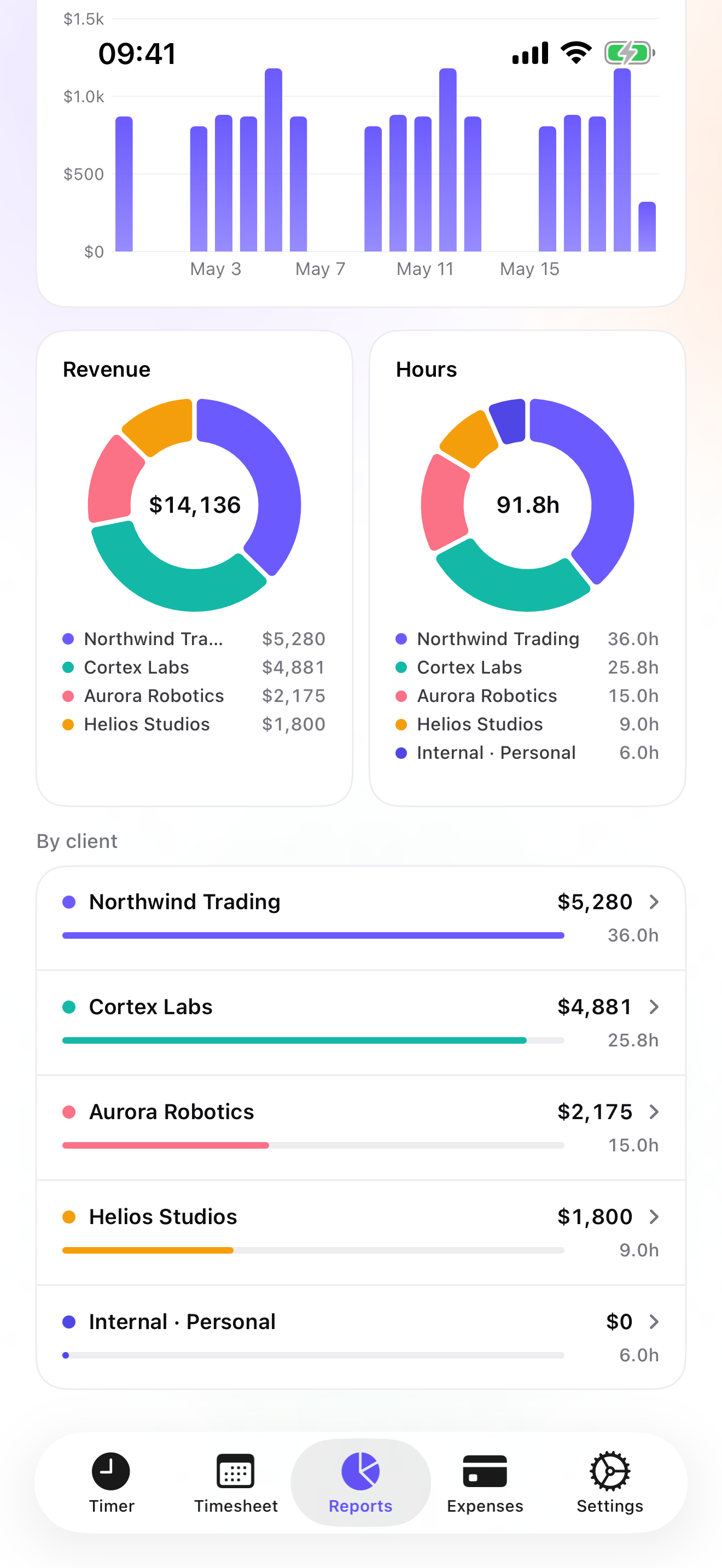
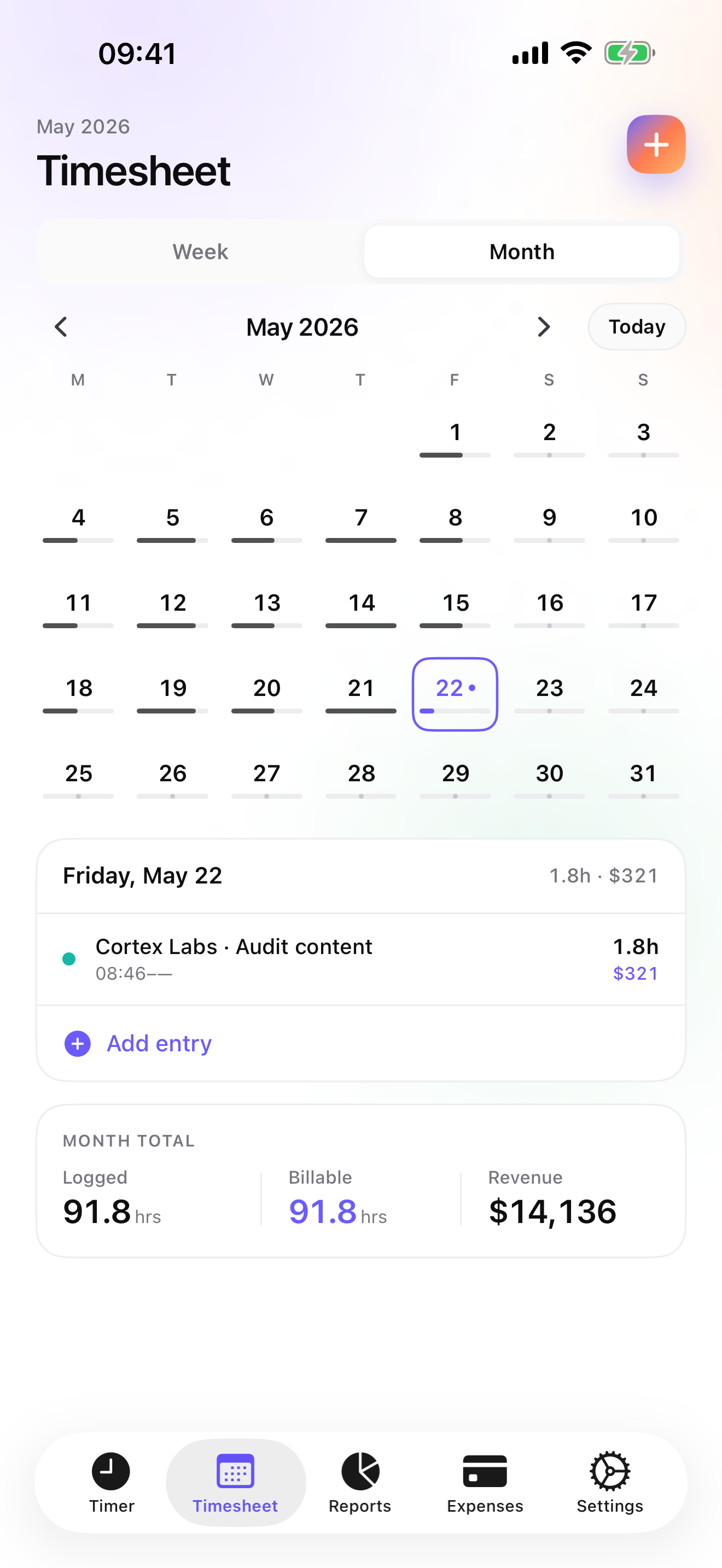
The Client → Mission → Task tree reads Client → Job → Task: scouting, shoot, cull, edit, delivery. Rates cascade from the client to the job and the task, with a single-entry override. The timer starts from the Apple Watch at the venue and from a widget or the Lock Screen at the desk; switching tasks saves the running entry. Reports from Essential show revenue and hours by client with a drill into each job, so a package's real hourly rate is one division away.
On Studio, the package is a quote; once accepted, a deposit invoice for 20, 30, or 50 percent of it holds the date, and after delivery the quote converts to the final invoice in one tap with your logo, numbering, US layout, and payment details. The final invoice does not deduct a deposit automatically; you account for it yourself. On Pro, Mileage, Parking, Hotel, and Hardware are among the fourteen expense presets, with receipt photos pinned to the job; lens rental gets a category you create once. Overdue invoices come with a pre-filled chase e-mail.
Data stays in a local database on the phone with a backup in your own iCloud Drive, daily from Essential; no account, no server on my side. The limits: no contracts or e-signature, no questionnaires, no online booking or payments, no gallery delivery, no Mac app for the editing desk, no iPad version yet, and CSV rather than an accounting connector.
Strengths
- Shoot, cull, and edit as tasks under each job, with drill-down reports
- Deposit invoice off the accepted package quote, then the final invoice on Studio
- Mileage, parking, hotel, and hardware presets with receipt photos on Pro
- No account, no vendor cloud
Limits
- No contracts, questionnaires, or online payments
- No gallery delivery
- No Mac app for the editing desk; no iPad yet
- One US rating since the July 2026 relaunch
Best for: A solo photographer who shoots and edits their own work and wants to know what each package really pays per hour.
Pricing: Free covers 3 clients and 2 entries a day, no export. Essential is $4.99/mo or $29.99/yr for reports, export, and daily backup. Pro is $7.99/mo or $59.99/yr for the expense presets, receipt photos, and widgets. Studio is $9.99/mo or $89.99/yr for quotes, deposits, and invoices; no free trial, but a watermarked invoice preview shows the PDF with your data first.
★★★★★ Tip top !I am very happy with this software. As a photographer, I need to know how I spend my time, and iTimeSheet lets me do it very quickly. The Excel export by e-mail is a very good idea. I am now waiting for the statistics module with charts to visualise how my tasks are spread over a given period. PS: thanks to the developer, who answered all my e-mails in less than 24 hours. Real follow-up!
translated from French ·« Je suis tres content de ce logiciel. En tant que photographe, j ai besoin de savoir comment je depense mon temps et Itimesheet me permet de la faire tres rapidement. L export excel par mail est une tres bonne idee. J attend maintenant le module statistique avec les graphes pour visualiser la repartition de mes taches sur une periode donnee. Ps : merci au developpeur qui a repondu en moins de 24 heures a tous mes mails. Un vrai suivi ! »
Matador200 · App Store review · France · 2008

HoneyBook
Contracts, invoices, and payments for independents
HoneyBook handles contracts, invoices, payments, and projects for independents, on a subscription, with more than sixteen thousand US ratings. Signed contracts and online payment are the parts iTimeSheet does not do; hours are not its focus.
Strengths
- Contracts and payments
- Client workflow
- Large US rating base
Limits
- Subscription and account
- Vendor cloud
- Not a time tracker
Best for: A photographer who wants contracts and online payments in one place.
Pricing: Subscription

Pixieset Studio Manager
Studio manager from the gallery company
Pixieset's Studio Manager covers bookings, contracts, questionnaires, and payments for photographers, on a free tier with paid plans, rated 4.9 on more than two thousand US ratings. If you already deliver galleries with Pixieset, keeping the business side there is natural.
Strengths
- Bookings, contracts, questionnaires
- Payments
- Free tier
Limits
- Account required
- Vendor cloud
- Not a time tracker
Best for: A photographer who books and gets paid online, especially one already using Pixieset.
Pricing: Free plan, paid plans

Studio Ninja
Studio management built for photographers
Studio Ninja handles leads, quotes, contracts, and invoices for photography studios, on a subscription. It shows 4.8 on only 16 US ratings as of the date above, so there is less public feedback than for the others.
Strengths
- Leads, quotes, contracts, invoices
- Made for photographers
- Subscription includes the workflow
Limits
- Few US ratings
- Account and vendor cloud
- No time tracking focus
Best for: A photographer who wants a photography-specific lead-to-invoice workflow.
Pricing: Subscription

Timemator
Pay once, track editing time privately
Timemator is a one-time purchase with no account, iCloud sync, rates and earnings, a Live Activity, and a PDF report for clients. No invoicing. A good private tracker if your invoices come from a studio-management tool.
Strengths
- One-time purchase
- No account
- Rates and earnings
Limits
- No invoices
- Folder / task model
- Small US rating base
Best for: A photographer who invoices elsewhere and wants a private tracker.
Pricing: One-time purchase

Invoice Simple
The fastest invoice, without the hours
Invoice Simple makes invoices, estimates, and receipts in seconds, with a free trial then a subscription, account optional, and more than a hundred and twenty thousand US ratings. No time tracking, so your real hourly rate stays a guess.
Strengths
- Very fast invoices
- Huge US rating base
- Account optional
Limits
- No time tracking
- Subscription after trial
- No job history
Best for: A photographer who wants quick invoices and does not track hours.
Pricing: Subscription

atWork
Hours and pay for a studio employee
atWork tracks hours and pay with an Apple Watch app and Siri, exports CSV, Excel, and PDF timesheets, backs up to iCloud, needs no account, and speaks 22 languages. No invoicing; right for an employed second shooter or retoucher.
Strengths
- No account
- CSV, Excel, PDF timesheets
- Watch and Siri
Limits
- No invoicing
- Job / client only
- Pro is an in-app purchase
Best for: A photographer employed by a studio who tracks hours and overtime.
Pricing: Free with in-app purchase
Side by side
| App | Account required | Where your data lives | Invoices | Receipt photos | Platforms | Pricing | Rating |
|---|---|---|---|---|---|---|---|
| iTimeSheet | No | Your iPhone (your iCloud for backup) | Yes (Studio) | Yes (Pro) | iPhone + Apple Watch | Free plan, paid plans | 5.0 ★ (1) |
| HoneyBook | Yes | Vendor's servers | Yes | — | iPhone + web/other | Subscription | 4.8 ★ (16,325) |
| Pixieset Studio Manager | Yes | Vendor's servers | Yes | — | iPhone + web/other | Free plan, paid plans | 4.9 ★ (2,360) |
| Studio Ninja | Yes | Vendor's servers | Yes | — | iPhone + web/other | Subscription | 4.8 ★ (16) |
| Timemator | No | Your iPhone (your iCloud for backup) | No | — | iPhone + Apple Watch | One-time purchase | 4.7 ★ (170) |
| Invoice Simple | Optional | Your iPhone; optional cloud | Yes | — | iPhone + web/other | Subscription | 4.9 ★ (122,817) |
| atWork | No | Your iPhone (your iCloud for backup) | No | — | iPhone + Apple Watch | Free with in-app purchase | 4.8 ★ (3,832) |
App Store ratings checked on October 15, 2026 (US App Store).
A day with iTimeSheet
One wedding, from booking to final invoice, with shipped features only.
March, booking
Package quote sent from Studio; accepted. Deposit invoice for a percentage of it, paid, and the date is held.
September, the day
Watch tap on Shoot at the venue, nine hours. Mileage and parking go on the job with the Pro presets.
The next two weeks
Widget at the desk: cull, then edit, each a task. Fourteen hours of editing, recorded instead of guessed.
Delivery
The quote converts to the final invoice in one tap; the deposit is not deducted automatically, so you account for it. Reports show the job at twenty-five hours: your real rate for that package.
Questions people ask
Does it work at a remote venue with no signal?
Yes. iTimeSheet stores everything on the phone and never waits for a server. The Apple Watch queues taps away from the phone and backdates them on reconnect. Only the iCloud backup and App Store purchases need a connection.
Where are my clients' names and dates stored?
In a local SQLite database on your iPhone; no account, no server of ours, no analytics, no ads. Backup is one file in your own iCloud Drive, daily from Essential. The privacy label lists device ID, purchases, and usage data, not linked to you and not used for tracking.
How do the deposit and the final invoice work?
On Studio, the package is a quote. Once accepted, you issue a deposit invoice for a percentage of it. After delivery, the quote converts to the final invoice in one tap, with your logo, numbering, US layout, and payment details. If the package changes, a credit note cancels the wrong invoice. The final invoice does not deduct a deposit automatically; you account for it yourself.
What does it cost for one photographer?
Free: 3 clients, 2 entries a day, no export. Essential $4.99/mo or $29.99/yr, Pro $7.99/mo or $59.99/yr, Studio $9.99/mo or $89.99/yr on the US store. Studio has no trial but a watermarked invoice preview. Subscriptions go through Apple; cancelling never locks your data.
Can it send contracts or take online payments?
No. iTimeSheet makes quotes, deposit invoices, invoices, and credit notes as PDFs with your payment details; it does not send contracts for signature or process payments. If you need those, HoneyBook, Pixieset, or Studio Ninja do them, and you can still keep your hours in iTimeSheet.
Verdict
For the photographer who shoots and edits alone, iTimeSheet is the first install: shoot and edit hours on the same job, the deposit off the package quote, mileage and gear where they belong, and a real hourly rate per package, with clients' details on your phone.
For contracts, questionnaires, and online payments, HoneyBook, Pixieset, or Studio Ninja. For a private tracker, Timemator.