The 7 best time tracking apps for landscapers on iPhone, ranked for 2026
A landscaper's April is a calendar of properties: the Tuesday mow route, the HOA strip on Thursday, a spring cleanup that runs a day over, and one design-and-plant job that is a project of its own. Most of it is billed every month on a seasonal agreement, some of it by the hour, and all of it from the cab of a truck. The right app knows which property got which hours, reminds you at the start of the month who to bill, and does it without a laptop.
In 2009 someone who had been using the free Lite version wrote that he hesitated to pay for the full app, did it for the export, and found it easy to apply to a variety of job types. Variety is a landscaper's normal week: maintenance on a contract, an hourly cleanup, a fixed-price planting. An app that only fits one of those leaves the other two in a notebook.
This guide is for the owner-operator with a truck, a trailer, and maybe one helper. If you run three crews on routes, the dispatch platforms below are built for you and I say so.
I build the first app on the list and have since 2008. Ratings are the US App Store numbers on the date above, facts about other apps come from their listings, and I point out where they beat mine.
How I ranked them
I ranked for a season of recurring visits, a few projects, and a lot of driving.
- A home for each property, all seasonTwenty-six mows on one property belong together. The app needs a level for the property and the agreement, with visits underneath.
- Monthly billing that does not depend on memoryAgreements bill on the first of the month. A reminder that the month has turned is worth more than a dashboard you forget to open.
- Hourly extras on the same customerThe cleanup after a storm is billed by the hour on top of the agreement. It should sit on the same customer at its own rate.
- Mileage and dump fees on the jobTrips to the green-waste site and the nursery belong to a property. Logged there, they get billed.
- Usable with gloves onTen stops a day means ten starts and stops. A Watch tap beats a passcode typed with grass on your fingers.
The ranking
App Store ratings checked on October 15, 2026 (US App Store).

iTimeSheet
A property per mission, the season's visits under it, and a nudge on the first of the month
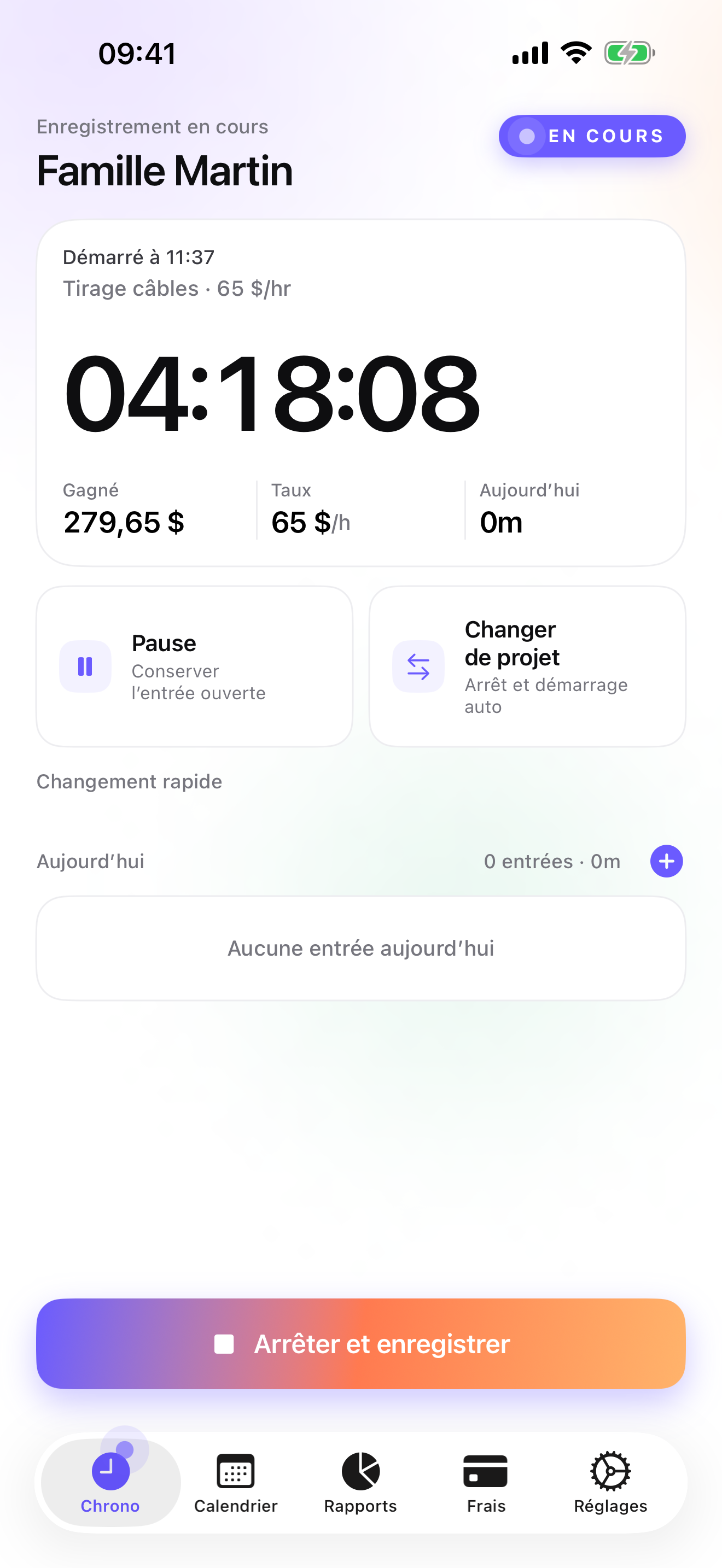
For a landscaper the Client → Mission → Task tree reads Customer → Property or Agreement → Service: mow, cleanup, planting. A homeowner on a seasonal agreement gets one mission for the season; the storm cleanup is a task with its own rate, and a one-off planting can be its own mission. Rates cascade from the customer, with an override on a single entry. Start and switch from the Apple Watch between stops; each switch saves the previous property's entry with its duration.
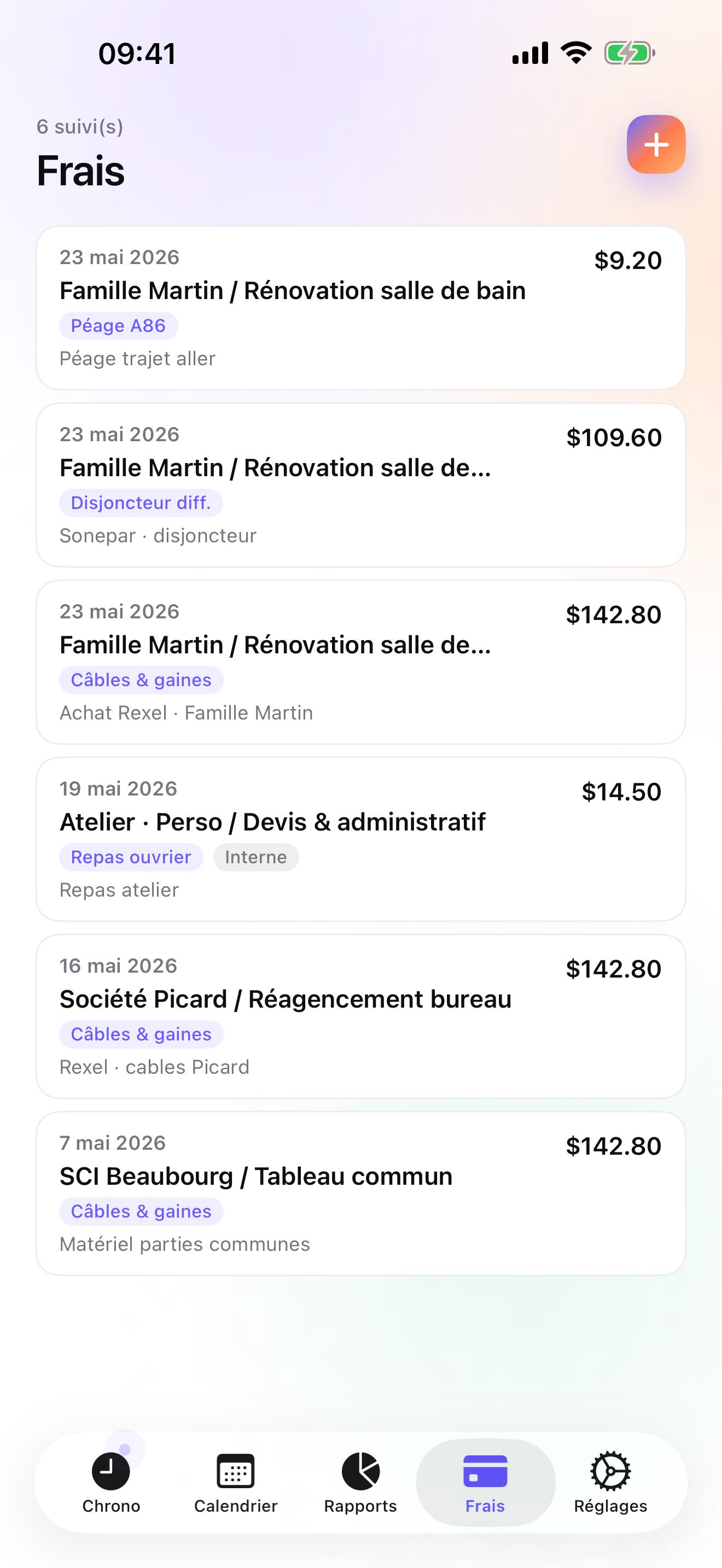
On Pro, mileage is one of the fourteen ready-made expense categories, and a dump-site or nursery receipt is photographed and pinned to the property under a category you create once. On Studio the Invoices tab shows each customer's un-invoiced amount and makes the PDF in one tap with your logo, numbering, US layout, and payment terms. A monthly recurring-invoice notification reminds you to bill your agreements; you still generate each invoice yourself. Quotes, deposit invoices, credit notes, and overdue chase e-mails cover the design jobs and the slow payers.
Data stays on the phone, with a backup file in your own iCloud Drive, daily from Essential; no account, no server on my side. The honest limits: no route planning or dispatch, one user, no card payments, no customer portal, iPhone and Apple Watch only with no iPad version yet, and no accounting connector beyond CSV.
Strengths
- Seasonal agreement as a mission, visits and extras under it with their own rates
- Monthly recurring-invoice reminder and one-tap invoices on Studio
- Mileage preset and receipt photos on Pro
- No account, no vendor cloud; Watch works offline and backdates taps
Limits
- No route planning, scheduling, or dispatch
- Recurring invoices are a reminder, not automatic sends
- Single user; no crew time
- iPhone and Apple Watch only; one US rating since July 2026
Best for: An owner-operator landscaper with a route of agreement customers and some hourly or project work.
Pricing: Free covers 3 customers and 2 entries a day, too tight for a route but enough to try. Essential is $4.99/mo or $29.99/yr for unlimited entries, reports, export, and daily backup. Pro is $7.99/mo or $59.99/yr for the mileage preset, receipt photos, and widgets. Studio is $9.99/mo or $89.99/yr for invoices and the monthly reminder; no free trial, but a watermarked invoice preview shows your real PDF first.
★★★★★ Worth every cent« I hesitated about buying this app, because iTimesheet Lite was already so handy, I couldn't imagine what else I'd need. I put the money down because I really wanted the option of exporting my hours, and I haven't regretted it at all. The app is easy to use, and easy to apply to a variety of job types. Even if you're a salaried employee, iTimesheet is fantastic for tracking the amount of time you're putting into different projects. The export is excellent and easy requires very little setup. It's definitely worth the asking price. »
Altcatred · App Store review · United States · 2009

Jobber
Routes, quotes, and payments for a lawn-care company
Jobber schedules and dispatches crews, sends quotes the customer approves online, invoices, takes card payments, and syncs with QuickBooks. It is one of the best-rated apps here on more than twenty-one thousand US ratings. For a company with crews on routes it does far more than iTimeSheet; for one truck it is a company subscription.
Strengths
- Scheduling and dispatch
- Online quotes and card payments
- QuickBooks sync
Limits
- Priced for a business
- Account and vendor cloud
- Heavy for one truck
Best for: A landscaping company with crews and an office scheduling routes.
Pricing: Subscription

Lawn Buddy
Lawn-care software connecting office, crews, and clients
Lawn Buddy is built for lawn-care businesses and connects the office, the crews, and the clients, with invoicing, on a subscription. Its US rating is 4.0 on 223 ratings. It is narrower than Jobber and closer to the trade, and like Jobber it assumes a team.
Strengths
- Made for lawn care
- Office, crew, and client in one place
- Invoicing included
Limits
- Subscription and account
- Team product
- Lower US rating than the big suites
Best for: A lawn-care business with crews that wants a trade-specific platform.
Pricing: Subscription

Duranta
Proposals measured from the property, launched in 2025
Duranta measures properties with AI for landscaping proposals and adds invoicing and a CRM. It launched in 2025 and shows 5.0 on only 9 US ratings, so the track record is short. Measuring a property without walking it is something iTimeSheet does not attempt.
Strengths
- AI property measurement for proposals
- Invoicing and CRM
- Landscaping-specific
Limits
- Launched 2025; few ratings
- Team subscription with account
- Not a time tracker first
Best for: A landscaping business that quotes a lot of new properties and wants measured proposals.
Pricing: Subscription

Housecall Pro
The home-services platform with marketing on top
Housecall Pro covers scheduling, dispatch, invoicing, payments, and customer marketing on monthly plans, with more than thirty thousand US ratings. Landscaping is one of many home services it serves. Strong for a company that wants to fill its schedule; overkill for a single truck.
Strengths
- Dispatch, invoicing, and payments
- Customer marketing tools
- Large user base
Limits
- Monthly plans for a business
- Account and vendor cloud
- Not trade-specific
Best for: A landscaping company that wants dispatch plus customer marketing.
Pricing: Subscription

Time Squared
Hours, mileage, and photos per property for an invoice made elsewhere
Time Squared tracks hours per project with photos, notes, GPS punch, and mileage, and produces project reports meant to feed an invoice made elsewhere. Free with ads, premium by subscription, iOS-only. Good for before-and-after photos per property; no invoices of its own.
Strengths
- Photos and mileage per project
- GPS punch
- Project reports
Limits
- No invoicing
- Ads on the free tier
- Team features need a subscription
Best for: A landscaper who invoices from another tool and wants photos and mileage per property.
Pricing: Free with in-app purchase

Invoice Simple
The quick invoice, with no clock
Invoice Simple makes invoices, estimates, and receipts in seconds, after a free trial and then a subscription; the account is optional. It has more than a hundred and twenty thousand US ratings. It does not track time, so the hours per property live elsewhere or nowhere.
Strengths
- Very fast invoices and estimates
- Huge US rating base
- Account optional
Limits
- No time tracking
- Subscription after trial
- No property history
Best for: A landscaper who bills flat monthly fees and never needs hours.
Pricing: Subscription
Side by side
| App | Account required | Where your data lives | Invoices | Receipt photos | Platforms | Pricing | Rating |
|---|---|---|---|---|---|---|---|
| iTimeSheet | No | Your iPhone (your iCloud for backup) | Yes (Studio) | Yes (Pro) | iPhone + Apple Watch | Free plan, paid plans | 5.0 ★ (1) |
| Jobber | Yes | Vendor's servers | Yes | — | iPhone + web/other | Subscription | 4.8 ★ (21,250) |
| Lawn Buddy | Yes | Vendor's servers | Yes | — | iPhone + web/other | Subscription | 4.0 ★ (223) |
| Duranta | Yes | Vendor's servers | Yes | — | iPhone + web/other | Subscription | 5.0 ★ (9) |
| Housecall Pro | Yes | Vendor's servers | Yes | — | iPhone + web/other | Subscription | 4.7 ★ (30,906) |
| Time Squared | Optional | Your iPhone; optional cloud | No | Yes | iPhone | Free with in-app purchase | 4.9 ★ (2,430) |
| Invoice Simple | Optional | Your iPhone; optional cloud | Yes | — | iPhone + web/other | Subscription | 4.9 ★ (122,817) |
App Store ratings checked on October 15, 2026 (US App Store).
A day with iTimeSheet
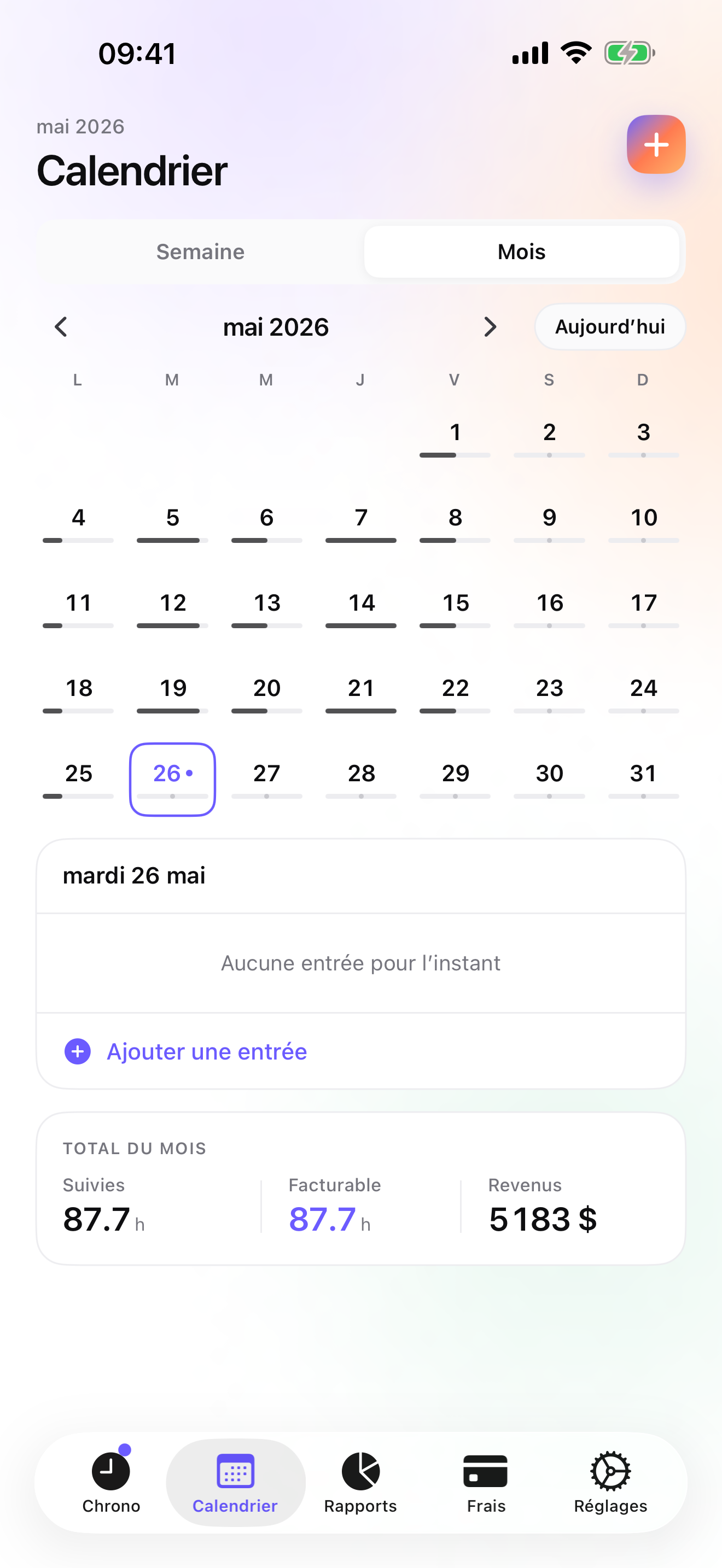
A week on the route and the first of the month, with shipped features only.
Tuesday, the mow route
Eight properties, eight Watch taps. Each switch saves the previous property's visit with its duration, on that customer's agreement.
Wednesday, storm cleanup
An hourly extra on the Patel property, logged as a cleanup task at the hourly rate. The green-waste receipt is photographed and pinned to it.
Friday, the mileage
The nursery run for next week's planting goes in as a Mileage expense on that project.
The 1st, morning
The recurring-invoice notification arrives. Invoices tab: each agreement customer shows its amount, one tap per PDF; the Unpaid filter shows who has not paid last month.
Questions people ask
Does it work on a rural property with no signal?
Yes. iTimeSheet stores everything on the phone and never waits for a server. The Apple Watch queues taps when it is away from the phone and backdates them once reconnected. A connection matters only for the iCloud backup and buying the subscription.
Where is my customer list stored?
In a local SQLite database on your iPhone. No account, no server of ours, no analytics, no ads. Backup is a single file in your own iCloud Drive, visible in Files, daily from Essential. The privacy label lists device ID, purchases, and usage data, not linked to you and not used for tracking.
Will it send my monthly agreement invoices automatically?
No. On Studio a monthly notification reminds you to bill recurring customers, and the Invoices tab shows what each one owes; you tap to generate and send each PDF. Mark them paid when the money arrives, and overdue ones get a reminder with a pre-filled chase e-mail.
What does it cost for one truck?
Free: 3 customers, 2 entries a day. Essential $4.99/mo or $29.99/yr, Pro $7.99/mo or $59.99/yr, Studio $9.99/mo or $89.99/yr on the US store. Studio has invoicing and no trial, but a watermarked preview shows the real invoice first. Billing is through Apple; cancelling never deletes or locks your data.
My helper works the route with me in summer. Can he use my account?
There is no account to share and no second user: iTimeSheet is one person, one phone. Log the property's visit time from your own wrist and pay the helper from a separate record. If you need a crew on a schedule, Jobber or Lawn Buddy do that.
Verdict
For the landscaper with one truck and a book of seasonal agreements, iTimeSheet is the first install: each property keeps its season of visits, the extras carry their own rate, the first of the month comes with a reminder, and the invoices leave from the cab.
With crews and routes, Jobber, Lawn Buddy, or Housecall Pro are the tools. Duranta is the interesting new option for measured proposals. If you never bill hours, Invoice Simple is all you need.