iT iTimeSheet
EN
Download
Agency consultant Independent consultant For a lawyer For an electrician For an architect For a freelancer Features Pricing
iTimeSheet For an architect
ESQ → APS → APD → PC → PRO → DCE → DET → AOR

Count your hours per phase. See where you're most efficient.

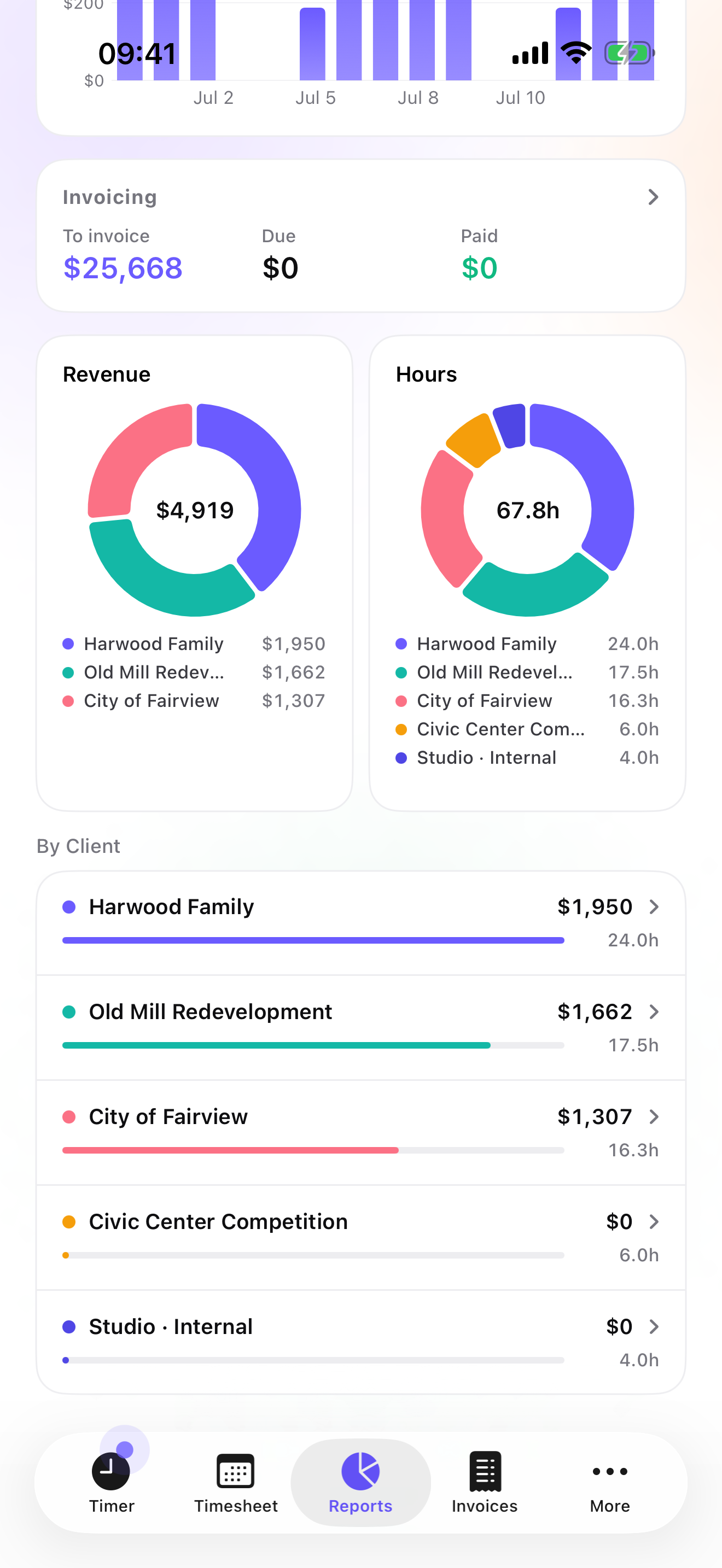
iTimeSheet's hierarchy mirrors the phase breakdown of the architect's contract. Count hours by phase, by project, by client — including the invisible hours: prospecting, unsigned quotes, billing, client communication. At year-end, you see where you're most efficient, and which project or client actually cost time.
1-minute daily entry 8 phases (ESQ → AOR) Invisible hours included Fees ready at month-end
iTimeSheet — efficiency report by project and study phase
What the trade demands

Time tracking that fits the architect's contract.

Phase breakdown, properly

iTimeSheet's 3-level hierarchy follows the French standard ESQ / APS / APD / PC / PRO / DCE / DET / AOR (works equally for RIBA stages, AIA phases, HOAI Leistungsphasen). Each phase is a "mission", each deliverable a "task" (site plans, visual renderings, technical drawings, specifications, site meetings). You know at all times how many hours on what.

Variable rate per phase

When your contract sets a different rate for a specific phase — associate on DCE, senior on APS, specialist expertise on PC — override at the phase level. Every entry inherits the right rate automatically, all the way to invoicing.

Where you're most efficient

Reports compare your real hours per phase across projects and across clients. Not the phase that "eats" time in the abstract — that depends on the firm, the program, the client — but the one where you, specifically, run faster or slower than expected. Enough to bid the next contract on numbers, not intuition.

Invisible hours, counted too

Prospecting, drafting unsigned quotes, chasing invoice payments, client communication: these hours don't fit any contract phase — but they exist. Create a "Firm" project to log them. At year-end, you know how many real hours your practice spends outside billable contracts.

Log fast. Invoice calm.

One tap to start the current phase. An iOS reminder at the time you choose, to pin down the day's hours. At month-end, fees are already broken down by project and phase — the export for your accountant is ready in two taps, not two evenings.

Suggested configuration

The hierarchy that fits the phases.

The client is the project owner. The project is the operation. The phase is ESQ, APS, APD, PC, PRO, DCE, DET or AOR. The task is the precise deliverable (site plans, visual renderings, technical drawings, specifications, PC application dossier, site meeting).

Set the contract rate on the project: it cascades to every phase. When your contract specifies a different rate on a specific phase (associate on DCE, senior on APS, specialist expertise for PC), override at the phase level. All subsequent entries apply the correct rate automatically.

Why it matters

See where you're most efficient

Tracking hours per phase across 3 to 5 projects shows your real productivity — project by project, client by client. A complex program, a demanding client, an atypical site can push real time far past the phase itself. The reports make these deltas visible before you sign the next contract, not after.

Bastide family
Client · project owner
$95/h
Bastide residence (R+2)
Project · $55,000 contract
$95/h
Phase ESQ
Inherits from project
$95/h
Phase DCE
Overridden · $80/h (associate)
$80/h

Recommended settings for an architecture firm

  • Depth: Client + Project + Phase (3 levels). The architect contract's "task" is carried by the phase itself.
  • Rate: per project (average rate), overridable per phase when the contract requires it (associate, senior, PC expertise, etc.)
  • Billable / internal flag: on (prospecting, unsigned quotes, R&D, training, lost competitions = non-billable — but counted)
  • Expenses: on for reprographics, bailiff fees, site travel
  • Reports: annual period for project efficiency, quarterly for cash flow
  • Export: CSV with Date / Project / Phase / Hours / Rate / Total columns
Quick reference

The phase breakdown, in plain terms

  • ESQ — Esquisse (Sketch). Initial idea, first proposals, architectural intent.
  • APS — Avant-projet sommaire (Schematic Design). First precise drawings, structural principles, budget envelope.
  • APD — Avant-projet définitif (Design Development). Detailed plans, visual renderings, technical choices, consolidated budget.
  • PC — Permis de Construire (Building Permit). Administrative dossier, regulatory documents, descriptive notes, filing at city hall.
  • PRO — Projet (Construction Documents). Execution drawings, technical specifications, quantitative estimates.
  • DCE — Dossier de Consultation des Entreprises (Bid Package). Everything that goes out to tender.
  • DET — Direction de l'Exécution des Travaux (Construction Administration). Site supervision.
  • AOR — Assistance aux Opérations de Réception (Project Closeout). Final acceptance, punch list, deliverables.

Each acronym becomes a "phase" in iTimeSheet, with its own rate and tracked hours. You decide the level of granularity — most firms settle for 4 to 5 phases out of the 8 standard.

How much it costs

Less than an hour of your day rate per year.

The Studio tier at $79.99/yr, which unlocks PDF invoices (text-only header), costs ~58 minutes of your billable time. Pays for itself on the first project where you pinpoint exactly where you're most efficient — and where you consistently underestimate your time. For architects who don't invoice directly, the Basic tier at $29.99/yr (~22 min of your day rate) covers tracking and export.

Other trades

iTimeSheet for other profiles