iTiTimeSheet
EN
Download
iTimeSheet Harvest alternative
Flat pricing. No surprises. Your data stays on your iPhone.

Time tracking and invoicing for solo freelancers β€” without the Harvest bill shock.

iTimeSheet Studio covers everything a solo freelancer or independent consultant needed from Harvest β€” time entries, expenses with receipt photos, PDF invoices with your logo, quotes, credit notes β€” at a flat $9.99 / mo with no per-invoice, per-project, or per-client charges. No account. No cloud. Your data stays on your iPhone.
No account required Flat $9.99/mo Studio PDF invoices included
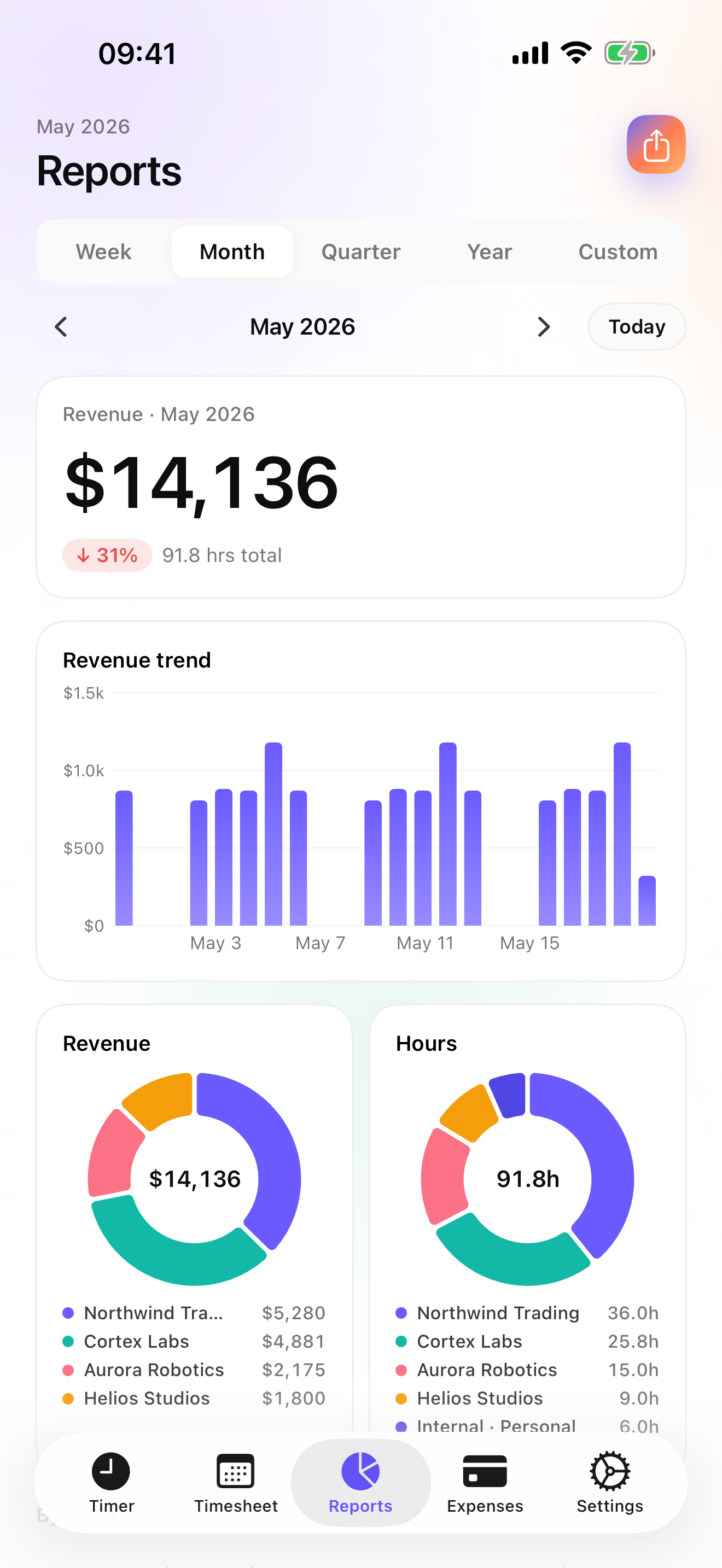
iTimeSheet β€” revenue report by client with drill-down
What changed

Harvest introduced usage-based pricing in 2025.

Following its acquisition, Harvest layered per-invoice, per-project, and per-client surcharges on top of its per-seat fee. Solo freelancers and small consultancies β€” who had steady, predictable billing β€” saw renewal invoices jump several times overnight. If you are one of them, here is what iTimeSheet Studio offers instead.

Side by side

iTimeSheet Studio vs Harvest β€” for a solo user.

Capability iTimeSheet Studio Harvest (solo)
Monthly cost (solo) $9.99 flat $9+/seat + usage surcharges
Per-invoice charge βœ… None Applies post-2025
Account required βœ… No β€” works fully offline Yes (email + password)
Data location βœ… On your iPhone (SQLite) Harvest's servers
Time tracking with hierarchy βœ… Client β†’ Mission β†’ Task, 4-level rate βœ… Client β†’ Project β†’ Task, 3-level
Expense tracking + receipt photos βœ… Included βœ… Included
PDF invoices with logo βœ… Included in Studio βœ… Included
Quotes β†’ invoice conversion βœ… One-tap Web only
Credit notes βœ… Included Not available
Deposit invoices (acomptes) βœ… Included Not available
Overdue reminders + chase email βœ… Included βœ… Included
Reports drill-down + period delta βœ… Included βœ… Included
Apple Watch timer βœ… All tiers βœ… Included
CSV export (customisable) βœ… Columns, order, format, separator βœ… Preset columns
Team workspaces / shared access β€” (single-user) βœ… Included
Web app β€” (iOS only) βœ… Included
QuickBooks / accounting connector β€” (CSV export only) βœ… Included

iTimeSheet is designed for solo freelancers and independent consultants. It is not a team tool.

Studio β€” $9.99/mo flat

Everything a solo freelancer needs to bill confidently.

Complete invoicing workflow

PDF invoices with your logo and company header. Quotes with one-tap conversion. Deposit invoices (acomptes). Credit notes. Per-country legal mentions for FR, DE, ES, US, JP. Payment details (IBAN/BIC or routing/account) on every invoice.

Invoice hub

All your invoices in one tab. Pending amounts per client at a glance. One-tap generation from logged time. Filterable history: Draft, Unpaid, Paid, Overdue. Mark paid, send overdue reminders, track everything without a browser.

Your data stays on your iPhone

Everything lives in a local SQLite database. No vendor server holds your clients, rates, or invoices. Backup is iCloud Drive β€” your own iCloud, not ours. Visible in Files.app. Export to CSV at any time.

Client β†’ Mission β†’ Task with rate cascade

Set your hourly rate once on a client. Override it per mission. Override again per task or per entry. Every time entry inherits the right rate automatically β€” no manual accounting per line item.

Flat pricing

One price. No seat math. No usage math.

Studio is $9.99/mo or $89.99/yr. That is the total β€” regardless of how many invoices you send, how many clients you bill, or how many projects you run. There is no iTimeSheet invoice that costs extra.

Free tier available (3 clients, basic reports). No free trial on Studio β€” discover the full invoicing workflow via the watermarked Invoice Preview inside the app.

Honest disclaimer

iTimeSheet is not for everyone.

Not a team tool

iTimeSheet is single-user by design. If you manage a team, need shared workspaces, or require approval flows, you need a different app. We skip this market intentionally.

iOS only

There is no web app, no Android version, no desktop client. If you need to track time from a browser or a Windows PC, iTimeSheet will not work for you.

No QuickBooks connector

Export is CSV (customisable columns, format, separator) or PDF invoice. If your workflow requires a direct QuickBooks or Xero sync, you will need to import the CSV manually.

Made for your work

See how iTimeSheet fits your trade